
Cosmic Track Watch Face SAM-31 vVARY
SMA Design Watch Faces




About this app
Developer Description
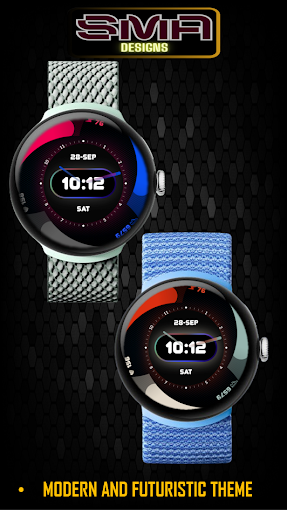
A Wear OS watch face with digital & analog time fitness stats & colorful accents
The surrounding circular accents feature a variety of color option giving the watch face a dynamic and futuristic feel. The black background further enhances the contrast, making the bright elements pop. The hour markers, presented in a minimalist style, add subtlety without cluttering the design.
Fitness tracking is seamlessly integrated into the design. On the left, your heart rate is displayed, while the top shows the battery level, and the right corner highlights your step count. This ensures you have all the key health metrics at a glance, without overwhelming the main time display.
The combination of vibrant accents, clear digital and analog time, and useful fitness metrics makes this watch face perfect for those who value both style and functionality. Whether you are tracking your daily activity or just want a watch that looks great on your wrist, this design delivers a blend of practicality and aesthetic appeal.
Why Choose Us:
Innovative Design: Our team of designers and engineers are committed to providing you with the latest in smartwatch technology and aesthetics.
Reliable Performance: Enjoy a watch face that not only looks great but performs flawlessly, keeping you updated with the most accurate information.
Upgrade your smartwatch experience today with our watch face app. Stay connected, stay informed, and stay stylish.
Download Now and take the first step towards a smarter, more elegant watch face experience.
★ FAQ
Q: Do your watch faces support Samsung Active 4 and Samsung Active 4 Classic?
A: Yes, our watch faces support WearOS smartwatches.
Q: How to install the watch face?
A: Follow these steps:
1. Open the Google Play Store app on your watch
2. Search for the watch face
3. Press the install button
Q: I bought the app on my phone, do I have to buy it again for my watch?
A: You should not have to buy it again. Sometimes the Play Store takes a bit longer to figure out that you already bought the app. Any additional order will automatically be refunded by Google, you will receive the money back.
Q: Why I can not see steps or activity data in a built-in complication?
A: Some of our watch faces come with Built-in steps and Google Fit steps. If you select built-in steps, ensure that you grant activity recognition permission. If you select Google Fit steps complication, please use the watch face companion app where you can grant permission on Google Fit to log your data.
Note also that Google Fit sometimes won’t show your real-time data due to its caching sync issues. We are also working to implement Samsung Health for Samsung phone devices
Version Information
- Version
- -
- Downloads
- 50+
- Updated on
- -
- Released
- Sep 30, 2024
- Requires
- Android Varies with device
Statistics
Google Play Rating History
Rating Distribution
Downloads Over Time
Cosmic Track Watch Face SAM-31 has been downloaded times. Over the past 30 days, it averaged downloads per day.
Shaded area shows 30-day prediction based on historical trends
Historical data collection started recently. More data points will be available over time.
ApkTrusted Ratings & Reviews
More from SMA Design Watch Faces
See more apps
Chrono Luxe Watch Face SAM-25
Paid

Cross Round Watch Face SAM-20
Free

Eclipse Minimal Watch Face -22
Paid

Focus360 WearOS Watch Face-40
Paid

Gear Sync Watch Face SAM-41
Paid

Glow Track Watch Face SAM-30
Paid

Luminous Halo WatchFace SAM-18
Paid

RainbowChrono WatchFace SAM-29
Paid

Speedometer WatchFace SMA 17
Paid

Spinning Alloy 1 Watch Face-23
Paid

Square Circle WatchFace SAM-16
Paid

Tech Lab Watch Face SAM-19
Paid

Titanium Edge WatchFace SAM-28
Paid

Vital View Watch Face SAM-24
Paid

Analog Digital WatchFace SMA 6
Paid
Big Clock Watch Face SAM-14
Paid
Similar Apps

Active Pro Watch face
Free

HKR002
Paid

ZKin Watch Face Grey Color
Paid

AZKin Watch Colorful Bright
Paid

DOJO Watch Face
Free

KZY018
Paid

Galaxy Time Pro: Watch face
Paid
YamWatch Digital 6
Paid
RE60 - Runner Watch Face
Paid
Health: Watch Face
Paid
EXD136: Digital Watch Face
Paid

IA92 Digital Watchface
Free

DIGI IMUKI URX49 Watch face
Paid

D0004 VNApps
Free
Chester Digital time
Paid

NTV550 - N Digital Sport
Free
Scan this QR code to download

Forwarding you to the page at Google Play market in seconds...
Open Google Play market now