
Nested Folder Notes - Folino v1.54.15
Tobias Schiek - Apps for your everyday life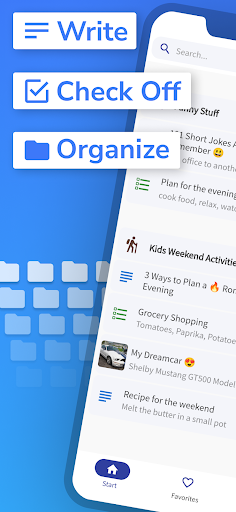


About this app
Developer Description
Unlimited Subfolders and Hierarchy
It's also great as a journal app.
With the newest update we have made the app even better:
Change creation date:
You can now flexibly adjust the creation date of your notes, perfect for better organization.
Sorting by creation date:
Notes can now be sorted not only by the modification date, but also by the creation date.
Customizable date display:
Choose whether you want to display the creation date or the modification date in your notes.
These new features make the app ideal for use as a diary or journal - and some of our users are already using it for exactly that!
They were very happy about the update because it makes capturing and browsing through memories even easier.
Try it out and enjoy even more flexible and clearer note management!
What else can the app do?
With the easy notes app "Folino", you have all your notes under control.
✔️ without ads
✔️ Made in Germany
✔️ Text Notes
Create as many text notes as you want. Various options are available for formatting.
✔️ Checklists
Create checklists and tick off completed entries or rearrange them as you wish.
✔️ Folders
Create your own notes and folder structure. You can create as many folders and subfolders as you want. The number is not limited.
✔️ Search function
A quick full-text search enables you to find all notes, checklists and folders.
✔️ Pin it
You can pin very important notes and folders so that they are always at the top of the list.
✔️ Favorites
A separate favorites list for notes and folders enables quick access to marked notes.
✔️ History
With a separate list for the most recently edited notes, you can quickly pick up where you left off.
✔️ Move
Notes and folders can be moved to other folders and subfolders, quick and easy.
✔️ Duplicate
Duplicating individual notes or entire folder structures saves you the hassle of copying your texts.
✔️ Recycle bin
Deleted notes are kept in the recycle bin and can be restored if desired.
✔️ Offline
The app can be used offline without an internet connection.
✔️ Manual synchronization
If you wish, you can use manual synchronization (via Google Drive) to access your notes with multiple devices.
✔️ Backup
A manual file backup allows you to export and import your notes.
✔️ Lock
Folders and notes, as well as the entire app, can be locked with a PIN.
✔️ Dark Mode
The app supports the dark mode of your smartphone (dark theme or black theme).
✔️ Ad-free
The app is and will be ad-free. Promised!
Additional features via in-app purchase:
✔️ Pictures
Add your own pictures to your notes.
✔️ Audio recorder
Save your notes and ideas as audio.
✔️ Icons and color selection for folders
There are many different symbols to choose from for the folders. You can also customize the color.
✔️ Colors for notes
Highlight individual notes with different colors.
If you have any questions or suggestions for improvement, I would be happy to receive an email from you.
What's New
- Two new buttons have been added to the end of the text notes toolbar: Insert Date and Insert Time
In-app purchases
$0.99 - $4.49 per item
Version Information
- Version
- 1.54.15
- Downloads
- 50K+
- Updated on
- Dec 19, 2025
- Released
- Dec 11, 2020
- Requires
- Android 7.0
Statistics
Google Play Rating History
Rating Distribution
Downloads Over Time
Nested Folder Notes - Folino has been downloaded times. Over the past 30 days, it averaged downloads per day.
Shaded area shows 30-day prediction based on historical trends
Historical data collection started recently. More data points will be available over time.
Nested Folder Notes - Folino users say on Google Play
 Dee C
Dee C
Folino allows folders to be created, and I can save the notes in a variety of locations using export and share. It has one font, but it can be resized wherever in the note I want to make font larger or smaller. I can bold, italicize, underline wherever I want, and can search and replace words. There's no text alignment or indent, but for notes it's a fairly minor concern. It allows synching files between different devices! Overall it's a well designed and useful app. Thank you!
 nageshwar rao adhikarala
Nice note app. While trying to pdf sharing, notification flashing as- some bugs are there, app is not responding "
 Cico Mico
Edit: well got a litte bit better, but it is still not there. Backups should be encrypted, this is a must! There should be an option to add draws too. The keyboard should open when user wants to add a note or a checklist. There is an option to start direct writing, but only works when writing notes, checklist ignores the option and always starts with the title.
 Shellbie Hogan
Good app still but however I think it needs looked at as I keep getting a message popping up if I haven't been on the app for a while saying something is wrong and that I should make sure that the play store is enabled or something and if the problem continues try reinstalling it so not sure what is going on there.
 Andrew Ampers Taylor
A CATASTROPHE I have listed lots of important notes. I list all my passwords and pins in an AtoZ notebook I keep in my safe. The pin number, after many months of almost daily use, suddenly refused to work! Thanks for your reply, I'd alter it if I were you 😂 No problem, I'll try to help you. Worked straight off on my A4 tablet (S10 ultra) using the same password. I am going to download all my files, port them to my Z Fold7 and add them to another app.
ApkTrusted Ratings & Reviews
More from Tobias Schiek - Apps for your everyday life
See more apps

Similar Apps

UpNote - notes, diary, journal
Free
Rocketbook
Free
Notes : Color Folders & Lists
Free
Inkpad Notepad & To do list
Free

touchnotes
Free

Workflowy |Note, List, Outline
Free

Mind Notes: Note-Taking Apps
Free

AI Journal Notebook - Reflectr
Free

Daybook - Diary, Journal, Note
Free

Notepad Lock - Notebook
Free

MyScript Notes (Nebo)
Free

xTiles: notes, tasks, projects
Free

Notepad - Notes and Tasks
Free

Evernote - Note Organizer
Free

SCRIBZEE®
Free

YesWriter - Writing, Notes
Free
Scan this QR code to download

Forwarding you to the page at Google Play market in seconds...
Open Google Play market now