Meal Planner & Recipe Keeper v1.2.218
Stashcook

About this app
Developer Description
Stashcook: Keep healthy food recipes, cooklist & weekly meal plans for any diet.
Meal Planner & Recipe Keeper
Simplify meal planning, saving recipes and shopping for groceries. Organize your recipes into collections. Use the meal planner to create weekly meal plans. Create shopping lists with ease and cook from your own recipe book.Streamline your meal planning with our meal planner app. Find, save and whisk up healthy food recipes, cooklist, and grocery lists for any diet, all in one place. For any home chef looking to make tasty meals.
Have you ever lost a great recipe? Stashcook to the rescue. Stashcook is your personal recipe keeper and virtual cookbook. Never again will you lose a delicious recipe.
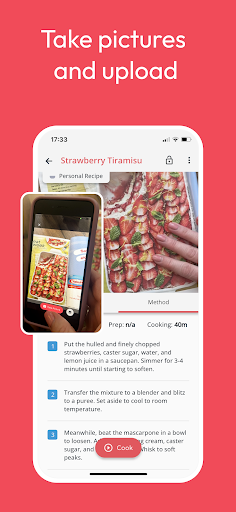
💾 Save recipes from ANYWHERE!
Use the stash button to save recipes from any website on the internet and access them anytime, anywhere with our recipe keeper. This includes BBC Good Food, Pinterest, Food Network, and Epicurious, to name but a few.
📆 Meal planning
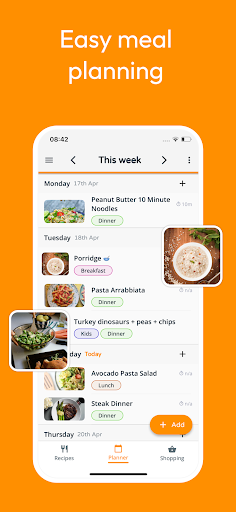
What's on the menu today? Check your weekly meal planner. Prepare meal plans and organize your week. Rearrange based on what you fancy that day. Add notes to ensure you remember to use those leftovers or your plans to eat out. Organize your meals with Stashcook and only buy what you need, saving you money and decreasing your food waste. Meal planning made easy.
🛒 Shopping list
Simplify shopping grocery! Add all the ingredients from any of your recipes. Then manually add any other items you need and let Stashcook organize them by supermarket aisle. Never again will you forget the milk!
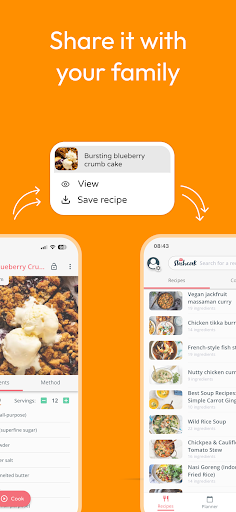
👪 Share
With Stashcook's Family Share feature, you can sync up to 6 accounts and automatically share your recipes, meals and grocery lists. Making it super easy for households to meal plan and shop as a team.
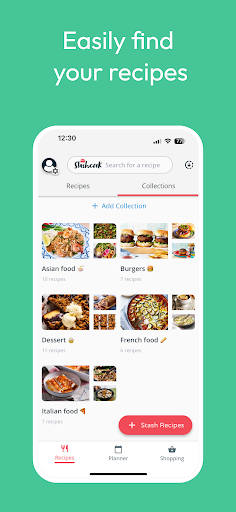
🤓 Organize recipes into collections
Use collections to group recipes. Need a quick dinner option? Just look in the "10-minute dinners" collection you made.
🍳 Cook
Stashcook aims to make following a recipe easier. It has been created with simplicity in mind and removes the annoying clutter often seen alongside recipes. It also has handy functions to scale ingredients and lock the screen, saving you the hassle of getting messy fingers all over your clean screen.
📊 Nutritional analysis
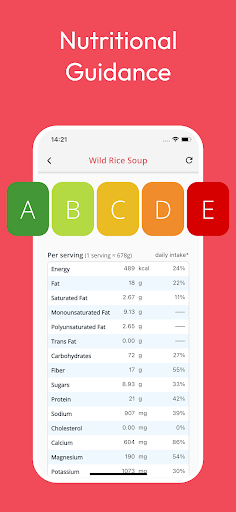
Get in-depth analysis for any of your stashed recipes. Also, find out which ingredients contribute the most to Calories, Proteins, Carbohydrates, Fats, Sugars and Sodium so you can take control of your diet and plan your food to fit your goals.
💸 No Limits
Stash as many recipes as you like. Prepare meal plans every week without restrictions. No charges and no membership is required. Only upgrade to Premium if you want the extra features.
Stash. Plan. Cook. with Stashcook
What's New
This release includes:
1) Further performance improvements on app start up
2) Bug fixes and other performance improvements
In-app purchases
$3.99 - $139.99 per item
Version Information
- Version
- 1.2.218
- Downloads
- 500K+
- Updated on
- Dec 22, 2025
- Released
- Jul 8, 2020
- Requires
- Android 8.0
Statistics
Google Play Rating History
Rating Distribution
Downloads Over Time
Meal Planner & Recipe Keeper has been downloaded times. Over the past 30 days, it averaged downloads per day.
Shaded area shows 30-day prediction based on historical trends
Historical data collection started recently. More data points will be available over time.
Meal Planner & Recipe Keeper - Google Play Rankings
Top Rankings
| Rank | Country | Category | List | Change |
|---|---|---|---|---|
| — |
Ranking History in
No ranking data available yet. Rankings are updated daily.
#2 in Top Grossing Food And Drink in United States


#30 in Top Free Food And Drink in United States


#2 in Top Grossing Food And Drink in Australia

#5 in Top Grossing Food And Drink in Pakistan


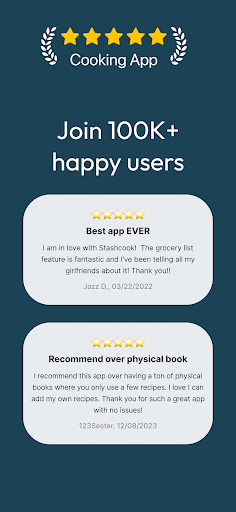
Meal Planner & Recipe Keeper users say on Google Play
 Jessica C.
Love this app!!! so easy to import from the web, Instagram and photos. I love that I can change ingredients and it will update the nutritional information. In the next update, I would love to see a way to sort the recipes by health rating! or to set your default view on opening the app to see everyone's recipes and not just your own when you have a family group.
 Rhonda Halstead
I love the ease of importing recipes, editing, adding to collections, etc. One recommendation would be the ability to search for all recipes not in a collection, as I sometimes forget to add that when adding new recipes. If I could easily filter by all unclassified recipes, it would be very helpful. I don't necessarily trust the nutrition information, though. Sometimes I make edits to the ingredients that should alter the nutrition info, but it doesn't always seem to reflect the changes.
 Leah Gourley
It's such a shame that you have to pay for it. The paywall keeps lots of this app off limits - only 4 free recipe saves and some places you can import recipes from are off limits. Could be such a great tool otherwise. I'd even put up with the ads (which are kind of annoying and in the way) if it meant I could actually use the features of the app, or even a one off payment. Otherwise I don't feel like it's worth paying a subscription for something that I should do myself if I were more organised.
 MzRenae Alcantar
you have to pay
 Angela Randall
I literally have to add each screen shot individually, plus once you add and try to add more to the recipe, it takes you back to beginning where I have to find the recipe. do you know how many I have screen shot on my phone! its not worth going 1 by 1 and adding, you can't even apply multi-photos at a time.. its easier just to connect to computer and print all at 1 time and have them right at hand... tried this app, not worth the time or money. but thanks
ApkTrusted Ratings & Reviews
Similar Apps

What's Cooking?
Free

Recify - Keeper & Organizer
Free

America's Test Kitchen
Free

Samsung Food: Meal Planner
Free

CookBook - Recipe Manager
Free

Recipe Keeper
Free
My Recipe Box: My Cookbook
Free

SuperCook - Recipe Generator
Free

HelloFresh: Meal Kit Delivery
Free

Mealime Meal Plans & Recipes
Free

Weekly Menu - Meal Planner
Free

Honeydew: Recipe Manager
Free

EveryPlate: Cooking Simplified
Free

Tasty
Free

Eat Smart Kiwi: Food Diary
Free

Paprika Recipe Manager 3
Free
Scan this QR code to download

Forwarding you to the page at Google Play market in seconds...
Open Google Play market now