
Loxi Cleaner - Phone Cleaner v1.6.5
APPDEV QUEBEC
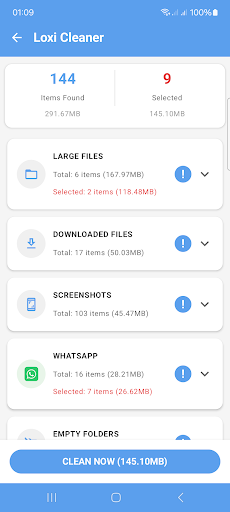


About this app
Loxi Cleaner - Phone Cleaner effectively addresses the issue of phone optimization and security scanning, making it an ideal solution for individuals seeking to boost their device's performance and safeguard against potential threats. Users who frequently download and install various apps, thus cluttering their devices, will benefit the most from this application. Compared to other tools in the category, Loxi Cleaner stands out due to its excellent user rating and the developer's reputation, as indicated by their professional website and contact information. However, the lack of permissions requested by the app raises questions about its ability to deliver on all promised functionalities.
Pros
- With an excellent user rating of 4.6 out of 5, Loxi Cleaner has demonstrated its effectiveness and user satisfaction, which is a strong indicator of its reliability and performance.
- The app's small size and requirement of only Android 8.0 or higher make it accessible to a wide range of devices, including older models, which is a significant advantage for users who may not have the latest smartphones.
- The developer, APPDEV QUEBEC, has a professional website and provides a contact email, which suggests a level of transparency and commitment to user support that is not always found in similar apps.
- The presence of in-app purchases at an affordable price of $0.99 per item offers users the flexibility to enhance their experience without being forced into expensive subscriptions or bundles.
- The absence of any permissions requests by the app is noteworthy, as it implies a strong focus on user privacy and minimal data collection, which is a significant pro for users concerned about their personal data.
Cons
- Despite the app's excellent rating, the relatively low number of downloads, at 50,000+, might indicate a limited user base and potentially less community support or feedback compared to more popular alternatives.
- The inclusion of ads in a tool meant for cleaning and security might detract from the user experience, especially if the ads are intrusive or not well managed, which could negatively impact the app's overall usability.
- The lack of permissions, while beneficial for privacy, might limit the app's ability to perform deep system cleans or effectively scan for certain types of security threats, which could be a concern for users seeking comprehensive device optimization.
- There is a potential concern regarding the balance between the app's free version functionalities and the need for in-app purchases, as some essential features might be locked behind a paywall, which could affect the overall value proposition for users.
Best for: The ideal user for Loxi Cleaner is an individual who values both performance and security on their Android device, likely someone who is not highly tech-savvy but is aware of the importance of maintaining their device's health, and is looking for a user-friendly, effective, and privacy-conscious solution to optimize and secure their smartphone without needing to delve into complex settings or root their device.
Developer Description
This app is a powerful phone cleaner and security scanner
It also includes a security scanner that identifies harmful apps, including those responsible for unexpected pop-up ads on your screen.
🧹 Junk Cleaner
Find and remove junk files stored on your device.
📄 Duplicate Files Cleaner
Find and remove duplicate photos, videos, audio files, and documents to free up storage space.
🖼️ Similar Photos Cleaner
Detect visually similar photos so you can review and delete unwanted images.
📦 Large Files Cleaner
Identify large videos, archives, and documents stored on your device and remove them easily.
📁 Empty Folders Cleaner
Find empty folders on your device and remove them easily in one place.
📸 Screenshot Cleaner
View all screenshots in one place and remove old or unnecessary ones.
📥 Downloaded Files Cleaner
Browse and manage files in your Downloads folder by size, type, or date, and remove unwanted files easily.
🗑️ App Uninstaller
View installed apps and uninstall the ones you no longer need to free up storage space.
🔋 Battery Information
View battery temperature, voltage, health status, and other technical details.
📟 RAM Monitor & Running Apps
Check current RAM usage and view running apps with quick access to their system info pages.
▤ Cache Monitor
See which apps are using large cache storage and open system settings to clear it manually.
🧩 App Manager
View and manage installed apps. Uninstall apps you no longer need.
🛡️ Security Scanner
Scan your device for potential harmful apps and suspicious permissions.
✓ Popup Ads Detector - Find out which app is causing pop up ads.
✓ Hidden Apps Detector – Detect apps that are concealed on your device.
✓ Fake Apps Detector – Detect apps that change their icons to imitate legitimate ones.
✓ Apps from Unknown Sources – Find apps installed from outside the Google Play Store.
✓ Risky Permission Alerts – Scan for apps with sensitive or excessive permissions.
✓ Recently Running Apps – Monitor app activity in real-time.
✓ Adware Removal – Remove apps that display intrusive popup ads.
Privacy
Given that Loxi Cleaner does not request any permissions, users can be relatively confident in its privacy stance. However, it's essential to monitor any future updates that might introduce new permissions or data collection practices. Users should also be cautious when clicking on ads within the app to avoid unintended downloads or subscriptions. Regularly reviewing the app's privacy policy and developer contact information can provide additional insights into data handling practices.
Tips
To get the most out of Loxi Cleaner, users should start by running a full system scan to identify areas for optimization and potential security risks. Regularly cleaning junk files and monitoring storage can help maintain device performance. Additionally, exploring the in-app purchases can provide enhanced features that might further improve the user experience, though it's crucial to review each purchase carefully to ensure it aligns with your needs.
What's New
* Fixed bugs.
In-app purchases
$0.99 per item
Version Information
- Version
- 1.6.5
- Downloads
- 50K+
- Updated on
- Jan 13, 2026
- Released
- Nov 19, 2025
- Requires
- Android 8.0
Statistics
Google Play Rating History
Rating Distribution
Downloads Over Time
Loxi Cleaner - Phone Cleaner has been downloaded times. Over the past 30 days, it averaged downloads per day.
Shaded area shows 30-day prediction based on historical trends
Historical data collection started recently. More data points will be available over time.
Loxi Cleaner - Phone Cleaner users say on Google Play
 Venugopal Revanna
just installed looks helpful
 Pamela Jane
Didn't help at all.
ApkTrusted Ratings & Reviews
More from APPDEV QUEBEC
See more apps
Netest: Internet Speed Test
Free

Empty Folder Cleaner
Free
ROX Security - Stop pop-up ads
Free

Hidden Apps Scanner - Goclean
Free

Appwatch - Pop Up Ads Removal
Free

Killapps - Close Running Apps
Free
Uninstaller Pro: App Uninstall
Free

Hibernator: Force Stop Apps
Free

RAM Monitor Memory
Free

Popup Ads Detector And Remover
Free

Cache Monitor - Cache Cleaner
Free

CPU Monitor App - Temperature
Free

Auto Scroll - Automatic Scroll
Free
Similar Apps

Phone Cleaner – Junk Files
Free

Cleaner Antivirus VPN Cleaner
Free

CCleaner – Phone Cleaner
Free

MiraClean - File Manager
Free

AVG Cleaner – Storage Cleaner
Free

Uninstaller
Free

Avast Cleanup – Phone Cleaner
Free

Super File Manager Explorer
Free

Storage Analyzer & Disk Usage
Free

1Tap Cleaner (clear cache)
Free

Antivirus AI - Virus Cleaner
Free

AVG AntiVirus & Security
Free

Mobile Security & Antivirus
Free

Anti-virus Dr.Web Light
Free

Ad Blocker
Free

GlassWire Data Usage Monitor
Free
Scan this QR code to download

Forwarding you to the page at Google Play market in seconds...
Open Google Play market now