
Remote Settings Phone v1.6
Tiny Watch

About this app
Developer Description
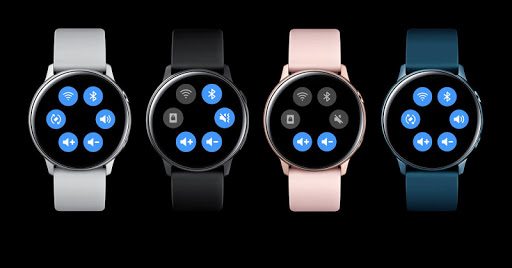
Now easy to setting phone from your Galaxy Watch.
For the application work fine, please enable all permission in picture description.
Feature settings support:
1. Wifi
2. Bluetooth
3. Sound mode (silent, sound, vibrate)
4. Rotate
5. Increase/decrease media volume.
Note: Please enable all permission for phone applications
Support for Samsung smart phone
What's New
Version Information
- Version
- 1.6
- Downloads
- 1K+
- Updated on
- Jun 24, 2019
- Released
- Jun 13, 2019
- Requires
- Android 6.0
Statistics
Google Play Rating History
Rating Distribution
Downloads Over Time
Remote Settings Phone has been downloaded times. Over the past 30 days, it averaged downloads per day.
Shaded area shows 30-day prediction based on historical trends
Historical data collection started recently. More data points will be available over time.
Remote Settings Phone users say on Google Play
 Anayat Hussain
Every feature is perfectly working juts need to add screen lock to make this application best.
 Martin Annandale
It works really well and is easy to use. I find that the watch app doesn't connect to the phone unless I've opened the phone app at least once in the last few hours. I specifically added the phone app to be excluded from being put to sleep by the phone power management services but still same issue.
 A Google user
I have oneplus 5T and when i change from vibrate to silent then i automatically activates DND mode not silent mode. And when i turn off Bluetooth from my samsung galaxy watch active 2 then i cant open app to turn it on again. So please fix this.
 Elowyn Mannetter
Works the first time you set it up but I can't get it to work after that.
A Google user
Permission granted: done Ignore battery optimization: done App works fine: 1% of the time Contact customer support: ignored It's funny how the developer's response to negative feedback is that the app works fine if the app is granted permission and ignored at battery optimization even after the user states (s)he done those things. Obviously no, the app doesn't work fine so the developer needs to stop telling people that it does. Doesn't respond to email either.
ApkTrusted Ratings & Reviews
More from Tiny Watch
See more apps
Photo Watch Face Pro
Paid

Photo Watch Face Gallery
Paid

Face Gallery Pro Wear Tizen OS
Free

File Manager Content Phone
Paid

Photo Remote Pro
Free
Photo Watch Maker Tizen WearOS
Free

Theme settings
Free
Phone Battery
Free
Phone Battery
Free

Theme Wallpaper Pro
Free

Battery Alarm Full
Free

Phone Launcher Wear OS
Paid

Ringtone Notification Galaxy
Paid

Document Viewer Companion
Free

Photo Remote Pro 2
Paid

Simple File Manager
Paid
Similar Apps

Lib of Dev (Open Source)
Free

Al Quran- Qibla & Prayer Times
Free

Wristcheck
Free

Breathing Exerise Guide
Paid

My Tenth Step
Free

QR & Barcode Scanner
Paid

Castro Premium - system info
Paid

One Key: password manager
Free

PDK Access by ProdataKey
Free

TAP Kiln Control Mobile
Free

Qibla Direction- GPS Compass
Paid

Progressive Pomo: Focus Timer
Paid

Video Recorder
Paid

AppDash: App Manager & Backup
Free

Sesame Search & Shortcuts
Free

Default Apps Pro
Paid
Scan this QR code to download

Forwarding you to the page at Google Play market in seconds...
Open Google Play market now