
MediaMonkey v2.1.1.1290
Ventis Media, Inc.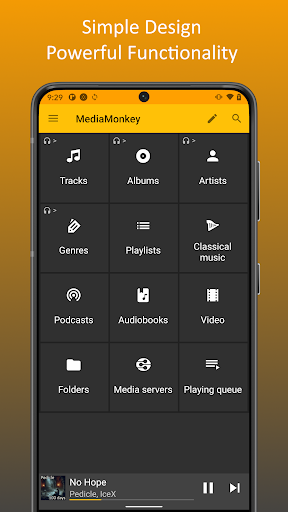




About this app
Developer Description
A media player for serious collectors that syncs between your device and PC.
❖ Sync with MediaMonkey for Windows *
-> Keep playlists, tracks and videos in sync.
-> Keep file info, ratings, lyrics, play history, etc. in sync.
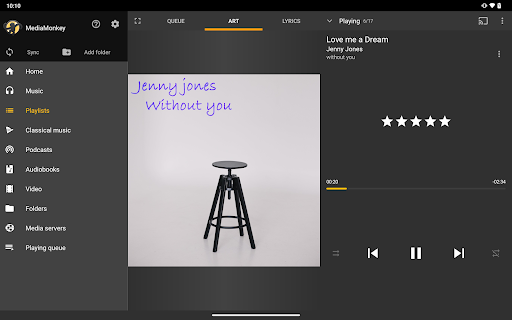
❖ Simple UI for managing Music, Classical music, Audiobooks, Podcasts, Video.
-> Navigate by Artist, Album, Composer, Genre, Playlist, etc.
-> Search entire library or find related tracks
-> Edit file info (e.g. Artist, Album, Composer, rating, etc.) with support for multiple attributes (e.g. Genre=Rock;Alternative).
-> Lookup Album Art and Lyrics.
-> Edit multiple files at once.
❖ Manage Playlists
-> Set up hierarchical playlists
-> Add/remove/re-order tracks
-> Sync playlists with MediaMonkey for Windows
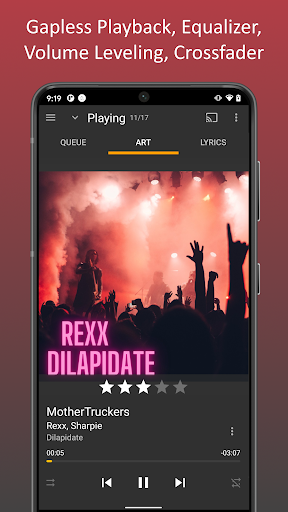
❖ Intuitive player and queue manager
-> Play content at a steady volume (using replay gain) to avoid fidgeting with the volume
-> Tune audio with a 5-band equalizer
-> Relax with a Sleep timer
-> Share your play history with third-party scrobblers (Simple Last.fm, Last.fm)
-> Cast to Google chrome cast or UPnP/DLNA devices ** †
-> Bookmark large files (e.g. Audiobooks, videos)
❖ Android Auto support
❖ Access and download media from UPnP/DLNA servers **
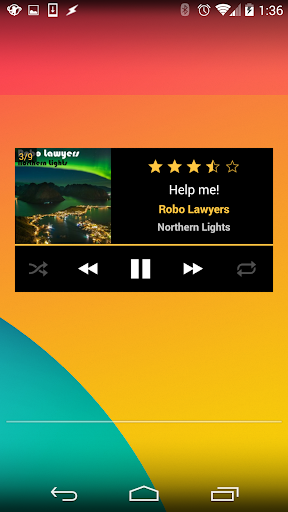
❖ Player widgets for home screen or lock screen
❖ Set tracks as ringtones
❖ Share tracks
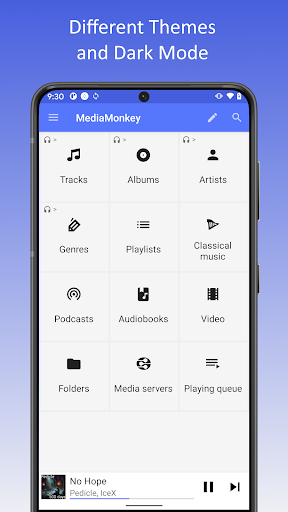
❖ Themes
* USB sync is unrestricted. Wi-Fi Sync is a time-limited trial--can be unlocked with MediaMonkey Pro.
** Time-limited trial--can be unlocked with MediaMonkey Pro. Note that MediaMonkey is Ad-free and as development is supported by sales of MediaMonkey Pro.
Privacy, Safety and Security Information
----------------------------------------
Data Handling
Ventis Media, Inc. is committed to your privacy and to transparency in our data handling practices. This app doesn't collect, use, or share any of your data unless required for the functionality or service being provided.
The following explains our disclosures in the Google Play Store regarding data safety:
o Email address and device identifier is only 'collected' if you explicitly 'Submit a debug log' (encrypted in transit, deleted after 90 days) so that we can get in touch with you.
o Videos, Audio Files are only 'collected' and transmitted when you explicitly:
- Sync media content with MediaMonkey for Windows (files and file metadata are transmitted from MediaMonkey for Android to MediaMonkey for Windows--they are not shared with us).
- Cast media content to a Chromecast or UPnP Server (files and file metadata are streamed encrypted, from MediaMonkey for Android to your cast device--they are not shared with us).
- Give Android Auto access to MediaMonkey content (files and file metadata are shared encrypted, from MediaMonkey for Android to your Android Auto device--they are not shared with us).
- Enable 'scrobbling' to share play history with others (metadata of played files is shared through your scrobbling client with last.fm--the data is not shared with us).
o Media file metadata is only shared with 3rd parties if you enable track information to be looked up (file metadata [Artist, Album, Title] is shared with 3rd parties in order to look up additional related track information--the data is not shared with us).
Application Permissions Atypical of a Player
o CAMERA: To scan QR codes to get configuration data to facilitate connections to MediaMonkey Servers
o WRITE_EXTERNAL_STORAGE: To write to 'shared' media folders such as /Music or /Playlists
o WRITE_SETTINGS: To change some system settings (e.g. disable touch sounds, set up ringtones/alarms)
o REQUEST_DELETE_PACKAGES: To uninstall Last.fm (it can't be disabled)
o ACCESS_NETWORK_STATE, ACCESS_WIFI_STATE, CHANGE_WIFI_STATE, CHANGE_WIFI_MULTICAST_STATE, INTERNET: For Wi-Fi Sync, UPnP, Casting
o REQUEST_IGNORE_BATTERY_OPTIMIZATIONS, WAKE_LOCK: To prevent shutdown during extended operations (e.g. Sync)
o INSTALL_SHORTCUT: To install custom shortcuts to Playlists
What's New
Sync
-Connection via VPN
-Autoplaylists incomplete
-Playlist hierarchy not updated
-Fails in some cases
-Error handling
Misc
-Artwork lookup
-Stability
1285
-Improved UI (menus & playlist editing)
-Adaptive background for Albums
-16 KB page size support
Fixes
------
UPnP Casting:
-NEXT may skip tracks
-Wiim/Marantz playback
Playback:
-'Missing codec' error
-Volume leveling for quiet tracks
Sync:
-May update tracks unnecessarily
Misc:
-'Mounting storage' alert for usb audio
In-app purchases
$1.49 - $2.49 per item
Version Information
- Version
- 2.1.1.1290
- Downloads
- 1M+
- Updated on
- Nov 20, 2025
- Released
- Apr 2, 2014
- Requires
- Android 8.0
Statistics
Google Play Rating History
Rating Distribution
Downloads Over Time
MediaMonkey has been downloaded times. Over the past 30 days, it averaged downloads per day.
Shaded area shows 30-day prediction based on historical trends
Historical data collection started recently. More data points will be available over time.
MediaMonkey users say on Google Play
 A Google user
I have been using this app for several years, over 20 to be exact. Never had a problem until now. Plays great for 3 to 4 songs then the next songs has no sound. I have stop whatever I am doing, pause the song and then press play to get the sound to return. I have a Samsung A32 that has no other problems other than what I have just explained. Please address this issue and fix it so I can give back my 5 star rating. Thank you, Allen
 Andrew S
I've finally got syncing going between my pc and Android pixel 6 phone but I just can't use the player reliably at all. Often it just jumps from track to track without playing anything. Sometimes it looks like it's playing but no sound comes out. The last time I tried to use it I picked a song from one album and every single time I tried to play it, it just jumped to a completely different song on another album. It's not the music library. I can play the same songs perfectly with Poweramp.
 Marc Pagan
With 1000+ albums, not being able to increase column count from 2 is a huge time waster when scrolling. Don't see that ability enabled in the paid app either. Also, no ability to select album viewing by artist, album name, etc. Therefore based on lack of features, no reason to upgrade. Lastly, the Pulsar app scanned my 5000+ song music library from my SD card in under 2 minutes, vs MediaMonkey taking over 30 minutes. The above are huge disappointments. As the PC app is excellent.
 Roy
Roy
this was a great app until recently going to a new Samsung phone. now on listening to my audio book files it take 10 seconds or so for the audio to start playing. tested with vlc and the files work fine so it's just mediamonkey. needs a better way to deal with bug fixes.
 Jennifer Wright
I've tried to use (pro/paid) MM a few times since 2016 and every time I give up once it's clear that recent 'updates' fail yet again in fixing the biggest issues with it. Its a great file manager, tagging, metadata and playlists ate easy. But any kind of sync has been broken for years and support is nonexistent. Now my 'perpetual' gold license has expired and its $99 to renew, but I still have support tix with no replies from 3 years ago. I just wanted a couple playlists synced to my phone. 👎
ApkTrusted Ratings & Reviews
More from Ventis Media, Inc.
See more apps
Similar Apps

Pulsar Music Player
Free

USB Audio Player PRO
Paid

FiiO Music
Free

Symfonium: Music player & cast
Free

Podcast App: Podurama
Free

Frolomuse: MP3 Music Player
Free

Oto Music
Free

Retro Music Player
Free

IDAGIO Stream Classical Music
Free

Podcast Republic - Podcast app
Free

Music Worx: EDM for DJs & Fans
Free

Songstats: Music Analytics
Free

ChoirMate
Free

AIMP
Free

Musicolet Music Player
Free

Napster - AI Music & Experts
Free
Scan this QR code to download

Forwarding you to the page at Google Play market in seconds...
Open Google Play market now