
sign pro PDF v3.6.17
Wacom Co, Ltd.


About this app
Developer Description
The complete solution for signing and annotating PDF documents.
When you use sign pro PDF as your document reader you will also have tools for:
- Electronic handwritten signatures
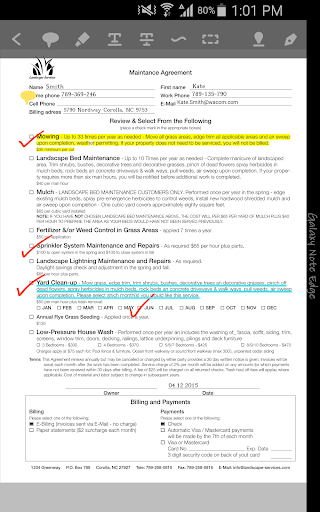
- Freehand annotations
- Sticky note texts
- Text highlight, underline and strikethrough
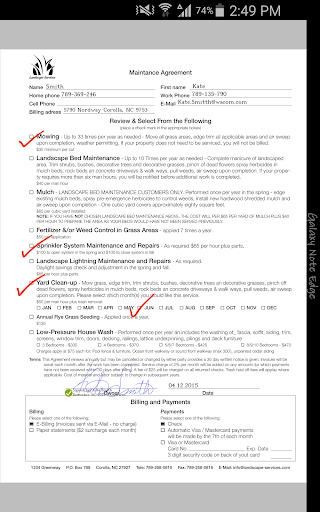
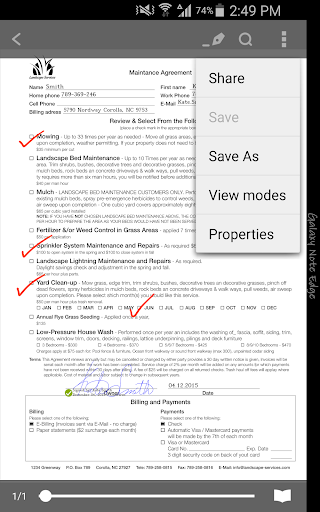
PDF files that require signatures or annotations may be transferred to a device through various means. For example, you might receive an email with a PDF file attachment which requires your signature. You can open the file attachment and view its contents directly in sign pro PDF. To sign the document, you can select the signature tool, select a position in the document and then sign using your finger, capacitive stylus or Wacom active stylus. You can then send your email reply with the signed PDF document attached.
Your signed document can be viewed in any PDF reader and your signature will appear exactly as you created it. In addition, sign pro PDF follows industry-standard PDF electronic signature standards so any changes to the document will result in signatures being shown as invalid.
The stylus used to sign determines the type of signature created:
- ‘touch’ signatures created using your finger or capacitive stylus do not contain biometric data
- ‘biometric’ signatures created using a Wacom active stylus contain full biometric data including pen pressure
Key features
- Handwritten annotations can be added
- Sticky note texts can be added
- Text mark-ups can be applied including highlight, underline and strikethrough
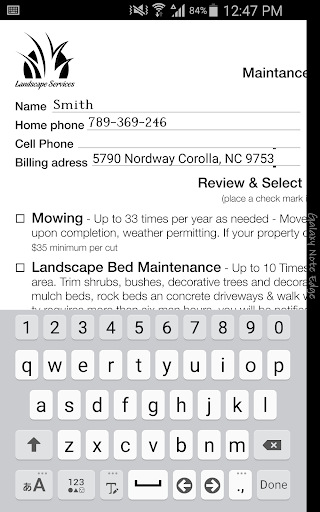
- Form filling is supported
- Signatures can be created using a finger or capacitive stylus
- Signature areas can be predefined for signing at a later time
- An eSeal can be prepared from an image source and can then be used to sign a document
- A custom File Manager gives the User options for opening and saving PDF documents which can be accessed using Dropbox and Share standards
- Password protected PDF documents are supported
- Signature information can be displayed, including the who, why and when of the signature
- Wacom Ink Layer Language (WILL) technology is used to give a high quality digital pen and ink experience
Compatibility
Required OS:
- Android OS 4.4.2 or later
With touch:
- Devices which run the required OS
With Wacom technology:
- Samsung Galaxy Note series
- Input devices that make use of Wacom EMR:
http://www.wacom.com/en-us/enterprise/technology-solutions
- Biometric signatures are only captured using Wacom technology
- Biometric signatures are fully compatible with the Wacom range of signature applications
Signature Credit
sign pro PDF uses a signature credit method:
- Free installation credits: 25 signatures can be created; after 25 signatures have been used, new signatures will be displayed with a demonstration watermark
- In-app purchase: credits can be purchased for new signatures
What's New
- Bug fixes
In-app purchases
$8.54 per item
Version Information
- Version
- 3.6.17
- Downloads
- 50K+
- Updated on
- Jul 11, 2025
- Released
- Jan 25, 2016
- Requires
- Android 7.0
Statistics
Google Play Rating History
Rating Distribution
Downloads Over Time
sign pro PDF has been downloaded times. Over the past 30 days, it averaged downloads per day.
Shaded area shows 30-day prediction based on historical trends
Historical data collection started recently. More data points will be available over time.
sign pro PDF users say on Google Play
 A Google user
How I can change a language of interface and text in app?
A Google user
Tried to fill in a scanned form with the annotation feature using a samsung galaxy note stylus. 1. The lack of palm rejection makes it difficult to use. 2. Handwriting ink is obviously lagging after a few fields. 3. Some ink made accidentally by the palm couldn't be erased. 4. Going to the annotation mode, i cannot zoom in/out with my fingers. Need to exit annotation mode, zoom, go back into annotation mode, to continue annotating.
A Google user
It requires a new signature each time you sign. No signature library.
A Google user
Not easily used
ApkTrusted Ratings & Reviews
More from Wacom Co, Ltd.
See more apps






Similar Apps

Noteshelf - Notes, Annotations
Paid

SignNow: Sign & Fill PDF Docs
Free

PDFEsign.com PDF E-Sign
Free

UpNote - notes, diary, journal
Free

Collect by WeTransfer
Free

Pawline
Paid

Passport Photo Easy - SG
Paid

3D Photo: Imager
Paid

Pocketpedia
Free
Flexcil Notes & PDF Reader
Free

HerePrint
Free

Nothing Pomodoro Timer
Free
Scan this QR code to download

Forwarding you to the page at Google Play market in seconds...
Open Google Play market now