
Go Chiefs! vVARY
Titanium Cyborg Systems (TCS) ServicesDownload Options



/
About this app
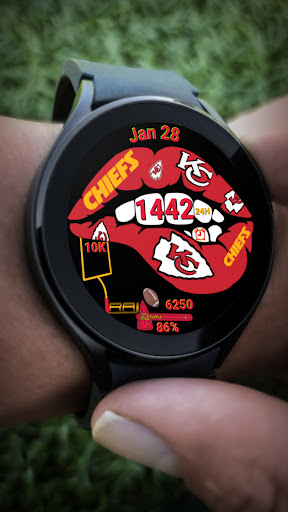
Chiefs Watch Face
Made for Wear Os
INSTALLATION:
1. Please make sure you watch is connected to your phone via Bluetooth
2. You can also install this watch face by accessing the Google Play Store in the web browser in a PC or Laptop with the same account you made the purchase from to avoid double charge.
3. If PC/laptop not available, you can use the phone web browser. Head over to the Play Store app, then to the watch face. Click the 3 dots in the upper right hand corner then Share. Use the available browser, I suggest Samsung Internet app, login the account you made the purchase from and install it there.
4. You can also check the Samsung Developers video installing Wear OS watch face in so many ways: https://youtu.be/vMM4Q2-rqoM
Our watch face apps are thoroughly tested in a real device (Galaxy Watch 4 Classic) and are reviewed and approved by the Google Play Store team before publishing them. We love to share our work and make sure users will enjoy our watch faces.
FEATURES:
- Digital clock switchable to 24h/12h via Phone Settings
- Alarm Shortcut
- Calendar Shortcut
- Health goal settings shortcut *Samsung Galaxy 4,5,6 only*
Reach your step goals to get the football all the way thru the goal post!
Please enjoy!
*Made for watches that run WearOs 4*
Check out RAJ CoLab updates at:
WebSite:
http://www.rajcolab.com
Facebook page:
https://www.facebook.com/RAJCoLab/
Developer page:
https://play.google.com/web/store/apps/dev?id=5910798788508387665
For support and request, you can email me at TiBorg.iot@gmail.com
INSTALLATION:
1. Please make sure you watch is connected to your phone via Bluetooth
2. You can also install this watch face by accessing the Google Play Store in the web browser in a PC or Laptop with the same account you made the purchase from to avoid double charge.
3. If PC/laptop not available, you can use the phone web browser. Head over to the Play Store app, then to the watch face. Click the 3 dots in the upper right hand corner then Share. Use the available browser, I suggest Samsung Internet app, login the account you made the purchase from and install it there.
4. You can also check the Samsung Developers video installing Wear OS watch face in so many ways: https://youtu.be/vMM4Q2-rqoM
Our watch face apps are thoroughly tested in a real device (Galaxy Watch 4 Classic) and are reviewed and approved by the Google Play Store team before publishing them. We love to share our work and make sure users will enjoy our watch faces.
FEATURES:
- Digital clock switchable to 24h/12h via Phone Settings
- Alarm Shortcut
- Calendar Shortcut
- Health goal settings shortcut *Samsung Galaxy 4,5,6 only*
Reach your step goals to get the football all the way thru the goal post!
Please enjoy!
*Made for watches that run WearOs 4*
Check out RAJ CoLab updates at:
WebSite:
http://www.rajcolab.com
Facebook page:
https://www.facebook.com/RAJCoLab/
Developer page:
https://play.google.com/web/store/apps/dev?id=5910798788508387665
For support and request, you can email me at TiBorg.iot@gmail.com
Version Information
- Version
- -
- Downloads
- 100+
- Updated on
- -
- Released
- Jan 14, 2024
- Requires
- Android Varies with device
Ratings & Reviews
Developer Response
More from Titanium Cyborg Systems (TCS) Services
See more apps





Similar Apps

M2K-Behind The Back Watchface
Paid

Cleveland Cavaliers Watch Face
Free
DIGI FAN Football Watch face
Paid

U of Alabama Classic Watchface
Free
Thunderbolt Digital Watchface
Free

M2K Hybrid Watch Face
Paid
Xmas Watchface
Free
BASKETBALL SHOOTER watch face
Paid
Ball Hoops Watchface
Paid

Giggle Globe Watchface
Paid

Merry Christmas Watch Face
Free

Christmas Frame - Characters
Paid

Valentine Day Pure Love
Free
Do What You Love
Paid
HUB Watch Face
Paid
Key WF028 Digital Watch Face
Free