
Document Scanner - PDF, OCR v4.279
Wazeem







About this app
Developer Description
AI-powered scanner: digitize, categorize & back up docs to PDF & Google Drive
Transform your smartphone into a powerful document scanner with DocScanner. Seamlessly digitize a variety of documents - from book pages, official letters, receipts, cards to whiteboards, and notes. Save and export with ease in both PDF and JPEG formats.
🌟 Features:
Google Drive Automatic Backups: Protect your scans with automatic backups to Google Drive.
Unlimited Scanning: Scan without limits in the highest resolution your camera supports.
Advanced AI Edge Detection: Benefit from our scanner's Artificial Intelligence trained on over a million document images, ensuring precise edge detection even in challenging conditions.
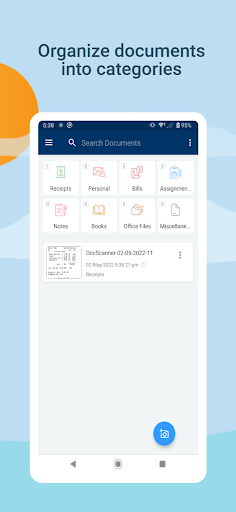
Organized Categorization: Use predefined categories or customize as per your needs.
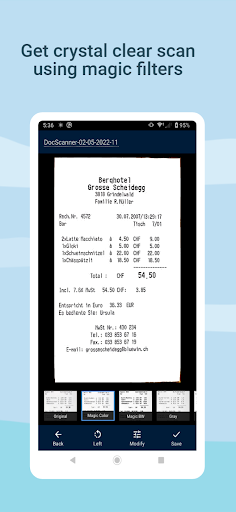
Professional Quality Filters: Achieve scans reflecting the original document's quality, with adjustable details, contrast, brightness, and automatic perspective correction.
Full-text Search: Effortlessly search content within your documents.
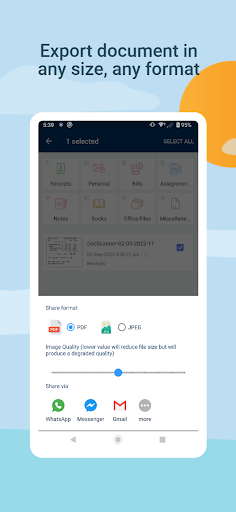
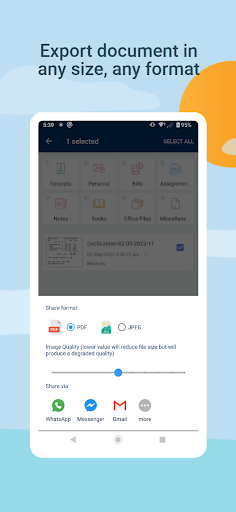
Multiple Sharing Options: Share your scans through WhatsApp, Gmail, Google Drive, and more.
Document Security: Safeguard your documents with enhanced security options.
Watermarking: Add counterfeit text or watermarks to your scanned pages for an added layer of security.
PDF Customizations: Modify PDF properties like page size (A3, A4, Letter, and more), margins, and numbering.
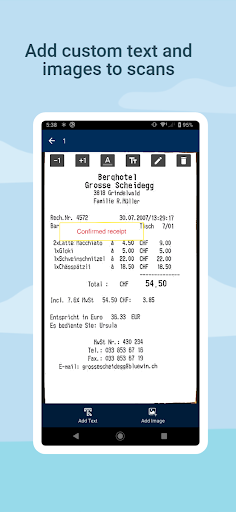
Decorative Enhancements: Add custom text and images to your scans.
Text Extraction: Convert your scans to text and share or copy the content seamlessly.
🔒 Permissions & Privacy:
DocScanner respects your privacy. We require access to your phone's camera for scanning and storage for saving your documents. Rest assured, all scanning is offline, ensuring no documents are uploaded online.
📜 Credits:
We extend our gratitude to Flaticon for their publically accessible icons, enhancing our application's visual appeal.
What's New
In-app purchases
$1.99 - $49.99 per item
Version Information
- Version
- 4.279
- Downloads
- 100K+
- Updated on
- Jul 4, 2024
- Released
- Aug 26, 2021
- Requires
- Android 5.0
Statistics
Google Play Rating History
Rating Distribution
Downloads Over Time
Document Scanner - PDF, OCR has been downloaded times. Over the past 30 days, it averaged downloads per day.
Shaded area shows 30-day prediction based on historical trends
Historical data collection started recently. More data points will be available over time.
Document Scanner - PDF, OCR users say on Google Play
 Rabia Aslam
A commendable App. Scan documents with just single click at any place. Time saving. Highly recommended.
 AS7
AS7
It is good, but it would be great if you provide paid version without ads.
 Mickey Nangolo
I love this scanner helps alot
 Karsten Keese
For a one-time purchase price, one might give it a shot to encourage development, but recurring subscription fees ad infinitum are out of the question when there are so many functionally superior competitor products available (whose programmers maintain and enhance their software, have operational costs and get paid, too) that can be bought instead of rented. Replaced with a better alternative and consequently uninstalled.
 Asive Mose
the filters are such a mess i cant even see clearly in mostly of the documents i was scanning this app is a no go to everyone
ApkTrusted Ratings & Reviews
More from Wazeem
See more apps


Similar Apps







Scan this QR code to download

Forwarding you to the page at Google Play market in seconds...
Open Google Play market now