
Video Editor VideoShowLite v10.2.4.3 lite
VIDEOSHOW Video Editor & Maker & AI Chat Generator

About this app
VideoShow Video Editor VideoShowLite solves the problem of complex video editing by providing a user-friendly interface for editing videos and photos with songs and filters, making it ideal for casual content creators and social media enthusiasts. With over 10 million downloads and a 4.6-star rating, it stands out in the Tools category for its accessibility and feature set. Compared to alternatives, VideoShowLite's offline capability and frequent updates make it a competitive choice. However, its lack of advanced features may leave professional editors seeking more comprehensive tools.
Pros
- VideoShowLite's high user rating and large download numbers indicate a well-received and reliable app, suggesting that it effectively meets the needs of its target audience.
- The app's developer, VIDEOSHOW Video Editor & Maker & AI Chat Generator, has a professional website and email, indicating a level of accountability and support not always found in similar apps.
- With no permissions required, users can feel more secure about their data privacy, which is a significant advantage over other video editing apps that may request unnecessary access to device features.
- The app's frequent updates, such as version 10.2.4.3 lite, demonstrate the developer's commitment to improving and expanding the app's capabilities, ensuring users have access to the latest features and fixes.
- The presence of both free and in-app purchase options allows users to choose how they engage with the app, providing flexibility for different user preferences and budgets.
Cons
- The app's monetization model, which includes ads and in-app purchases, may lead to a cluttered interface or prompts that could detract from the user experience, especially for those seeking a distraction-free editing environment.
- Despite its user-friendly interface, the lack of advanced editing features may limit the app's appeal to professional editors or those seeking more complex video manipulation capabilities.
- The presence of ads could potentially collect user data for targeted advertising, which might be a concern for users prioritizing privacy, although the app's zero-permission requirement somewhat mitigates this issue.
- Some users might find the range of in-app purchases, from $0.99 to $199.99, to be overly broad or expensive, potentially limiting accessibility for budget-conscious users.
Best for: The ideal user for VideoShow Video Editor VideoShowLite is likely a socially active, tech-savvy individual between the ages of 16 and 40 who frequently creates and shares content on platforms like Instagram, TikTok, or YouTube, and is looking for a straightforward, user-friendly video editing tool that can enhance their posts without requiring extensive editing knowledge or experience.
Developer Description
VideoShow Video Maker Vlog Maker, Edit Video and Photo with Song, Filter
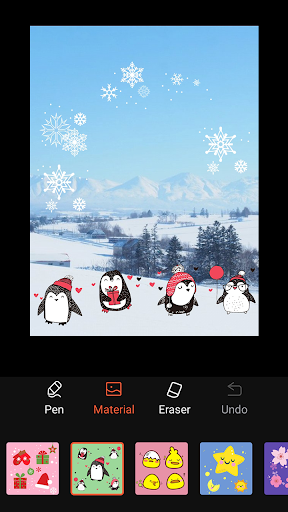
VideoShowLite is a quick movie maker, vlog maker and slideshow editor for young filmmakers and vloggers. Both professional photographers and non-professional beginners can create stylish and spark video at ease. We provide gif stickers, animation subtitles, magic effects, special doodle, trendy transition, filter and hot music.
Powerful video editor
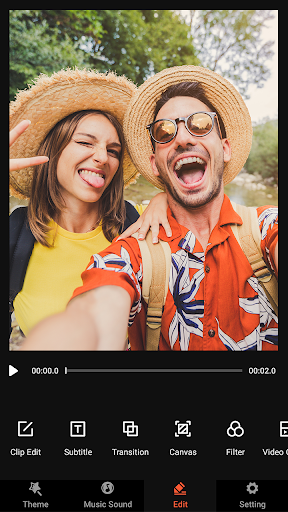
Video Show Video Maker is engaging to build an all-in-one video editor for those who need a good tool to merge or trim video, convert video into MP3 file, collage and loop video clips, compress video and cut movie on phones. We have exquisite themes, subtitles, music, filters...everything you need to make an awesome video.
Exclusive innovation
- Video dubbing. Record and use your own voice or our sound effects.
- Doodle on video. Zoom in and out. Let your audiences focus on the region you want.
Toolbox features
- Powerful video trimmer: cut the unnecessary parts of your video.
- Fast trimming: trim and crop your video, edit clips, images in no time.
- Video compressing: reduce your video size.
- Video to Mp3: turn the soundtrack of your video into mp3 file.
Key features
- Various text styles and fonts for subtitles are supplied.
- The materials store provides theme, stickers, fonts, sound effects, music.
- Import HD 4k videos, save battery and space. Support most video formats, like MP4, MOV, AVI.
Share videos
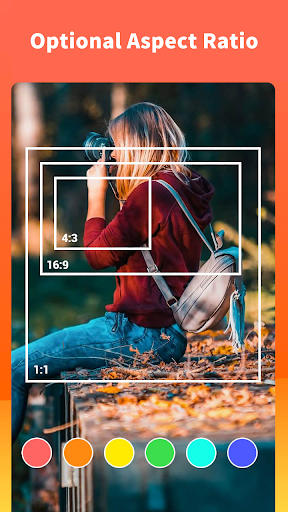
Square themes and no crop mode, blurred background, voice enhancement make your video more appealing. VideoShowLite is a smooth and flexible film studio for you to edit movies and photos.
Privacy
Given that VideoShowLite requires no permissions, the risk of data collection for purposes beyond the app's functionality seems minimal. However, users should remain cautious about the data they input into the app, such as login credentials for social media integration. To maintain privacy, users should review the terms of service and ensure they understand what data, if any, is collected and how it is used.
Tips
For the best experience, users should start by exploring the app's tutorial or guide to understand the full range of features and capabilities. To optimize performance, especially on lower-end devices, closing other resource-intensive apps while using VideoShowLite is recommended. Additionally, users can enhance their editing skills by experimenting with different filters and effects to find the combinations that best suit their style.
What's New
With this update:
We provide you with the following functions
- Improve performance and optimize experience
Let you enjoy editing!
In-app purchases
$0.99 - $199.99 per item
Version Information
- Version
- 10.2.4.3 lite
- Downloads
- 10M+
- Updated on
- Oct 14, 2025
- Released
- Jul 3, 2014
- Requires
- Android 6.0
Statistics
Google Play Rating History
Rating Distribution
Downloads Over Time
Video Editor VideoShowLite has been downloaded times. Over the past 30 days, it averaged downloads per day.
Shaded area shows 30-day prediction based on historical trends
Historical data collection started recently. More data points will be available over time.
Video Editor VideoShowLite users say on Google Play
 Nathan Ross
Excellent 👍🏿 Well worth it 👌🏿 "I truly recommend the premium version." Because you get to create unlimited magical pictures & videos nonstop. Believe me when I say you won't be disappointed. I definitely will be recommending to all of my family and friends 💯💖🤗❣️❣️❣️❣️
 Aarti Kumari
The app is good, but there is a major problem. After editing, the video cannot be saved or converted, as the export fails every time. Kindly fix this bug so that users can easily save their edited videos.
 Hero Hai
slow , ads annoying
 Minister Isirimah
its a good app
 DAVID OKOLI
Simply amazing and easy to use.
ApkTrusted Ratings & Reviews
More from VIDEOSHOW Video Editor & Maker & AI Chat Generator
See more apps
Retouch Remove Objects Editor
Free

Collage Maker Photo Editor PIP
Free

AI Video Editor - VideoShow AI
Free

AI ChatBot GPTalk AI Generator
Free

Video Editor VideoShow Pro
Paid

AI Photo Enhancer, AI Enhancer
Free

Screen Recorder Video Recorder
Free

AI Video Maker AI Video Editor
Free

AI Photo Editor Pic BG Eraser
Free

Video Compressor Mp3 Converter
Free

AI Image Generator & AI Video
Free

Music Video Maker - TapSlide
Free

Screen Recorder VRecorder Lite
Free
Similar Apps

ActionDirector - Video Editing
Free

Add Music To Video & AI Editor
Free
Music Video Maker - Slide Show
Free

VideoFX Music Video Maker
Free

VivaVideo - Video Cut & Editor
Free

BeatSync: Photo & Music Videos
Free

GoCut - Effect Video Editor
Free

Veffex: Video effects, filters
Free

Smart Video Crop - Video Cut
Free

Splice - Video Editor & Maker
Free

Photo Video Maker: Slideshows
Free

Video to MP3 - Video to Audio
Free

Photo Video Maker - InSlide
Free

Reels & Video Editor - inMelo
Free

Motion Ninja Video Editor
Free

Video Maker
Free
Scan this QR code to download

Forwarding you to the page at Google Play market in seconds...
Open Google Play market now