
Dolphin EasyReader v12.04
Dolphin Computer Access Ltd








About this app
Developer Description
Reading App for Dyslexic and VI Readers - Open a World of Accessible Books
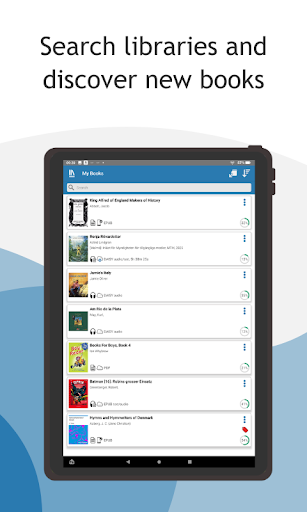
EasyReader removes barriers to reading, connecting users to accessible book libraries and talking newspaper stands globally. Every reader can enjoy books independently, in ways they find comfortable and accessible.
Free for personal use by anyone with a print disability, EasyReader enhances the reading experience for individuals with dyslexia, vision impairments, and other print-related challenges.
Simply log in to your preferred library and download up to ten titles at a time. Millions of books, including classic literature, the latest bestsellers, non-fiction, textbooks and children’s storybooks are all available to read in ways that are accessible to you. You can also access talking newspaper stands to enjoy magazines, newspapers and other reading material.
The Flexibility to Read Your Own Way
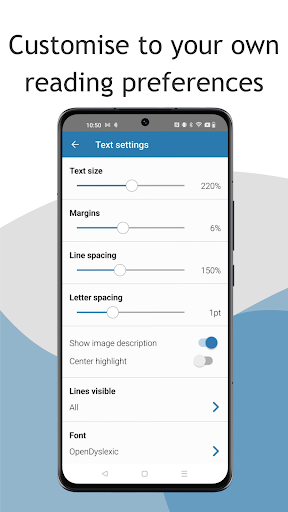
Download up to ten titles at a time and customise your reading experience to suit your vision and preferences.
Supporting Dyslexic readers and people with Irlen Syndrome:
- Adjust fonts and try dyslexia-friendly fonts
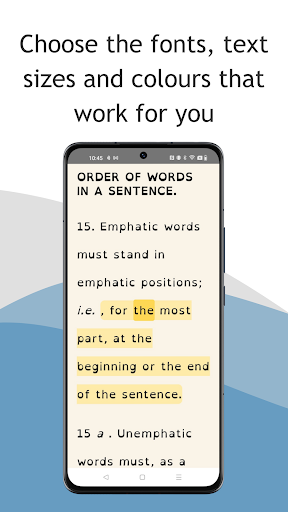
- Customise text, background colours and word highlights to improve readability
- Modify letter spacing, line spacing and line views for comfort
EasyReader offers an exceptional experience for readers with vision impairments:
- Adjustable text size with touchscreen actions
- Choose custom colour contrasts for comfortable reading
- Braille display support for accessing books and documents
- Linear reading mode for screen readers and braille users
Audio Books & Text-to-Speech (TTS)
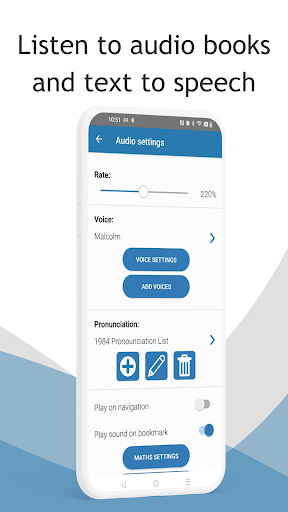
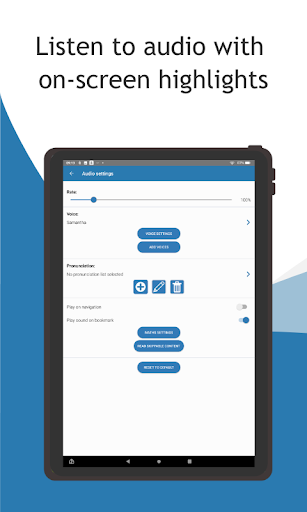
Listen to audio books or use Text to Speech (TTS) to read books and newspapers with human-sounding synthesised speech. Personalise your reading experience further and read-along with on-screen text highlights that perfectly synchronise with the audio.
- Choose your preferred reading voices.
- Adjust reading speed, volume and pronunciation for optimal clarity
Read a Range of Formats
Choose from a wide range of book and document formats:
- HTML
- Text files
- DAISY 2 & 3
- ePub
- MathML
- Microsoft Word (DOCX)
- PDF (via RNIB Bookshare)
- Any text copied to your device clipboard
Easy Navigation
Access your favourite libraries with EasyReader and browse, download and navigate books effortlessly.
Skip pages, jump to chapters, or search by keyword to find information instantly, whether you read visually, with audio or braille.
Help & Support
EasyReader is intuitive, but if you need additional guidance or assistance, simply 'Ask a Question’ in EasyReader Help. The built-in AI searches Dolphin user guides, the Knowledge Base, and training materials for answers. If you prefer manual search, step-by-step help topics are available on the Dolphin website.
Share feedback or report a bug directly in EasyReader to help Dolphin enhance EasyReader App.
Libraries & Talking Newspaper Services in EasyReader
Global:
Project Gutenberg
Bookshare
UK:
Calibre Audio
RNIB Bookshare
RNIB Newsagent
RNIB Reading Services
USA & Canada:
Bookshare
CELA
NFB Newsline
SQLA
Sweden:
Legimus
MTM Taltidningar
Inläsningstjänst AB
Europe:
Anderslezen (Belgium)
ATZ (Germany)
Bookshare Ireland (Ireland)
Buchknacker (Switzerland)
CBB (Netherlands)
DZB Lesen (Germany)
DZDN (Poland)
Eole (France)
KDD (Czech Republic)
Libro Parlato (Italy)
Luetus (Finland)
NBH Hamburg (Germany)
NCBI Overdrive (Ireland)
NLB (Norway)
Nota (Denmark)
Oogvereniging (Netherlands)
Passend Lezen (Netherlands)
Pratsam Demo (Finland)
SBS (Switzerland)
UICI (Italy)
Unitas (Switzerland)
Vereniging Onbeperkt Lezen (Netherlands)
Rest of World:
Blind Low Vision NZ (New Zealand)
LKF (Russia)
NSBS (Suriname)
SAPIE (Japan)
Vision Australia (Australia)
Please note:
Most libraries require membership, which can be set up via their websites.
EasyReader lists and links to all available libraries in the app.
What's New
Calibre Audio, UK: Additional book metadata has been added. Improved error message borrow limit is reached
ABC: Search filter view translated into more languages
AVH: Fixed a CSS styling issue for page references in DAISY books
In-app purchases
$4.99 - $49.99 per item
Version Information
- Version
- 12.04
- Downloads
- 100K+
- Updated on
- Dec 15, 2025
- Released
- Oct 31, 2017
- Requires
- Android 7.0
Statistics
Google Play Rating History
Rating Distribution
Downloads Over Time
Dolphin EasyReader has been downloaded times. Over the past 30 days, it averaged downloads per day.
Shaded area shows 30-day prediction based on historical trends
Historical data collection started recently. More data points will be available over time.
Dolphin EasyReader users say on Google Play
 Nitin Sharma
ultimate software for visually impaired person to read books
 Helen Gardiner
CONTRACT IS A BARRIER. Like all apps, you have two options: agree to their terms or don't use the service. Their terms are so unnecessarily long, for all I know I could miss a line that says they get to charge me something. Given the generally poor ratings I'm not inclined to just trust them. Very disappointing for an app intended for the disabled. I'm interested in other options for CELA if anyone has one.
 M Bassett
Would love to hear a sample of the voices before I pay 8.99 for one that I am not happy with. Also is there a way to highlight just one word to be read that would be very helpful for my child. I know that you can double click the word and it will say it but if you you double click that word and it would only highlight that word that would be visually helpful.
 Kamla Piano
It is very frustrating to find the book always reverts to Chapter 1. Every morning I find myself scrolling through chapters to find my place and having to listen to chapters again over and over to find it. The bookmark function makes no difference as there is no option to 'Go to last Bookmark'. This is destroying the listening experience- how terrible for Authors who donate their books. There's something wrong with the App.
 Marcela Rufino Leus
As an audiobook user, this is Painful to use! There so many improvements needed! Voice speed only changes by 15%, that is too much, just let us adjust the way we like it. i.e depending on the narrator, for me only a 5-10% adjustment is needed. Add book cover. Please label and divide chapters properly, it's a mess, especially for diversability users! I can't make titles go away, I remove them and they keep coming back. I honestly wish Cela used Libby. Also needs to work with Android Auto.
ApkTrusted Ratings & Reviews
Similar Apps
Listening: Text to Speech
Free
Text reader - text and voice
Free

NaturalReader - Text to Speech
Free
eReader Prestigio: Book Reader
Free

Speechify – Voice AI Assistant
Free

Letterly: Write by Voice & AI
Free

ElevenReader - Voice Reader
Free
Readwise Reader
Free
MagPie - Native speech
Free

FBReader: Favorite Book Reader
Free
PocketBook reader - any books
Free
Cantook by Aldiko
Free

YesWriter - Writing, Notes
Free

Smart AudioBook Player
Free

ePlatform Digital Libraries
Free
ReadEra Premium – ebook reader
Paid
Scan this QR code to download

Forwarding you to the page at Google Play market in seconds...
Open Google Play market now