Everything Adaptive Blue Icons v2.6
NARIK DESIGN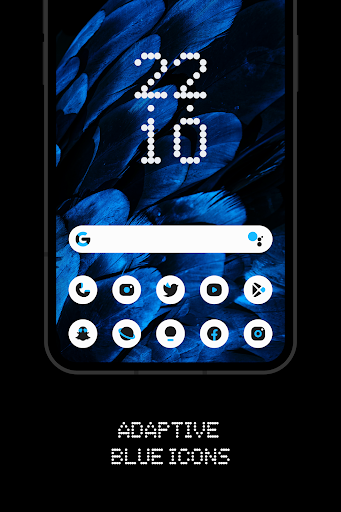


About this app
The Everything Adaptive Blue Icons app solves the problem of bland and uninspiring icon packs by offering a harmonious blend of blue, black, and white colors, catering to users who value aesthetic consistency on their Android devices. This app benefits users who are particular about their home screen's visual appeal and are looking for a premium icon pack that can elevate their device's overall look and feel. Compared to other personalization apps in its category, Everything Adaptive Blue Icons stands out with its excellent user rating and the developer's reputation for creating visually stunning icon packs. However, its limited downloads and lack of extensive feature set might make it fall short for some users.
Pros
- With an excellent user rating of 5.0 out of 5, this app demonstrates a high level of user satisfaction, indicating that it meets the expectations of its target audience.
- The app's paid model and lack of ads ensure a clean and uninterrupted user experience, allowing users to enjoy their customized icons without distractions.
- The developer's active presence on social media, as indicated by their Twitter handle, suggests a commitment to engaging with users and potentially gathering feedback for future updates.
- The app's small size and minimal Android requirement of 5.0 make it accessible to a wide range of devices, including older models.
- The availability of in-app purchases provides users with the flexibility to further customize their icon pack, although the specific offerings are not detailed.
Cons
- The limited number of downloads, despite the excellent rating, might raise concerns about the app's visibility and the potential for long-term support from the developer.
- The lack of detailed information about the in-app purchases could lead to confusion or unexpected costs for users, which might negatively impact their overall experience.
- The app's functionality and feature set, while visually appealing, might be too narrow for users seeking a more comprehensive personalization solution.
- The absence of a comprehensive website from the developer, with only a Twitter handle provided, might make it difficult for users to find detailed support, FAQs, or community forums.
Best for: The ideal user for the Everything Adaptive Blue Icons app is a tech-savvy individual, likely between the ages of 18 and 35, who values a visually consistent and premium look for their Android device, is willing to pay for quality, and is active in customizing their home screen to reflect their personal style or brand preferences.
Developer Description
Harmony with blue, black and white colors
FEATURES:
• 5400+ Premium adaptive icons
• 13 Kustom widget
• Cloud-based Wallpapers that perfectly match the icons
• Icon request tool
• Regular Updates
How to use this Icon pack?
• Install a supported Launcher
• Open Everything Adaptive Blue Icons, go to Apply section and Select Launcher to apply. If your launcher is not in a list make sure you apply it from your launcher settings
How do I change to light / dark mode?
After changing device theme to light / dark, you need to reapply icon pack (or apply another icon pack, and then this one immediately).
SUPPORTED LAUNCHERS:
• Nothing Launcher
• Nova Launcher
• Lawnchair Launcher v2
• Niagara Launcher
• Smart Launcher 6
• Rootless Pixel Launcher
• Shade Launcher
• Lean Launcher
• Hyperion Launcher
• Posidon Launcher
• Action Launcher
• Stario Launcher
• Ruthless Launcher
Colors Changing Automatically only with:
• Lawnchair 12.1 latest Dev version
• Hyperion
• Niagara Launcher
• Stario Launcher
• Smart Launcher 6
DISCLAIMER
• Dark mode only works on Android 10 and above devices!
• You need to re-apply icon pack to change to light / dark mode. Except Lawnchair 12.1 latest Dev version, Hyperion Beta, Niagara, Smart Launcher 6 or Stario Launcher
• If you can't change the shape of the icon, you NEED a custom launcher that can do that.
• A supported launcher is required to use this icon pack!
• In Pixel Launcher (stock launcher in Pixel devices) work with app Shortcut Maker.
• In Stock One UI Launcher use Theme Park.
• Kustom Widgets requires KWGT and KWGT PRO app (paid app)! It won't work without KWGT PRO
• This app is not developed by NOTHING.
• FAQ section inside the app which answers a lot of questions you may have. Please read it before you emailing your question.
CONTACT ME:
Twitter: https://twitter.com/narikdesign
Telegram: https://t.me/narikdesign
Instagram: https://www.instagram.com/narikdesign
Privacy
Given that the Everything Adaptive Blue Icons app requests zero permissions, it poses minimal risk to user privacy and security, as it does not collect or access any sensitive data. However, users should still be cautious when making in-app purchases and ensure they understand what they are buying. It's also advisable to keep an eye on future updates and their potential impact on permissions and data collection.
Tips
To get the most out of the Everything Adaptive Blue Icons app, users should first ensure their device meets the minimum Android requirement and then explore the available in-app purchases to customize their icon pack further. For optimal performance, it's recommended to restart the device after applying the new icons. Additionally, users can enhance their experience by combining this icon pack with other personalization apps that offer complementary features, such as wallpaper or widget customization.
What's New
v2.6
• Added 160 new icons
• Fixed some icons not applying automatically
v2.5
• Added 139 new icons
v2.4
• Added 159 new icons
v2.3
• Added 240 new icons
• Added Motorola Launcher support
In-app purchases
$0.99 - $9.99 per item
Version Information
- Version
- 2.6
- Downloads
- 5K+
- Updated on
- Nov 27, 2025
- Released
- Nov 22, 2023
- Requires
- Android 5.0
Statistics
Google Play Rating History
Rating Distribution
Downloads Over Time
Everything Adaptive Blue Icons has been downloaded times. Over the past 30 days, it averaged downloads per day.
Shaded area shows 30-day prediction based on historical trends
Historical data collection started recently. More data points will be available over time.
Everything Adaptive Blue Icons - Google Play Rankings
Top Rankings
| Rank | Country | Category | List | Change |
|---|---|---|---|---|
| — |
Ranking History in
No ranking data available yet. Rankings are updated daily.
#43 in Top Paid Personalization in India

Everything Adaptive Blue Icons users say on Google Play
 Gerry Muchtar (gerrym)
Exceptional icon pack! The icons are meticulously crafted, showcasing the highest quality. A perfect blend of creativity and functionality. My device has never looked better. Highly recommend for those who appreciate top-notch design! 👏🔥 #IconPerfection #FiveStars
 Gobinda Mahato
The icons are great. But I have only one problem when i change any icon then it loses the shape like every icons are 12 px rounded but changed icon was square like shape its looks odd to me. please fix it.
 Abhinandh anu
needed more updates
 Milan Karmali
mera 2 app chute gaya
ApkTrusted Ratings & Reviews
More from NARIK DESIGN
See more apps





Similar Apps

Retro Mode - Icon Pack (Light)
Paid

PurpleLine Icon Pack : LineX
Paid

Vera Icon Pack: shapeless icon
Paid

Ares Dark Icon Pack
Paid

Borealis - Icon Pack
Paid

Nothing Pomodoro Timer
Paid

Olympia - Cartoon Icons Pack
Paid

BOLT Icon Pack
Paid

Eye Break Reminder
Paid

Ares Light: Pastel Icon Pack
Paid

Retro Mode - Icon Pack (Neon)
Paid

Bing Wallpapers
Free
Gothic Forest Green Icons
Free
Scan this QR code to download

Forwarding you to the page at Google Play market in seconds...
Open Google Play market now