Full Mirror for MirrorLink v2.8
AC APPS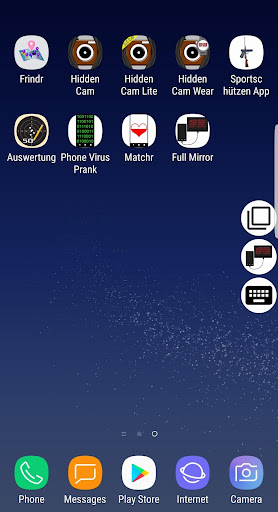


About this app
Developer Description
Use all your favorite apps in the car
FEATURES:
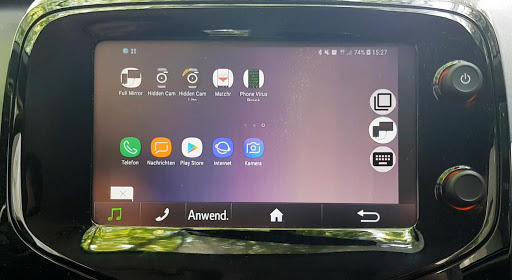
+ All your favorite apps in the car
+ Add apps to favorites
+ All apps run full screen
+ Switch between apps
+ Keyboard
VIDEO TUTORIAL:
https://youtu.be/A_IKXsJmgGs
INSTRUCTION:
Set-up
First, make sure your phone is developer unlocked. To check it, open the settings, then “about phone”, there click on “software information” and tap rapidly on the “build number” till it says “you are a developer”. After this, return to the settings and select “developer options”, activate them, then scroll down and activate “force activities to be resizable”.
The app
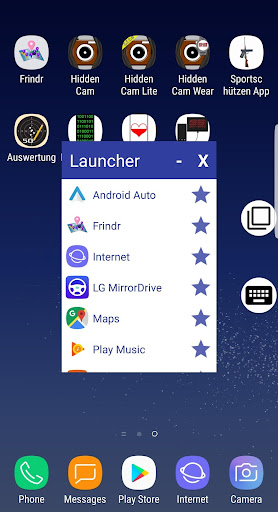
Start the app and grant the overlay, accessibility (scroll down to the app Full Mirror, select it and activate this option) and other permissions. Then use the back button to return to the app. Make sure the icons (Full Mirror icon, keyboard icon and recent apps icon) are on the screen. Now connect the phone to your car and start any of the MirrorLink certified apps. Then click on the icon to open the launcher. To add apps to favorites, click on the star, to remove them, click on the star again. Now tap and hold on the app, you started from the car menu earlier. It will open this app again in a small window, which will appear in the lower left corner. Now you can start any app from the launcher, simply by clicking on it. If the connection breaks, click okay on the message and start the same certified app from the main menu, you started first and you will continue where you left. To minimize the launcher, click on the “-“, to close the app, click on the “X”.
Recent apps button
To switch between apps, click on the recent apps icon. If it shows the message that the app cannot be displayed, click okay and select the same certified app, you started earlier. Keep doing it every time the connection breaks.
Keyboard
If you need the keyboard, click on the keyboard icon. You can choose between the day and night mode. To minimize the keyboard, click on the minimize keyboard button in the lower left corner, the text you typed will be saved, so you can open it again and continue typing. When you are done typing, click on the exit button in the lower right corner, the keyboard will disappear and you can paste this text into a search field or any text field (tap and hold on the field till a menu appears, then select “paste”), e.g. in the messenger.
COMPATIBILITY:
Please note that this app doesn't currently work on Android 10.
Compatible cars: Citroen, DS, Honda, KIA, Peugeot, SEAT, Skoda, Suzuki, Toyota, Volkswagen (VW).
Non compatible cars: Audi, BMW, Chevrolet, Ford, Mercedes, Opel, Renault, Subaru, etc…
Compatible phones: our app works best with Samsung devices of the A and S-series, like A3, A5, A50, A7, A70, S6, S7, S7 Edge, S8, S8+, S9, S9+, S10, S10+ but also with Note 8, Note 9 etc. Other phones may work, too, please contact us for further information!
Non compatible phones: Asus, Huawei, Lenovo, LG, Sony, Samsung J-series, A6, A8, Xiaomi, etc.
DISCLAIMER:
PLEASE DO NOT USE THIS APP WHILE DRIVING AS IT MAY DISTRACT THE DRIVER. WE DO NOT TAKE ANY RESPONSIBILITY FOR ANY ACCIDENTS CAUSED WHILE USING THIS APP. PLEASE DRIVE SAFELY!
What's New
Version Information
- Version
- 2.8
- Downloads
- 10K+
- Updated on
- Sep 29, 2020
- Released
- Jul 7, 2019
- Requires
- Android 7.0
Statistics
Google Play Rating History
Rating Distribution
Downloads Over Time
Full Mirror for MirrorLink has been downloaded times. Over the past 30 days, it averaged downloads per day.
Shaded area shows 30-day prediction based on historical trends
Historical data collection started recently. More data points will be available over time.
Full Mirror for MirrorLink users say on Google Play
 A Google user
BE WARNED. If you have android 10 this app does not work. I contacted the developer a while ago and they still do not have a solution. It should be mentioned here as I do meet all of the compatibility and the app worked well up to the OS upgrade. I'm hoping they rectify this soon.
A Google user
Works well with Samsung running Android 9 once setup properly. Developers are very helpful, just waiting for a solution to allow audio input which would make this app much more complete.
 John Chapman
Didn't work on 2019 RAV4 as no USB connection could be established. Mirror link greyed out and could not be started. Suspect it is a Toyota problem. However, install video was good
A Google user
If you own Samsung phone don't buy it doesn't work. When I try to install it it tells me that it is compatible with LG phones and doesn't work.... They told me to keep on pressing OK, but it simply doesn't work. I Emailed you guys and you kept on telling me the same thing. I finally uninstalled. I am telling you it doesn't work
ApkTrusted Ratings & Reviews
More from AC APPS
See more apps


Similar Apps




Scan this QR code to download

Forwarding you to the page at Google Play market in seconds...
Open Google Play market now