Snipping tool - Screenshot vVARY
Incredible Apps Inc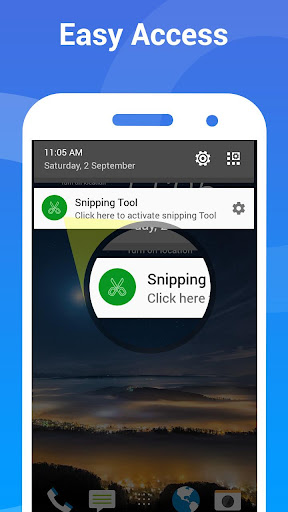


About this app
Developer Description
Take capture desired portion of screenshot & Share as image
Introducing first app in Android to capture desired part of screen and share generated image.You can take a screenshot quickly without pressing any hardware button, just one touch for screenshot.
Snipping Tool lets you select which portion of screen you want to take as screen shot.No need to crop or blur your non-essential part of screen,Take screenshot of only highlighted portion of screen and share on the single tap to image.
HIGHLIGHTS
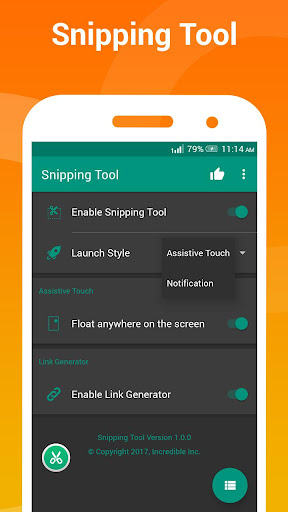
Quick access - Tap Assistive touch (like Facebook chathead) or accessible from notification.
Snip Tool- Use finger to select desired screen portion to take screen shot.
Share Link - App will generate a image of taken screenshot.
Photo Share - You can also share taken snipped photo.
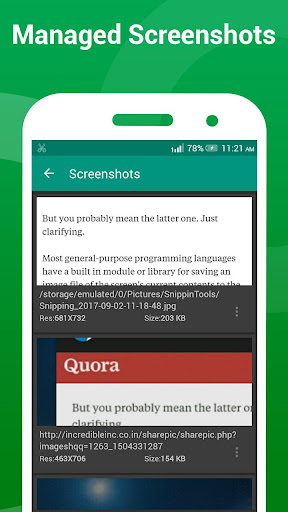
Browse History- You can view and manage all taken screenshot with generated image for later use.
No Root - This app doesn’t need root access.
When you turn the Snipping service ON, a sniphead will appear on your screen that allows you to snip any portion of your screen with just a tap. Once you tap it, the current screen selection mode will be open ,Use your fingers to select portion of screen and release your finger when done. That's about it. You're all set and good to share the piece that you just snipped with anyone as image.
If you have a suggestion, a question or you want to report a bug please use the provided feedback function or contact me directly via email.
Version Information
- Version
- -
- Downloads
- 500K+
- Updated on
- -
- Released
- Sep 5, 2017
- Requires
- Android Varies with device
Statistics
Google Play Rating History
Rating Distribution
Downloads Over Time
Snipping tool - Screenshot has been downloaded times. Over the past 30 days, it averaged downloads per day.
Shaded area shows 30-day prediction based on historical trends
Historical data collection started recently. More data points will be available over time.
Snipping tool - Screenshot users say on Google Play
 William Lee
GOOD
 Ben Incent
I like this tool. But, one thing I noticed as for now is, it displaces the area that I snipped all the time. I have my list of songs, I only snip the number 3 to 7 on the list , but it showed to me the number 2 to 6.
 Richard Schneider
App needs to be updated for current Android software. Doesn't want to work now. Was great before.
 Miguel Baez
1. I'm going to rate this app a ⭐⭐ and that's because the app forces you to watch unnecessary ads. 2. That flowing bottom disappears from the screen for no reason just to make me open the app to watch again Unnecessary ads smh..
 Jurgen Larios
The free version is excellent. To eliminate the watermark, I decided to go for the PRO version, but surprise, it has a bug and it closes as soon as you open it. They must give an update to fix the issue. I emailed them, but it cannot reach them, so you end with a paid version, which it doesn't work and you will be unable to communicate with these people. My advice, do NOT buy the PRO-version. Keep using the free one if the watermark doesn't bother you or look for an alternative.
ApkTrusted Ratings & Reviews
More from Incredible Apps Inc
See more apps
Video to MP3 Converter
Free
Amazing Cube Live WallpaperPro
Paid

Video to MP3 Converter Pro
Paid
Blue Light Filter - Eye Care
Free

Music Editor
Free
Lite Tool For Video Editing
Free

HD Screen Recorder
Free

HD Screen Recording Pro
Paid
Snipping tool - Pro
Paid
Amazing 3D, 4D Live Wallpaper
Free

Blue Light Filter Pro Eye Care
Free

Reverse Video
Free
Similar Apps

Eye Break Reminder
Paid

Personio
Free
Tally Counter & Score Clicker
Free

Deputy: Employee Scheduling
Free

Mattermost
Free

Setmore Appointment Scheduling
Free

RAYNET CRM
Free
ScreenMaster:Screenshot Markup
Free
FormsApp
Free
Content - Workspace ONE
Free

Loom – Screen and Cam Recorder
Free
Twos: Remember & Share Things
Free

BooKeep
Paid
Google Automotive Keyboard
Free
Scan this QR code to download

Forwarding you to the page at Google Play market in seconds...
Open Google Play market now