
Loom – Screen and Cam Recorder v248.2.2
Loom, Inc




About this app
Loom – Screen and Cam Recorder solves the problem of cumbersome content creation and team communication by providing a straightforward, on-the-go recording solution. This app benefits professionals, educators, and anyone who needs to convey complex information quickly, making it a strong contender in the Business category due to its ease of use and feature set. Compared to alternatives, Loom stands out with its simplicity and lack of ads or in-app purchases, which enhances the user experience. However, its effectiveness can be limited by the quality of the device's camera and microphone.
Pros
- With over 1,000,000 downloads and a 4.0/5 user rating, Loom demonstrates strong social proof and a generally positive user experience, indicating a well-designed and useful app.
- The absence of ads and in-app purchases ensures that users can utilize the app without interruptions or additional costs, enhancing the overall usability and making it more professional.
- Loom's developer, Loom, Inc, provides a professional website and contact email, suggesting a commitment to user support and feedback, which is crucial for business applications.
- The app's minimalistic approach to permissions, requesting none, is a significant advantage in terms of privacy and security, as it minimizes potential data collection and misuse.
- The simplicity of the app makes it accessible to a wide range of users, regardless of their technical skill level, which is beneficial for team collaboration and communication.
Cons
- One concern is the potential limitation in features compared to more comprehensive screen recording and video editing apps, which might make it less appealing to power users who require advanced functionalities.
- The lack of permissions might also limit the app's ability to integrate with other services or provide more sophisticated features, potentially restricting its versatility.
- Some users might find the app's focus on simplicity to be a drawback if they are looking for more advanced editing capabilities or effects, which could be a consideration for those needing more than basic recording functionality.
- The requirement for Android 10 or later might exclude users with older devices, limiting its accessibility to those with newer smartphones.
Best for: The ideal user for Loom – Screen and Cam Recorder is a professional, educator, or individual who frequently needs to create and share instructional content, explanations, or updates with teams or clients, and values simplicity, ease of use, and privacy in a screen and camera recording app.
Developer Description
The fastest way to record content on-the-go and stay connected with your team.
Record your screen and camera with one tap. Share that content in an instant with a link.
Loom for Android is the fastest, easiest way to record content on-the-go and stay connected with your team. Whether you’re screen recording product demos, giving feedback, or simply sharing your thoughts, Loom makes it simple to stay in the loop with async video.
TRUSTED BY THE BEST
Over 14 million people across 200,000 companies use Loom to record, share, and review asynchronous video. From HubSpot, to Atlassian, to Netflix, Loom is the screen recording and collaboration tool of choice for top companies.
EVERYTHING YOU NEED AND MORE
Using Loom, you can collaborate with your team, add time-stamped comments and reactions to those videos, and save videos you’ve recorded to your device. Now, you can spend less time crafting the perfect email in-between meetings, and say it with video using Loom for Android.
KEY FEATURES
• Record your screen, camera, microphone, and internal audio
• Automatically save videos to the cloud and share them instantly with a link
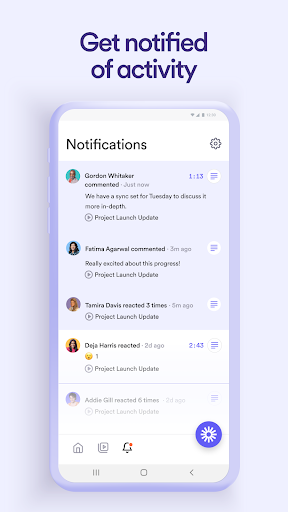
• Get notified when someone views, reacts, or comments on your video
• Leave time-based comments and emoji reactions
• Manage your Loom video library on-the-go and across devices
• Choose who can see your video with security and access controls
• Download recordings to your camera roll
• Adjust video playback speed
• Edit and trim your video using the Loom web app
ABOUT LOOM
Loom is the leading video communication platform for async work. Engineered for simplicity and speed, you can record, watch, and share videos to move work forward whether you're at your desk or on the move.
LOOM IN THE NEWS
"Why are we all trapped in enterprise chat apps if we talk 6x faster than we type, and our brain processes visual info 60,000x faster than text?...now is the time for Loom." – TechCrunch
"It fills this gap between writing an email and taking the time to have a meeting or conference...it's rare to have something that's low friction and high impact, while also adding personal connection." – Forbes
“Asynchronous video is catching on fast, and Loom thinks it's going to change the way we work. And maybe do everything else, too.” – Protocol
Privacy
Given that Loom requests no permissions, the risk of data collection or misuse is significantly minimized. However, users should still be cautious about what they record and share, especially if the content is sensitive or confidential. It's also advisable to review Loom's privacy policy on their official website to understand their data handling practices.
Tips
To get the most out of Loom, users should ensure their device's camera and microphone are of good quality to improve video and audio clarity. Additionally, familiarizing oneself with the app's settings and features can enhance the recording experience. For optimal performance, closing unnecessary background apps can help prevent lag or crashes during recording.
Version Information
- Version
- 248.2.2
- Downloads
- 1M+
- Updated on
- Jan 8, 2026
- Released
- Mar 18, 2021
- Requires
- Android 10
Statistics
Google Play Rating History
Rating Distribution
Downloads Over Time
Loom – Screen and Cam Recorder has been downloaded times. Over the past 30 days, it averaged downloads per day.
Shaded area shows 30-day prediction based on historical trends
Historical data collection started recently. More data points will be available over time.
Loom – Screen and Cam Recorder users say on Google Play
 Janna Donovan
very easy to use. very portable. very easy to download with the paid version and post anywhere I want or need to post
 Kavita Gundur
Ok app. No ads. Hard to load a name or delete video
 Gabrio Linari - Gmail
I love loom but you guys need to improve performance. Tina from the tech team told me that will be a focus now. it is slow loading your videos on the Android app, slow loading members area on your PC/comp and slow showing your content in general..once they load they play ok usually. please make it as fast as your front end. been asking this from 1 year almost. invaluable tool. especially from non-US locations! not all world revolves around the US data centers. thank you
 David Mitrovic
Constantly crashing videos, screen recording stops and turns blank for no reason. Very unreliable and disappointing, and all of this while in the supposedly trial "premium" period. Feel like I don't want to know what is the regular package if the premium is so buggy.
 Ian Barr
This app is of extremely poor quality. whatever they were trying to do, they failed miserably. i bought pro for my company and the app just isnt fleshed out or fully functional. the straw that broke the camels back for me was recording a 1.5 minute video. i finally got a perfect take and there is an audio artifact that i cannot remove. im paying for the pro version, and this is not professional grade software. terrible terrible i would sue
ApkTrusted Ratings & Reviews
Similar Apps

Screen Recorder
Free

ADV Screen Recorder
Free

Screen Recorder - Vidma REC
Free

Screen Recorder Unlimited
Free

Screen Recorder - AZ Recorder
Free

Glip Screen Recorder
Free

Screen Recorder - Vidma Record
Free

ScreenMaster:Screenshot Markup
Free

Screen Recorder - XRec Lite
Free

Private Screenshots
Free

Mobizen Screen Recorder
Free

Screen Recorder - XRecorder
Free

BIGVU Teleprompter & Captions
Free

Screen Recorder: Facecam Audio
Free

Elgato Stream Deck Mobile
Free

mcpro24fps manual video camera
Paid
Scan this QR code to download

Forwarding you to the page at Google Play market in seconds...
Open Google Play market now