
Screen Recorder - XRecorder v2.4.7.1
InShot Inc.


About this app
The Screen Recorder - XRecorder app effectively solves the problem of capturing high-quality video recordings of on-screen activity, making it an ideal solution for gamers, educators, and content creators who need to record tutorials or demos. With its excellent user rating and massive download base, it stands out among other video players and screen recording apps. Compared to alternatives, XRecorder's built-in video editor and smooth HD capture capabilities make it a top choice. However, its lack of permissions raises questions about its ability to access necessary system resources.
Pros
- With over 100 million downloads and a 4.7-star rating, Screen Recorder - XRecorder has demonstrated its reliability and effectiveness in meeting user needs, making it a trustworthy choice for screen recording tasks.
- The app's built-in video editor allows for seamless post-recording editing, enhancing the overall user experience and making it a one-stop solution for screen recording and video editing needs.
- The developer, InShot Inc., has a reputation for delivering high-quality apps, which adds to the credibility and trustworthiness of Screen Recorder - XRecorder.
- The app's ability to record games with audio is a significant advantage, catering to the gaming community's needs and setting it apart from other screen recording apps.
- The absence of permissions requests suggests a focus on user privacy, which is a significant pro for users concerned about data security and app transparency.
Cons
- The presence of ads and in-app purchases might detract from the user experience, especially for those seeking an ad-free or fully featured experience without additional costs.
- The lack of permissions could potentially limit the app's functionality or compatibility with certain system features, which might be a concern for power users or those with specific recording needs.
- Some users might find the in-app purchase model aggressive, with prices ranging from $0.99 to $49.99 per item, which could be a barrier for those on a tight budget or preferring a one-time payment model.
- The app's requirement for Android 8.0 or higher might exclude users with older devices, limiting its accessibility to a broader audience.
Best for: The ideal user for Screen Recorder - XRecorder is likely a tech-savvy individual or professional, possibly a gamer, educator, or content creator, who requires high-quality screen recordings with audio and values the convenience of a built-in video editor, and is comfortable with the app's monetization model and potential privacy implications.
Developer Description
Record games with audio. Smooth, HD screen capture & Built-in video editor.
NO root needed
NO recording time limit
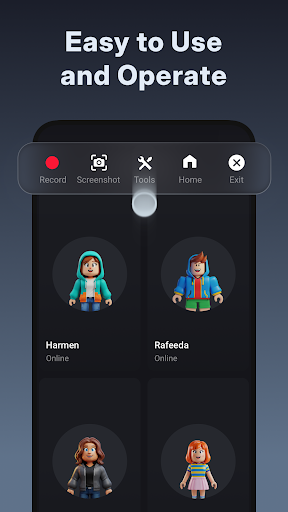
Screen Recorder & Video Recorder - XRecorder helps you capture smooth & clear screen videos, screenshots in the easiest way. Just with a tap on the floating ball, you can record HD video tutorial, video calls and videos that can not be downloaded. And you will never miss live game shows, and important moments anymore.
Download XRecorder to capture anything you like!
🏅TOP FEATURES:
● Capture screen to take a clear Screenshot
● Record Gameplay on your phone
● Internal audio recording without noise (ONLY Android 10 or above)
● YouTube & RTMP Live stream: be a gaming streamer to gain fun and popularity
● Facecam: express reactions freely with multiple camera switch
● Brush Tools: draw on the screen to make your screen capture extra special
● Video Editor: trim, remove the middle part, add music and speed control
● Maximum 120 FPS recording support to enjoy the ultimate visual experience
● Export Full HD video with custom settings: 240p to 1080p, 60FPS, 12Mbps
Pro Video Recorder:
● Customize floating ball style & opacity: a tailor-made one only for you
● One-tap Trash control: Enable or Disable it as you like
● No watermark: record a clean video & screenshot
● No recording time limits & No root needed
● Floating window: One touch to snap the exact moment or hide it when it’s not needed
● Custom Floating Window: show recording time or minimize it & replace button function
● Countdown timer: to be a fully prepared recorder
● Trash Bin: immediately recover deleted photos, videos, etc. within 3 days
● Alternative storage location: internal storage/ SD card
● Easy to pause/resume recording, rotate screen
Video Recorder with multiple editing tools
● Video trimmer: Trim, Cut and Split video to make it a better artwork
● Crop & Rotate video left, right or any other angle
● VIdeo for all platforms: adjust Ratio and Background fit for any occasion
● Music video maker: add popular music in your video
● Funny Sticker and Text to personalize your screen capture
● Stylish Filters: Story, Vintage, Lomo, etc. always a right for you
● Speed up/Slow down to adjust video pace
● Save as draft to make continuous editing possible
📼Screen Recorder in FULL HD
Screen Video Recorder - XRecorder supports recording game screen in the highest quality, 1080p, 12Mbps, 60FPS. Of course, you can record screen with adjustable resolution(240p to 1080p), quality, and FPS(15FPS to 60FPS).
🎉Screen Recorder with Facecam
Screen Recorder with Facecam helps you record your face and reaction in a small overlay window. It can be dragged freely to any position on the screen and customized to any size.
🏆Game Recorder with no Time Limit
Still looking for a gameplay video recorder to witness glorious moments? Just try XRecorder to enjoy the smoothest gameplay screen capture. It helps you record gameplay video without time limit.
📹Screen Video Recorder with no Watermark
Still find a screen capture tool without watermark? Download this video recorder to capture screen in a cleaner way. If you want to capture screen, record screen or take a screenshot efficiently, it is a must-have screen recorder.
🎧Screen Recorder with Audio
Want to record gameplay, video tutorial with audio? This powerful screen recorder with audio/sound will record your voice & internal audio fluidly and clearly. Download this fantastic screen recorder with audio - XRecorder to record your own video now.
Thanks for downloading Screen Recorder - Video Recorder. If you want to get support and share your ideas with more friends or have any feedback:
Join us at: https://www.reddit.com/r/XRecorder/
Email us at: xrecorder.feedback@gmail.com
Privacy
Given the app's lack of permissions, it's essential to be cautious about the data it might collect through other means, such as in-app analytics. Users should review InShot Inc.'s privacy policy to understand their data handling practices. Additionally, being mindful of the ads displayed and avoiding clicking on suspicious links can help maintain device security.
Tips
For optimal performance, users should ensure their device has sufficient storage space before recording, as high-quality video files can be large. Utilizing the built-in video editor to trim or crop recordings can help manage storage space. Additionally, exploring the app's settings can reveal options for customizing recording quality, frame rates, or audio sources to better suit specific needs.
What's New
- Better recording experience.
- Other bug fixes and performance improvements.
Update XRecorder to start a better recording experience!
Join us at: https://www.reddit.com/r/XRecorder/
Email us at: xrecorder.feedback@gmail.com
In-app purchases
$0.99 - $49.99 per item
Version Information
- Version
- 2.4.7.1
- Downloads
- 100M+
- Updated on
- Dec 30, 2025
- Released
- May 10, 2019
- Requires
- Android 8.0
Statistics
Google Play Rating History
Rating Distribution
Downloads Over Time
Screen Recorder - XRecorder has been downloaded times. Over the past 30 days, it averaged downloads per day.
Shaded area shows 30-day prediction based on historical trends
Historical data collection started recently. More data points will be available over time.
Screen Recorder - XRecorder - Google Play Rankings
Top Rankings
| Rank | Country | Category | List | Change |
|---|---|---|---|---|
| — |
Ranking History in
No ranking data available yet. Rankings are updated daily.
#28 in Top Free Video Players in United States


#33 in Top Grossing Video Players in United States


#3 in Top Free Video Players in Russia

#8 in Top Free Video Players in Argentina


Screen Recorder - XRecorder users say on Google Play
 Tasleem Akhter
It's an amazing app it gives us what we need it's results are amazing and I have no regret with this app it also has many features love you ho gyaa wadda wadda👅🥀
 Kaji Jashimuddin
good
 c a
c a
it's kind of good
 Nathanael Chahyadi
when i try to edit it, the audio gets dleayed for idk reasons
 J
J
wants access to all recordings. no thanks
ApkTrusted Ratings & Reviews
More from InShot Inc.
See more apps
Photo Editor & Effects: MagPic
Free

AI Photo Editor - Polish
Free

Video Editor & Video Maker
Free

Music Player & MP3 Player
Free
App Lock - Lock Apps, Password
Free

Video to MP3 - Video to Audio
Free

All Video Downloader
Free

Gallery - Album, Photo Vault
Free

Remove Objects - Photo Editor
Free

File Manager
Free

Video Downloader - XDownloader
Free

MP3 Cutter and Ringtone Maker
Free

Ringtones songs - RingWall
Free

QR Code Scanner & Barcode
Free

Cast to TV, Chromecast & Roku
Free

Cast to TV/Chromecast/Roku
Free
Similar Apps

Screen Recorder - AZ Recorder
Free

Screen Recorder Video Recorder
Free

Mobizen Screen Recorder
Free

Screen Recorder Video Recorder
Free

Screen Recorder - AX Recorder
Free

Screen Recorder - Vidma REC
Free

ADV Screen Recorder
Free

Screen Recorder: Facecam Audio
Free

Screen Recorder - Vidma Record
Free

Screen Recorder - Record Video
Free
Screen Recorder GU Recorder
Free

Video Maker
Free

YouCut - Video Editor & Maker
Free

KineMaster - Video Editor
Free

AI Video Maker AI Video Editor
Free

Screen Recorder - G1REC
Free
Scan this QR code to download

Forwarding you to the page at Google Play market in seconds...
Open Google Play market now