
Screen Recorder v2.7.1
naveensingh




About this app
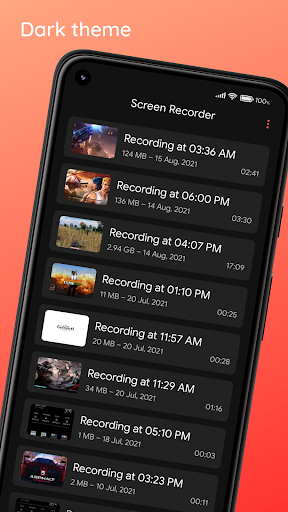
The Screen Recorder app solves the problem of capturing high-quality video recordings of apps and games without watermarks or restrictions, making it an excellent choice for content creators, gamers, and educators. With over 1 million downloads and a 4.1-star rating, this app benefits from strong social proof and a well-received user experience. Compared to alternatives in the Video Players category, Screen Recorder stands out for its simplicity and lack of permissions, but may fall short in terms of advanced editing features. Overall, its ease of use and high-quality recordings make it a solid choice for those seeking a straightforward screen recording solution.
Pros
- The app's high rating and large download numbers demonstrate its effectiveness and popularity, indicating a well-designed and user-friendly experience.
- The absence of permissions required by the app is a significant advantage, as it minimizes potential security risks and ensures that users' data is protected.
- The developer's reputation, as evident from their website and email, suggests a commitment to supporting and updating the app, which is essential for long-term user satisfaction.
- The app's offline capability and lack of watermarks make it an attractive option for users who need to record screens without internet access or annoying logos overlayed on their videos.
- The in-app purchases, although present, are relatively inexpensive and optional, allowing users to access additional features without being forced into costly subscriptions.
Cons
- Despite the app's strengths, some users may find the lack of advanced editing features limiting, as it may not offer the same level of control as more comprehensive video editing software.
- The presence of ads may be annoying for some users, although the option to make in-app purchases to remove them is a viable solution.
- The app's compatibility with older Android versions is not explicitly stated, which may raise concerns for users with devices running earlier versions of the operating system.
- Some users have reported issues with the app's performance on lower-end devices, which may be a concern for those with less powerful hardware.
Best for: The ideal user for this app is a tech-savvy individual, likely between the ages of 18 and 40, who needs to create high-quality screen recordings for personal or professional purposes, such as content creation, education, or gaming, and values ease of use, simplicity, and minimalistic design.
Developer Description
Record apps & games in high quality. No watermarks. No strings attached.
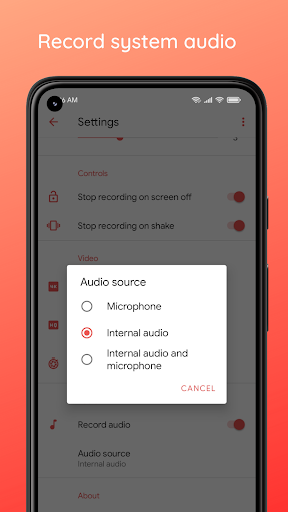
Looking for a reliable and high-quality screen recorder for your Android device? Look no further! Our app allows you to record both system audio and microphone audio, so you can capture everything you need in one place. Plus, with customizable settings, you can choose the resolution, frame rate, and bit rate that works best for you. And with no watermarks, you can be confident that your recordings will be clean and professional.
Join our beta program and be the first to try out new features and help us create an even better screen recorder.
Key features:
• Record screen and audio simultaneously
• Record both system (internal) and microphone (external) audio
• Floating toolbox for easy access to controls
• Shake to stop recording feature
• Quick Settings Tile for Android 7.0 and above
• Record Full HD videos with customizable settings (240p to 1080p, 15FPS to 60FPS, 2Mbps to 30Mbps)
• No watermarks. Record clean & high-quality videos
Following is a list of frequently asked questions, visit Help & feedback section in the app for more FAQs:
• How to record android system internal sound?
If you have a device with Android 10 or higher, you can record the system (internal) audio in the following three cases: Media, Games & Unknown (if the app in question allows it). Android 9 and below versions don't allow 3rd party apps to record internal audio. Please check if your device has software updates to Android 10.
• Why my microphone doesn't work during WhatsApp calls or when playing online multiplayer games (PUBG, CODM, etc.)?
Unfortunately, only one app can record audio at one time. Android doesn't allow two apps to capture audio (except system apps) at the same time to prevent latency issues. Android 10 solves this (kinda). Either disable audio recording or use Do not disturb while recording to prevent WhatsApp calls.
• I have Android 10, why can't I record internal audio?
Make sure you are using Screen Recorder Version 0.8 or above.
• Why the app doesn't work at all on Xiaomi devices?
Some vendors use aggressive battery-saving methods and that seems to break third-party apps. On Xiaomi devices, go to App info-/-Other permissions and allow "Display pop-up windows while running in the background" permission. For more details visit the Help & feedback within the app.
Permissions:
Internet: Required for collecting anonymized analytics data and crash logs to help improve the app.
Audio recording: Required if you want to record audio.
Display over other apps: Required to display the recording toolbox and error dialogs.
High precision sensor reading: Required for shake detection (helps you stop recording by shaking your phone).
Need help or have feedback? Visit the "Help & Feedback" section within the app or leave a review. If you like the app, please consider rating it.
Privacy
Given that the app requires no permissions, the risk of data collection or security breaches is minimal. However, users should still be cautious when using any screen recording app, as it may inadvertently capture sensitive information. To ensure safe usage, users should review the app's terms and conditions, as well as the developer's privacy policy, to understand how their data is handled.
Tips
To get the most out of this app, users should first familiarize themselves with the app's settings and options, such as video quality and format. Additionally, users can optimize performance by closing unnecessary apps and ensuring their device has sufficient storage space. Finally, users can explore the app's integration with other video editing software to enhance their screen recordings.
What's New
• Minor bug fixes and improvements
In-app purchases
$0.99 - $2.49 per item
Version Information
- Version
- 2.7.1
- Downloads
- 1M+
- Updated on
- Nov 29, 2025
- Released
- Nov 23, 2019
- Requires
- Android 7.1
Statistics
Google Play Rating History
Rating Distribution
Downloads Over Time
Screen Recorder has been downloaded times. Over the past 30 days, it averaged downloads per day.
Shaded area shows 30-day prediction based on historical trends
Historical data collection started recently. More data points will be available over time.
Screen Recorder users say on Google Play
 Bella Solidum
I found a clean, better recorder it's awesome because there's no annoying recorder circle thing and also pls add the edit feature so i can edit videos 10/10
 player _1920
Better than other Screen Recorders, Didn't saw Quality Loses in Some Frames👍. The Only Cons is The video saving is slow. Edit: The Recorder Is Saving Two Files, Recorded Video & Sound(.aac) to its Internal storage Which slows down The Saving Longer Videos To External Storage... Also After Recording it for a few Minutes, There's Some delay at sound for 1 or 0.7 seconds.
 Irshad
it is a good app but is ma face camera nai Ha
 Severyn Beauvais
works mostly alright, but sometimes it records microphone audio, sometimes it records device audio, its inconsistent and does not allow you to choose between the two for some reason
 True Unpog
When I first downloaded this app, all the features were free, now they locked important settings like fps and bitrate through a paywall.
ApkTrusted Ratings & Reviews
Similar Apps

ADV Screen Recorder
Free

Screen Recorder - Vidma REC
Free

Screen Recorder - Vidma Record
Free

Screen Recorder - AZ Recorder
Free

Screen Recorder - XRec Lite
Free

Screen Recorder: Facecam Audio
Free
Screen Recorder GU Recorder
Free

Mobizen Screen Recorder
Free

Screen Recorder Unlimited
Free

Loom – Screen and Cam Recorder
Free

Screen Recorder Video Recorder
Free

Glip Screen Recorder
Free

Screen Recorder - XRecorder
Free

Screen Recorder Video Recorder
Free

ScreenMaster:Screenshot Markup
Free

Teleprompter for Video
Free
Scan this QR code to download

Forwarding you to the page at Google Play market in seconds...
Open Google Play market now