Typing Master icon

Typing Master v2.5.8

Contains ads

Typing Master screenshot 0 Typing Master screenshot 1 Typing Master screenshot 2 Typing Master screenshot 3 Typing Master screenshot 4 Typing Master screenshot 5 Typing Master screenshot 6 Typing Master screenshot 7 Typing Master screenshot 8 Typing Master screenshot 9 Typing Master screenshot 10 Typing Master screenshot 11 Typing Master screenshot 12 Typing Master screenshot 13 Typing Master screenshot 14 Typing Master screenshot 15 Typing Master screenshot 16 Typing Master screenshot 17 Typing Master screenshot 18 Typing Master screenshot 19 Typing Master screenshot 20 Typing Master screenshot 21 Typing Master screenshot 22 Typing Master screenshot 23

About this app

Typing Master is an app designed to help users learn to type on their smartphones, solving the problem of inefficient typing on small screens. This app benefits individuals who frequently use their smartphones for messaging, emailing, or note-taking, and are looking to improve their typing speed and accuracy. Compared to other tools in the category, Typing Master stands out with its simple and ad-supported model, but falls short in terms of user rating data and limited downloads. The lack of permissions required by the app is a notable advantage, indicating a potentially secure and private user experience.

Pros

  • The app's simplicity and ease of use make it an excellent choice for beginners who want to improve their typing skills without being overwhelmed by complex features.
  • With no permissions required, Typing Master ensures a secure and private user experience, which is a significant advantage over other apps in the Tools category.
  • The app's small size and offline capability make it a great option for users with limited storage space or those who need to practice typing on-the-go.
  • The developer's decision to offer the app for free with ads provides an accessible and affordable solution for users who want to improve their typing skills without incurring additional costs.

Cons

  • The lack of user rating data and limited downloads may raise concerns about the app's effectiveness and popularity, making it difficult for potential users to gauge its quality.
  • The presence of ads may be distracting or annoying for some users, potentially disrupting their typing practice and negatively impacting their overall experience.
  • The app's limited features and lack of customization options may not cater to the needs of advanced users or those who require more specialized typing instruction.

Best for: The ideal user for Typing Master is an individual, likely between the ages of 13 and 30, who frequently uses their smartphone for communication or productivity purposes and is looking to improve their typing speed and accuracy, with a basic to intermediate level of technical skill and a willingness to practice regularly to achieve their typing goals.

Developer Description

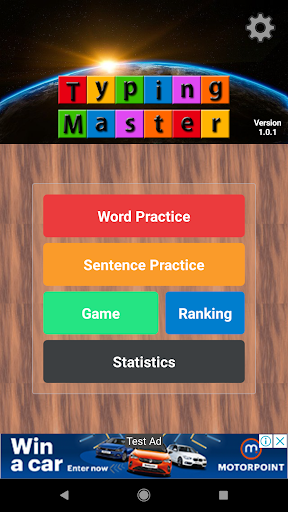
It is an app that helps you easily learn to type on a smartphone.

If you are not used to typing, try typing practice.
You can improve your typing speed.

There is also a function to adjust the font size for those with blurred eyes.

Recommend it to your acquaintances who reply to messengers late due to the slow typing speed on smartphones.
It will help you a lot~

function
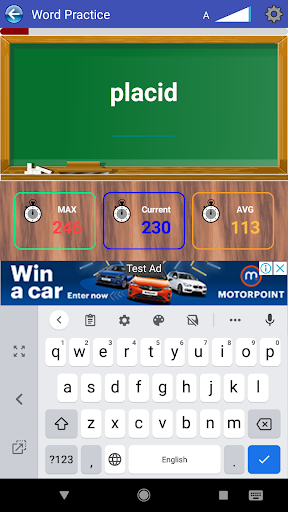
1. Word practice (1,100 words)
2. Sentence practice (930 proverbs)
3. Games (venetian format)
4. Statistics (shows speed/practice time/practice typing count by day)

Privacy

Since Typing Master requires no permissions, the risk of data collection or security breaches is minimal. However, users should still be cautious when clicking on ads, as they may be redirected to external websites or prompted to download additional apps. To ensure a safe experience, users should only download the app from trusted sources and keep their device's operating system and security software up-to-date.

Tips

To get the most out of Typing Master, users should start by practicing regularly, even if it's just for a few minutes each day. Additionally, users can optimize their typing experience by adjusting their device's keyboard settings and exploring the app's hidden features, such as customizable typing exercises. To minimize distractions and optimize performance, users should also consider using the app in offline mode or enabling their device's 'Do Not Disturb' feature.

What's New

2.5.8(2025.8.27)
- Android 15 Support

2.5.6(2024.10.23)
- Android 14 Support

2.5(2023.3.14)
- reverse landscape mode
- Practice - Setup (Proceed only when correct answer is entered)

2.4(2022.9.25)
- Fixed a screen layout error in landscape mode
- UI

2.1(2022.07.30)
- Fixed a screen layout error in landscape mode

2.0(2022.3.28)
- Landscape mode support

1.1.2(2022.1.18)
- Stability improvements

Version Information

Version
2.5.8
Downloads
50K+
Updated on
Aug 27, 2025
Released
Nov 4, 2021
Requires
Android 6.0

Statistics

Google Play Rating History

Current
Average
Range

Rating Distribution

Total Ratings:

Downloads Over Time

Typing Master has been downloaded times.

Total Downloads
Last 30 Days
Avg Daily Est.

Shaded area shows 30-day prediction based on historical trends

Historical data collection started recently. More data points will be available over time.

Typing Master users say on Google Play

★★★★★
KULDEEP KULDEEP

Its very important application

28 Mar 24, 2022
★★★★
MD ASHAR ATTARI MD ASHAR ATTARI

Its usefull with keyboard

25 Mar 19, 2022
★★★
PRM PRM

Kam chalau hai

0 Sep 25, 2025
★★
Abhi Kumar Abhi Kumar

Working slow

2 Jan 31, 2022
rkh psd rkh psd

I Don't want your irritating text messages/ day, i warned.🏴🏴

11 Nov 19, 2022

ApkTrusted Ratings & Reviews

0.0
0 ratings
5
0
4
0
3
0
2
0
1
0
✓ Thank you! Your review has been submitted and will be published after admin approval.
Be the first to write a review...

More from High Soft

See more apps

Similar Apps

Explore Tags

Browse all tags