
新明解国語辞典 第七版 (三省堂) vVARY
CodeDynamix



About this app
Developer Description
Seventh edition new clear language dictionary (SANSEIDO)
[Important] What to do if the app does not start
Please try the procedure in Q3 on the following page
https://oneswing.net/faq/android_faq.html
*** ** * ** *** ** * ** *** ** * ** *** ** * ** ***
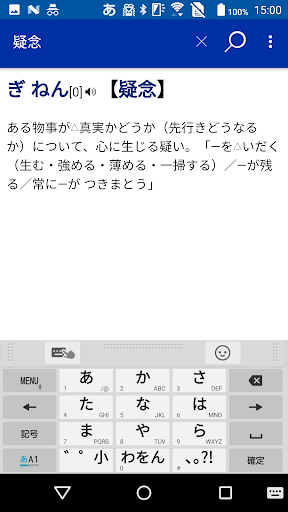
The definitive edition of the Japanese dictionary that captures the essence of words.
The best-selling small Japanese dictionary in Japan.
■ Features
-Including new words, the number of recorded words has been further increased, and the number of items is 77,500.
・ A new "grammar" column has been added. For a deeper understanding of Japanese, we focus on expressions that are often overlooked in everyday life, and explain grammatical matters in detail from the perspective of understanding Japanese from the outside.
・ The adjective items were reviewed, and the meanings of the words expressing emotions and sensations were explained so as to match the sensibilities of the users.
-Compatible with the new "Common Kanji Table" (Cabinet notification in November 2010). Compliant with the latest national language policies.
-The latest "living accent dictionary" that uses common accents that maintain normativeness.
-"Operation" column that briefly shows various aspects of operation, focusing on expressions related to interpersonal relationships, especially the characteristics of treatment expressions and the meanings that they have depending on the usage situation.
■ Basic usage
・ Headword search
● Search method 1 / "Forward"
Search for "headlines" that start with the keyword entered in the search window.
● Search method 2 / "part"
Search for a "headline" that partially matches the keyword entered in the search window.
● Search method 3 / "Complete"
Search for a "headline" that exactly matches the keyword entered in the search window.
● Search method 4 / "backward"
Search for "headlines" that end with the keyword entered in the search window.
・ Full-text search
● Search method ⑤ / "Full text"
In the search window, not only the "headline" but also the "full text" including the explanation
Search for the entered keyword.
■ Supports mutual skewered search with multiple ONE SWING apps.
■ Cooperation with Wikipedia Japanese (online dictionary)
Wikipedia Japanese version of the online dictionary that can be used for free is also included
Can be the target of batch search
■ About the search engine "ONESWING"
This application uses a dictionary search library equipped with high-speed and abundant search functions.
■ Support information
For inquiries after purchasing this product, please contact the "ONE SWING Support Center".
* Please contact the publisher for information on dictionary content.
■ ONE SWING Support Center
Reception hours 365 days a year
Reception site: https://www.oneswing.net/
We accept inquiries from the "Inquiries" page at the top of the site.
* We do not make inquiries by phone. Thank you for your understanding.
**************************
■ Required memory size
At the time of installation: about 300MB
When using: 2MB or more
■ Memory management
The application (search engine + browser) is the in-body application area
Will be installed in. (About 2MB)
Book / dictionary data is on microSDHC card or built-in data area
Will be installed in. (About 300MB)
Note) * To replace the microSDHC, click the "Menu Button".
Select "Content Download" for books and dictionary data
You will need to download it again.
★ Please download via Wi-Fi ★
* Please use Wi-Fi. (If the optical line is 100M
1/6 of 3G line)
* Charge so that the battery does not run out during download
We recommend that you keep the cable connected.
* Download time: Approximately 60 minutes (when using 3G line)
■ How to download contents
1. 1. Launch the application.
2. The inquiry dialog about downloading the contents is displayed at the first startup. Select "Yes".
3. 3. A dialog for confirming the Wi-Fi connection and battery level is displayed. Select "OK".
4. Select the "Start" button.
5. Use the back key on the main unit to go back.
**************************
Version Information
- Version
- -
- Downloads
- 500+
- Updated on
- -
- Released
- Jun 11, 2013
- Requires
- Android Varies with device
Statistics
Google Play Rating History
Rating Distribution
Downloads Over Time
新明解国語辞典 第七版 (三省堂) has been downloaded times. Over the past 30 days, it averaged downloads per day.
Shaded area shows 30-day prediction based on historical trends
Historical data collection started recently. More data points will be available over time.
ApkTrusted Ratings & Reviews
More from CodeDynamix
See more apps
デジタル大辞泉(小学館)進化する国語辞典:2025年版
Paid

社会人のマナー186(KADOKAWA)
Paid

ウィズダム英和辞典第3版・和英辞典第2版(三省堂)
Paid

究極の雑学 (KADOKAWA)
Paid

ONESWING辞典棚forAndroid
Free

社会人話し方のマナーとコツ188(KADOKAWA)
Paid

新英和中辞典第7版 (研究社)
Paid

角川類語新辞典(KADOKAWA) <串刺し非対応>
Paid

イヌ・ネコ家庭動物の医学大百科 改訂版
Paid

リーダーズ英和辞典第3版+リーダーズ・プラスセット(研究社)
Paid

大辞林(三省堂):『スーパー大辞林3.0』
Paid

ウルトラ統合辞書2025: 月々250円使い放題
Free

現代用語の基礎知識2025◆電子辞書(自由国民社)
Paid

経済ビジネス英語表現辞典【用例中心】(大修館書店)
Paid

明鏡国語辞典 第二版 (大修館書店)
Paid

広辞苑第六版(岩波書店)<串刺し非対応>
Paid
Scan this QR code to download

Forwarding you to the page at Google Play market in seconds...
Open Google Play market now