ML MediaPlayer v1.10.001
メディアロジック (Media Logic, corp.)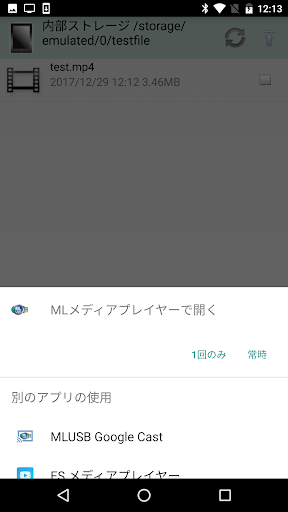


About this app
Developer Description
Can play 4K/HD movies of USB devices such as video camera and USB memory.
USB device: Video camera/USB memory,hard disk etc.
Overview
Movie saved in internal storage/USB storage etc can be played.
Notes:
MLUSB mounter is necessary when using this application.
https://play.google.com/store/apps/details?id=jp.co.medialogic.usbmounter
Features
4K movie file compatible
- supports playback of XAVC S movie of SONY 4K handy cam.
- supports playback of 4K movie of Panasonic 4K video camera.
Supports USB device
- MLFS supports various file systems: NTFS,exFAT,FAT32,FAT16,UDF,ISO9660
- Processing is tuned for playback.
In the case of 4K movies etc. with high bit rate and dropped frames, this application may be able to play smoothly.
- There are two playback modes.
Virtual Web server mode(default): Reads movie data via the virtual web server started by the MLUSB Mounter.
MLFS direct mode: remounted with MLFS in ML Media Player, and read movie data directly from USB device.
Please try MLFS direct mode when dropping frames in Virtual Web server mode.
(It can be set from the "setting" button displayed at the upper left of the screen during movie playback)
"MLFS": Original technology to directly control USB devices and mount various file systems.
For details, please see the MLUSB Mounter Google Play Store's information.
Continuous Playback
- Multiple movie files can be played back continuously.
- Multiple movies on the USB device can also be played continuously.
- The playback order can be specified with the MLUSB Mounter.
(Specified by sorting the file list display such as "Name(A to Z)","Date" order, etc.)
Simple UI/No ad display
- Specify the file to be played from the MLUSB Mounter. It is easy to specify with a simple UI.
- MLUSB mounter, ML media player, will not display advertisements.
How to use
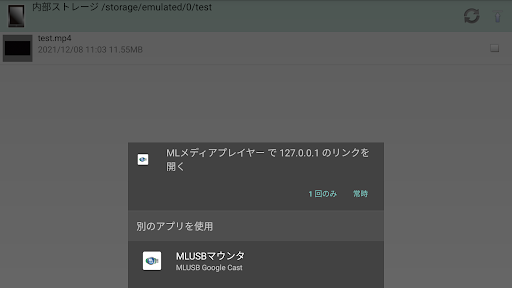
Please select "ML media player" in "App selection" displayed when selecting the target file (extension MP4/MTS etc.) with the MLUSB mounter.
(Please boot from the Ver.1.48 or later MLUSB Mounter.)
Corresponding video file
- 4K/HD movie XAVC S file shot with SONY 4K handy cam(extension MP4)
- 4K/HD movie file shot with Panasonic 4K video camera(extension MP4)
- MP4 file(extension MP4)
- ACVHD file(extension MTS)
- Other, supports various video formats
About 4K video playback environment
The following environment is recommended for playback of 4K movie file.
- Smartphone chipset Snapdragon 820,835
4K movie (XAVC S 100 Mbps) playback operation confirmation model from USB storage
Google Nexus 9 / Android 7.0
Google Nexus 6 / Android 6.0.1
Google Nexus 6P / Android 8.0.0
Google Nexus 5X / Android 7.1.2 *1
docomo SONY SO-02H(Xperia Z5 Compact) / Android 7.0
docomo SONY SO-04J(Xperia XZ Premium) / Android 8.0.0
docomo SONY SO-01K(Xperia XZ1) / Android 8.0.0
au Samsung SCL23(Galaxy S5) / Android 6.0.1
docomo Samsung SC-04G(Galaxy S6 edge) / Android 7.0
docomo Samsung SC-02H(Galaxy S7 edge) / Android 7.0
docomo Samsung SC-03J(Galaxy S8+) / Android 7.0
docomo Samsung SC-01K(Galaxy Note8) / Android 7.1.1
au HTC HTV33(HTC U11) / Android 7.1.1
HUAWEI P10 lite / Android 7.0
HUAWEI Mate 10 Pro / Android 8.0.0
Motorola Moto G5s Plus / Android 7.1.1
Fujitsu F-01K(arrows NX) / Android 7.1.1
*1 Please try MLFS direct mode if playback is interrupted or sound skipping occurs.
What's New
- Improved NDK module stability. Enhanced the stability of native libraries in 16KB page size environments.
Ver.1.09
- Due to optimization of the application size and review of the operating environment, support for some Intel devices (x86_64) has been discontinued.
Ver.1.08
- Supports API level 35 (Android 15)
Ver.1.07
- Supports API level 34 (Android 14)
Ver.1.06
- Fixed a bug that MLFS direct mode cannot be executed on API level 31 (Android 12) or later.
Version Information
- Version
- 1.10.001
- Downloads
- 50K+
- Updated on
- Dec 23, 2025
- Released
- Dec 29, 2017
- Requires
- Android 4.1
Statistics
Google Play Rating History
Rating Distribution
Downloads Over Time
ML MediaPlayer has been downloaded times. Over the past 30 days, it averaged downloads per day.
Shaded area shows 30-day prediction based on historical trends
Historical data collection started recently. More data points will be available over time.
ML MediaPlayer users say on Google Play
 A Google user
As is the case with the entire ML series of android apps - unparalleled functionality and usefulness. Worth every dime. Lets you mount a number of image formats.
 Scott Sager
Works Great. I hooked a hard drive up to my android device. Only issue I found was that you can't choose alternate subtitles or soundtracks. Not many options there.
A Google user
i will give full star if it can read audio CD as well. Please provide update to read audio cd. tq
 henry evans
shoes
 D Dragon
Trying to play the DVD, it says file format not supported. It's a DVD. File format is .vob
ApkTrusted Ratings & Reviews
More from メディアロジック (Media Logic, corp.)
See more apps

Similar Apps

Video Converter Pro
Paid
FX File Explorer
Free

MP4Fix Video Repair Tool
Free

NOVA Video Player
Free

Focus Video - Video Compressor
Free

HQ Video Player & Casting
Paid

Video Downloader & HD Player
Paid
USB Audio Player PRO
Paid

Simple Gallery Pro
Paid

Music Player & Podcast
Free

Retro Music Player
Free
RS File Manager File Explorer
Free

IPTV Player: Watch 8K Live Tv
Paid
Neutron Music Player
Paid

Smart Video Downloader
Paid

Symfonik
Paid
Scan this QR code to download

Forwarding you to the page at Google Play market in seconds...
Open Google Play market now