MLUSB Mounter - File Manager v1.91.001
メディアロジック (Media Logic, corp.)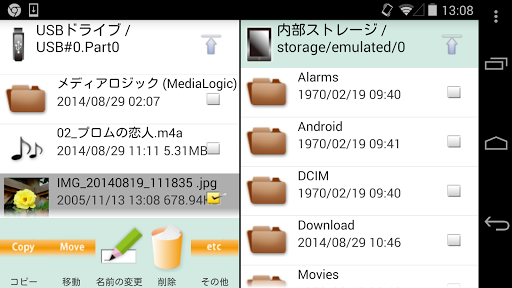




About this app
Developer Description
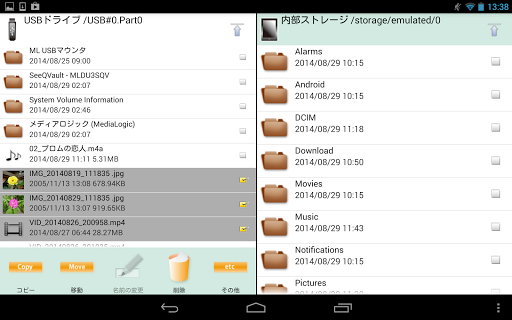
MLUSB Mounter is a File Manager App (Filer) for the smartphone and tablet.
Overview
You can access files in the terminal and files in USB devices(memory,harddisk,card reader etc).
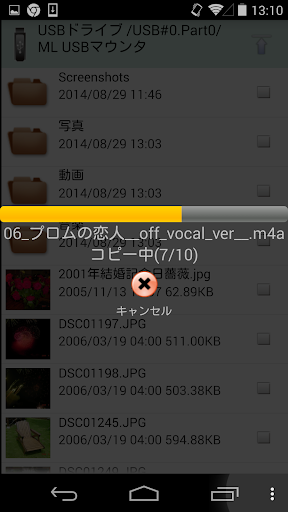
Also, you can backup the files in the terminal to the USB device or copy the files inside the USB device into the terminal.
(Connect USB device to terminal with USB OTG cable.)
Features
MLFS installed
- Possible to access the USB device of the file system that the OS of the terminal does not support
- NTFS write support! BD/DVD media accessible!
[Supported file system]
NTFS(*1),exFAT(*2),FAT32,FAT16,UDF(*3),ISO9660(*3)
*1: Read-only.
Becomes possible to write by purchasing the extensions "MLUSB NTFS Write".
*2: Becomes possible to mount by purchasing the extensions "MLUSB exFAT File System Support".
*3: Becomes possible to mount read-only by purchasing the extensions "MLUSB UDF/ISO Mount".
"MLFS": Original technology to directly control USB devices and mount various file systems.
Other features
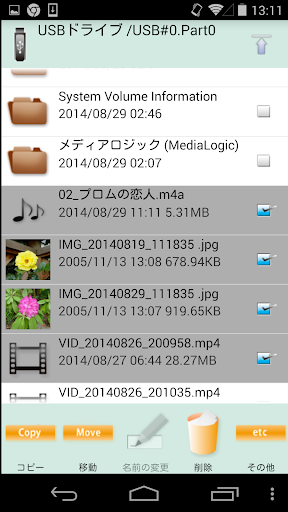
- Various file operations such as [Copy/Move/Delete/Rename] can be done.
- Independent filelist of 2 screens can be displayed.
- Supports WebDAV client function. Access to WebDAV device and WebDAV server is possible.
Extensions(Free)
ML MediaPlayer
- Movie playback app dedicated to MLUSB mounter.
- See below for details.
https://play.google.com/store/apps/details?id=jp.co.medialogic.mediaplayer
Extensions(Pay)
Purchase is required when using the following functions.
MLUSB Google Cast
- Can cast the contents of the terminal to Chromecast etc. and watch it on TV.
MLUSB UDF/ISO Mount
- Can connect USB BD/DVD drive and access BD/DVD media(UDF/ISO9660).
- Can refer to BD/DVD media as ISO image file.
Can play DVD-Video by using the DVD menu by opening ISO file with Kodi etc media player app.
Can import ISO files into the terminal.
- ISO file can be mounted as BD/DVD media.
- Video CDs can also be played.
Notes:
- Not support copyright protected media.
MLUSB Disk Utility
Disk management of USB devices is possible without PC.
Disk Formatter
- Can be formatted with FAT32,FAT16,exFAT.
Disk Eraser
- Can overwrite the data and erase it completely.
Disk Checker
- Can inspect the disk.
MLUSB Auto Backup
- Autobackup Movie/Photo/Music files to USB device.
MLUSB WebDAV Server
- Can share the folder of the volume inside the terminal/USB device as a WebDAV server.
- The WebDAV shared folder can be accessed from Android's WebDAV compatible app, PC Web browser, etc.
MLUSB exFAT File System Support
- Add exFAT mount function to MLFS.
MLUSB NTFS Write
- Add NTFS write function to MLFS.
MLUSB ISO9660 Write
- Can write files and folders to DVD-R and DVD-RW media in an ODD drive connected to USB.
MLUSB Blu-ray Authoring
- Can author MP4 video files into Blu-ray BDMV format and write them to BD-R, BD-RE media in a Blu-ray drive connected via USB.
System Requirements
OS etc.
Android 5.0 or later
Android TV
Devices
Built-in storage, SD card, USB mass storage.
Details, visit the website.
http://www.medialogic.co.jp/
* DISCLAIMER
"Media Logic, corp." IS NOT RESPONSIBLE FOR ANY DAMAGE OR LOSS OF ANY PROGRAMS, DATA OR INFORMATION ON THE PRODUCT BEING SERVICED.
What's New
- Improved NDK module stability. Enhanced the stability of native libraries in 16KB page size environments.
Ver.1.90
- Fixed an issue where the app could crash on Android TV.
In-app purchases
$0.99 - $3.49 per item
Version Information
- Version
- 1.91.001
- Downloads
- 500K+
- Updated on
- Dec 23, 2025
- Released
- Aug 29, 2014
- Requires
- Android 5.0
Statistics
Google Play Rating History
Rating Distribution
Downloads Over Time
MLUSB Mounter - File Manager has been downloaded times. Over the past 30 days, it averaged downloads per day.
Shaded area shows 30-day prediction based on historical trends
Historical data collection started recently. More data points will be available over time.
MLUSB Mounter - File Manager users say on Google Play
 Ricki J
This app is awesome, bought it years ago and is my go to file manager/mover app. I rarely give reviews (it has taken years for me to give this one). This app handles just about everything I have thrown at it (in the one exception, the developer bought the same device to resolve the issue). It is compatible with OTG: SD/TF CARDS- USB memory stick - SSD HDD - 2.5" SATA HDD This is the only app I use for file management/moving. The interface is intuitive and easy to navigate.
 Renegade Immortal
I`m not too sure what happened. As i try to launch the MLUSB MOUNTER , it won`t launch at all. The app simply flash a bit like to open the software, but it closes back to where it was earlier. I uninstall and install again and again but the problem still persist. Any idea on how to fix this?
 umer Ali
mkv files are not playing ...
 Thejus Rao
Hi, using this on my Google Chromecast 4k with Android 12. When I try to plug in my 1TB hard drive it's stuck on "USB device mounting" and I can't access anything on it. Basically, this app doesn't work. But I've seen other people have success with it. I'm not sure why it's not working for me. Am I doing anything wrong?
 Smart AI Ehzaan Mohammed
trash I wanted to see my USB drive files but when I checked it doesn't show my USB drive i need to purchase an app for seeing my pen drive.just a big piece of trash.
ApkTrusted Ratings & Reviews
More from メディアロジック (Media Logic, corp.)
See more apps

Similar Apps
FX File Explorer
Free
RS File Manager File Explorer
Free
Send files to TV
Free

Total Commander - file manager
Free
Cx File Explorer
Free

Super File Manager Explorer
Free

Kodi
Free

LocalSend: Transfer Files
Free

spacedesk - USB Display for PC
Free

NOVA Video Player
Free

Explorer
Free

ASTRO File Manager & Cleaner
Free

File Manager
Free
Material Files
Free

EX File Manager
Free

Symfonium: Music player & cast
Free
Scan this QR code to download

Forwarding you to the page at Google Play market in seconds...
Open Google Play market now