
Speedometer EX vVARY
Smart and Small SoftwareDownload Options
Screenshots


/
About this app
[0~1400 km/h] sophisticated Speedometer corresponding to an analog display.
<<>>
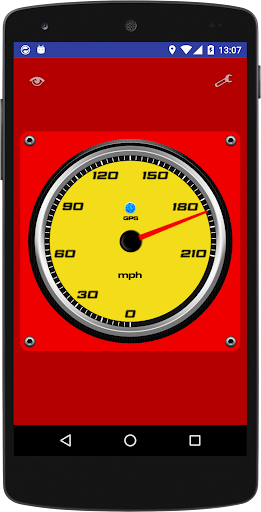
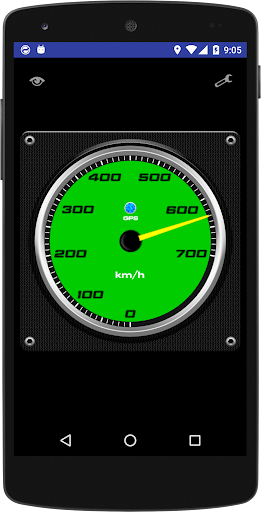
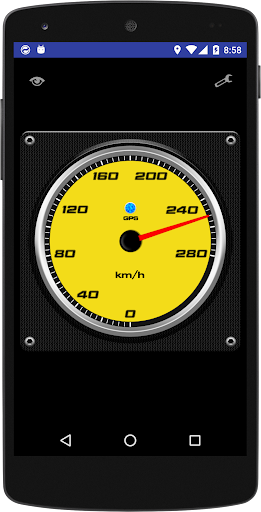
11 kinds of speed range, meter panel color changes, the maximum speed record, three of the trip meter, such as the switching of analog display and digital display, is a speedometer equipped with a rich set of features.
· Screen touch analog display and digital display with switches instantly.
(Analog display mode)
· 0 ~ 35 km/h (mph)
· 0 ~ 70 km/h (mph)
· 0 ~ 140 km/h (mph)
· 0 ~ 210 km/h (mph)
· 0 ~ 280 km/h (mph)
· 0 ~ 350 km/h (mph)
· 0 ~ 420 km/h (mph)
· 0 ~ 560 km/h (mph)
· 0 ~ 630 km/h (mph)
· 0 ~ 700 km/h (mph)
· 0 ~ 1400 km/h (mph)
※ speed range can be set to "automatic switching" in setting.
· Meter panel type of color (blue, green, red, white, yellow)
· Needle of color kind of (red, white, yellow)
· Base color of the type (black, red, woodgrain, Honeycomb pattern, Metal)
· Kind of background color (black, red, green, orange, purple)
· Speed measurement value can be corrected. (In the range of ± 10%)
· The maximum speed of the recording function
· Equipped with three of the trip meter
[Instruction]
1. Install the app.
2. Start the app to enable the GPS function.
3. To be in the analog display "GPS" lamp is lit in blue and you're ready.
· "Settings" ... analog display screen upper right corner of the "spanner" setting when you tap the icon screen is displayed.
· When you tap the "eye" icon in the "report" ... the top left of the screen, you maximum speed and three of the trip meter is displayed.
※ each recorded value of the report is cleared to "0" in the long press of the "Reset" button.
【Caution】
※ not available at the terminal where the GPS function is not installed.
※ When the GPS function is not enabled is not available.
※ location (underground, tunnel, etc.) radio waves of GPS does not reach not available in.
※ Each measured value may cause an error.
11 kinds of speed range, meter panel color changes, the maximum speed record, three of the trip meter, such as the switching of analog display and digital display, is a speedometer equipped with a rich set of features.
· Screen touch analog display and digital display with switches instantly.
(Analog display mode)
· 0 ~ 35 km/h (mph)
· 0 ~ 70 km/h (mph)
· 0 ~ 140 km/h (mph)
· 0 ~ 210 km/h (mph)
· 0 ~ 280 km/h (mph)
· 0 ~ 350 km/h (mph)
· 0 ~ 420 km/h (mph)
· 0 ~ 560 km/h (mph)
· 0 ~ 630 km/h (mph)
· 0 ~ 700 km/h (mph)
· 0 ~ 1400 km/h (mph)
※ speed range can be set to "automatic switching" in setting.
· Meter panel type of color (blue, green, red, white, yellow)
· Needle of color kind of (red, white, yellow)
· Base color of the type (black, red, woodgrain, Honeycomb pattern, Metal)
· Kind of background color (black, red, green, orange, purple)
· Speed measurement value can be corrected. (In the range of ± 10%)
· The maximum speed of the recording function
· Equipped with three of the trip meter
[Instruction]
1. Install the app.
2. Start the app to enable the GPS function.
3. To be in the analog display "GPS" lamp is lit in blue and you're ready.
· "Settings" ... analog display screen upper right corner of the "spanner" setting when you tap the icon screen is displayed.
· When you tap the "eye" icon in the "report" ... the top left of the screen, you maximum speed and three of the trip meter is displayed.
※ each recorded value of the report is cleared to "0" in the long press of the "Reset" button.
【Caution】
※ not available at the terminal where the GPS function is not installed.
※ When the GPS function is not enabled is not available.
※ location (underground, tunnel, etc.) radio waves of GPS does not reach not available in.
※ Each measured value may cause an error.
Version Information
- Version
- -
- Downloads
- 1K+
- Updated on
- -
- Released
- Oct 1, 2016
- Requires
- Android Varies with device
Ratings & Reviews
Developer Response
