
Gizmo v21.0.2
JRiver

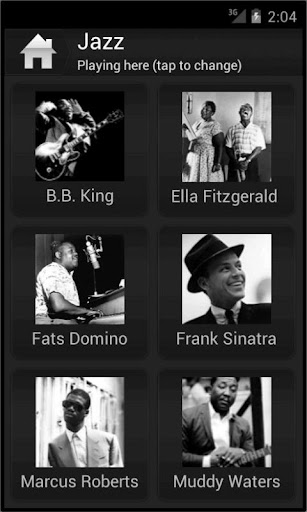
About this app
Developer Description
Stream music, photos, video from JRiver. Play to DLNA renderer, use as remote.
What's New
Fix local playback crash on newer Android versions (S+).
Version Information
- Version
- 21.0.2
- Downloads
- 100K+
- Updated on
- Aug 25, 2023
- Released
- Jun 9, 2010
- Requires
- Android 2.3
Statistics
Google Play Rating History
Rating Distribution
Downloads Over Time
Gizmo has been downloaded times. Over the past 30 days, it averaged downloads per day.
Shaded area shows 30-day prediction based on historical trends
Historical data collection started recently. More data points will be available over time.
Gizmo users say on Google Play
 A Google user
It's free and offers a lot, you can't ask for more. One little glitch that I like to solved is: remembering last position while scrolling through playlists.
A Google user
One of the things that made me decide to purchase the software. Very convenient as a remote. The not so good parts: no ability to rate songs from within the app (must be a glitch, doesn't save if you click on the stars) ; interface is frankly a bit wonky and cheapish feeling, which is okay, but for example, when searching you can't go back one step without going back to the beginning of search. Can't see which tracks the program found without actually pressing play. Small things like that.
 Daniel Hobbs
Too old and can't work well with modern full screen gesture setup. Seems to not show any now playing status. But other than that. Works still
A Google user
Gizmo could be helpful if you are using JRiver and don't have the computer right in front of you. It will control the software from a phone or tablet. However, it lacks key usability features for music. First, there's no way to reorder, edit, or delete the current play queue, other than adding another album. (Well, you can press "Play" on another track, which will replace the entire queue.) This is a pretty basic feature, and it's surprising to find it missing. The Search feature is really fast, but there's no way to view the tracks on an album and add *some* of them to the playe queue. Update in June 2016: Still no way to reorder play queue or add individual tracks from an album. It's puzzling how such basic features are missing -- I guess this is really meant just for controlling movies.
 Derek Jordan W
Confusing to use for rendering audio from your pc. constant "communication errors", requiring me to open the phone and hit play after every single song. very annoying.
ApkTrusted Ratings & Reviews
More from JRiver
See more apps
Similar Apps

Pronti - Outfit Maker
Free

Strawberry
Free

Zenith AI - The AI Superpower!
Paid

AI Vocabulary Builder - Vokab
Paid

LCH-Rising
Paid

BILT: 3D Instructions
Free

Body Alchemy
Free

DreamBuild: Sketch to 3D
Paid

PrimalPal
Paid

Say Something Nah!
Paid

FreshCheck - Food Expiration
Paid

Giftful: Universal Registry
Free

Plant Identification: AI Care
Paid
Scan this QR code to download

Forwarding you to the page at Google Play market in seconds...
Open Google Play market now