
iCLOO! - sports video analysis v2.12.102
iCLOO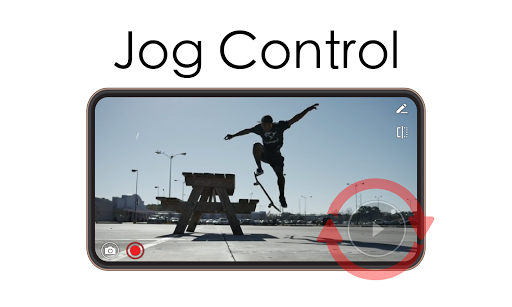


About this app
Developer Description
Enjoy your video with jog control for slo-mo, reverse, and multi-speed playback
Summary of Features
1. Jog control: unique and powerful video playback
- Instant video stream analysis (no waiting for import)
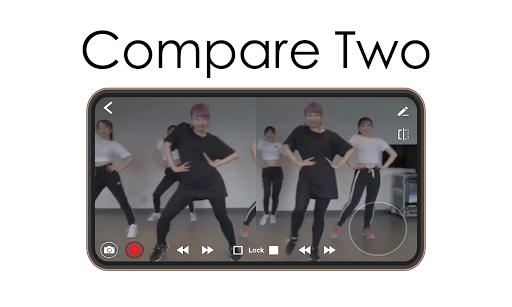
- Compare two videos together (toggle [1] and [1|2] icon)
- Support slow motion, fast forward, and rewind by swiping the screen
- Adjust video speed (1x, 1.2x, ...) and frame-by-frame jog dialing
- Zoom in/out videos while playing
2. Recording: unlimited stop and record support while you play the video
- Record everything displayed on the screen (play, slow motion, fast forward, mix, etc.)
- Add your voice while you're recording video.
- Zoom in/out supported while recording!
3. Additional functions
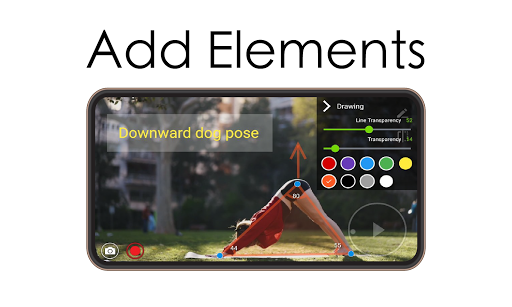
- Drawing tool - lines, protractors, rectangles, circle, arrows, curves, mosaic, etc. - and text input.
- Up to 3 tag words and bookmark function for search
- Share video with friends
Exclusive Video Playback and Editing
1. Video playback and analysis using a jog dial at your command. By selecting the desired section while playing the video without converting the video file, you can play it as slow motion, reverse playback, section repeat, etc. In addition, you can use the jog dial to analyze and check the video frame by frame.
2. Advanced frame editing tools for video analysis.You can insert the angle, line, and shape into the frame of the video to help you analyze dynamic movements in the video. You can also insert information that is not delivered from the video by using text, emoticon, etc.
3. Record & snapshot function to save the edited content as a record.You can record the edits from an existing videos as new video and snapshot. You can easily create video materials for your own sports or dance lessons without special tools. For example, to analyze a golf swing, you can repeatedly review multiple videos that highlight a particular part and continue to make revisions.
Notice
- iCLOO! app provides highly flexible playback and recording features together. We use a unique approach to load video clips that will require a large memory space. We recommend you to shut down all other apps when playing or editing your videos. We will keep improving the performance while we offer all those good features.
- Operation may not be desired on low specification devices. (Recommended: Galaxy S7 or higher, LG G5 or higher)
- UHD (4K)Video playback may not be desired.
- If you send a file that has a problem with playback to brainkeys@naver.com, we'll see if we can fix the problem.
----Developer Contact :BrainKeys (brainkeys@naver.com)
What's New
In-app purchases
$1.49 - $89.99 per item
Version Information
- Version
- 2.12.102
- Downloads
- 100K+
- Updated on
- Oct 17, 2025
- Released
- Oct 29, 2018
- Requires
- Android 7.1
Statistics
Google Play Rating History
Rating Distribution
Downloads Over Time
iCLOO! - sports video analysis has been downloaded times. Over the past 30 days, it averaged downloads per day.
Shaded area shows 30-day prediction based on historical trends
Historical data collection started recently. More data points will be available over time.
iCLOO! - sports video analysis users say on Google Play
 Beth J
Better than Coach's Eye! Glad I found this app. Been shopping for a CE replacement and getting frustrated with the lack of choices on Android. Lacks a few features around sharing by comparison, but I've been using Google drive lately for that anyway, and this handles that just as well. Only request right now would be - when you draw a straight line, wish it would let you draw it rather than drop it on screen and you have to move it. Love the record delay and stop feature.
 Elte Hupkes
I really like this app for what it does - allowing me to directly play a video from my gallery with frame by frame scrubbing. The UI looks a bit dated but who cares. I'd gladly pay some money for that feature alone to get rid of the ads, but a subscription...nah. It's the Play Store's fault I guess for not having a good payment model for version upgrades, but I doubt I'll ever pay anything other than a one time fee for this. Other than that I very much recommend this app!
 Alexis Gagnon Morris
This app is perfect if you want to just analyze your video for whatever sport you are practicing. No log in, no account creation, no need to import video from your gallery. I loved this app instantly and I immediately tried to pay for a "pro" version to remove the banner adds. Unfortunately there's no way to pay a one time fee. You have to pay a recurring monthly or yearly "subscription". No thanks. Why isn't there an option to buy the current version?
 Russell Young
5 stars for the functionality, the control wheel is the best I've seen among the several similar apps I tried. I was all set to go with it when I found it freezes my android when I record: I can take video from my phone and import it but recording from within the app freezes and requires closing the phone and reopening even to exit every time. This makes it pretty awkward to use, which is what caused the demotion to 2 stars.
 A Google user
Terrible. Low quality video. The "slow mo" is just a slow video, it doesn't capture anything, iys all just blurry. Slow mo isn't a video that you can slow down, it's a video with a much higher frame rate that captures things that are USUALLY very fast, slower. If you are expecting a app that can capture a fast moving object, you will be sorely disappointed.
ApkTrusted Ratings & Reviews
More from iCLOO
See more apps



Similar Apps












Scan this QR code to download

Forwarding you to the page at Google Play market in seconds...
Open Google Play market now