
Mobile IDentification App v4.5.6
행정안전부


About this app
Developer Description
Mobile IDs issued by the government have the same legal validity as physical IDs
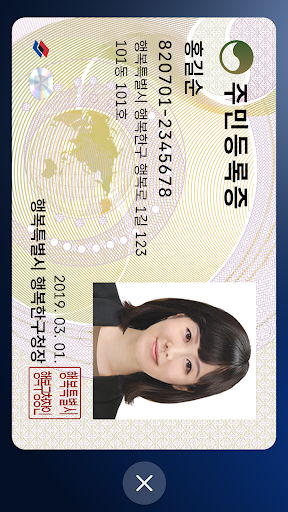
Mobile ID, Mobile Resident Registration Card, Mobile Driver’s License, Mobile National Veterans Registration Card, and Mobile Overseas Koreans Identity Verification Card are IDs that can be issued on personal smartphones and have same legal effect as traditional IDs.
[Mobile ID App Introduction]
Mobile ID, Mobile Resident Registration Card, Mobile Driver’s License, Mobile National Veterans Registration Card, and Mobile Overseas Koreans Identity Verification Card are government-issued IDs stored securely on personal smartphones, carrying the same legal effect as traditional IDs and provides convenient usage.
[Introduction to Mobile Resident Registration Card and Driver’s License]
The Mobile Resident Registration Card and Driver’s License are legal IDs securely encrypted and stored on personal smartphones, issued by the Ministry of the Interior and Safety and the Korean National Police Agency.
[Eligibility and Requirements]
- Holders of a Resident Registration Card or Driver’s License, or new applicants
- Smartphone registered under the applicant’s name
- Subscriber to a domestic mobile network enabling personal identity verification
Android OS 8.0 or higher, with biometric authentication and NFC support
※For non-IC ID holders, QR issuance is available at community centers (Resident Registration Card) or driver’s license test centers (Driver’s License).
※Subscriber of mobile virtual network operator (MVNOs) can also apply.
(Excluding TPlus (KCT – Korea Cable Telecom))
※Corporate-issued phone or anonymous prepaid phones currently cannot be used.
[How to Apply for a Mobile Driver’s License]
To issue your Mobile Driver’s License quickly, bring your physical driver’s license and a smartphone with the Mobile ID app installed to a driver’s license test center. Applications can also be submitted at police department offices or through the Korea Road Traffic Authority's Integrated Driver’s License Services website for online IC driver’s license requests.
▶Issuance Methods (Resident Registration Card, Driver’s License):
- Method 1: Replace your physical ID with an IC ID and issue the mobile ID directly by scanning (tagging) it with your smartphone.
- Method 2: Use on-site QR issuance at community centers (Resident Registration Card) or driver’s license test centers (Driver’s License) without replacing the physical ID.
※ Mobile IDs (Resident Registration Card, Driver’s License) are legal IDs, and at least one in-person identity verification process is required at the issuing agency.
※ If a physical ID is replaced with an IC ID, future reissuance of a mobile ID upon changing smartphones will not require a revisit to the issuing agency.
※ IC Resident Registration Card: Application is available only at community centers, and it takes about 15 days for issuance.
※ IC Driver’s License: Issuance is available on the same day at license test centers or takes approximately 15 days when applying through police departments.
※ For online applications of IC driver’s licenses, select a date for receipt at least 15 days after the application date (excluding public holidays).
※ For details on IC Driver’s License issuance, visit the Korea Road Traffic Authority’s website (www.safedriving.or.kr).
[Precautions]
- Tagging IC IDs (Resident Registration Card, Driver’s License): Remove the smartphone case, place the IC ID on a flat surface, and ensure contact for 3–4 seconds.
※ Tagging area: Back upper section (near the camera).
※ Avoid overlapping IC IDs with other items like transit cards, as it may cause duplicate recognition.
- Facial Recognition Procedure: Clean the smartphone's front camera and position it in a well-lit area. Keep your face about 40–50 cm (arm’s length) away, look straight ahead, and follow the instructions (e.g., blink, turn your head right and left).
[Inquiries]
Mobile ID Call Center: 1688-0990
Version Information
- Version
- 4.5.6
- Downloads
- 5M+
- Updated on
- Nov 13, 2025
- Released
- Jan 25, 2022
- Requires
- Android 8.0
Statistics
Google Play Rating History
Rating Distribution
Downloads Over Time
Mobile IDentification App has been downloaded times. Over the past 30 days, it averaged downloads per day.
Shaded area shows 30-day prediction based on historical trends
Historical data collection started recently. More data points will be available over time.
Mobile IDentification App - Google Play Rankings
Top Rankings
| Rank | Country | Category | List | Change |
|---|---|---|---|---|
| — |
Ranking History in
No ranking data available yet. Rankings are updated daily.
#1 in Top Free Lifestyle in South Korea

#13 in Top Free Apps in South Korea


Mobile IDentification App users say on Google Play
 Jack M
좋습니다. 단점이라면 앱 신분증 키는게 지갑에서 카드 꺼내는거 보다 오래 걸리는 점이네요 ㅋㅋ
 김도윤
김도윤
제발 민증도 지원이 되게 해주세요
 조영현
조영현
앱 초기 로딩 시간을 지금보다 2배정도 더 빠르게 단축 시킬 필요가 있어보임.
 Jay Kim
모바일 면허증은 경찰서나 시험장에서 재발급받는거네요.
 Anna Lee
Only possible for Koreans 외국인 안 됨
ApkTrusted Ratings & Reviews
More from 행정안전부
See more apps








Scan this QR code to download

Forwarding you to the page at Google Play market in seconds...
Open Google Play market now