
Safety e-Report v3.1.9
행정안전부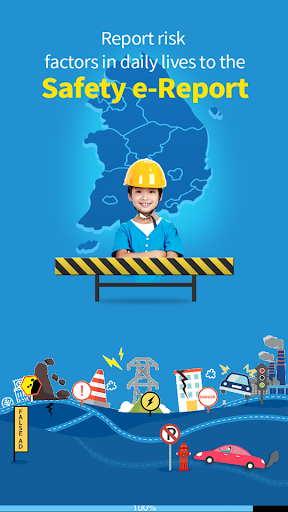


About this app
Developer Description
Eliminate safety risk factors in the daily life
The report covers all the risk factors in the public safety like facilities, transport, schools, lives and maritime affairs and the reported contents are linked and processed with the e-people service.
* Call 119 for emergency fire, rescue and saving lives and 112 for the security.
Here is the guideline to the accessibility used by the app.
The accessibility below are required to normally use the app.
□ Storage space: It is the access to the device, pictures and media files and used to access the user DB like saving the setup information of the user.
□ Telephone : It is the rights of sending and managing calls and used to directly connect the call center for the government complaints and set up the push environment.
□ Camera: It is the rights of taking pictures and shooting video and used for the picture / video attachment required for the report.
□ SMS : It is the rights of sending and viewing the message and used to provide SMS services including answers, post-survey on satisfaction and events.
□ Location : It is the rights of accessing the device location and used to provide the map service based on the current location.
□ Microphone: It is the rights of recording the audio and used for the voice report.
The user may permit / refuse each right in the application setup but may not normally use functions of the app if the user refuses the required access.
You can easily set up the access rights after deleting and reinstalling the app if you refuse the popup menu for required accessibility in the app installation.
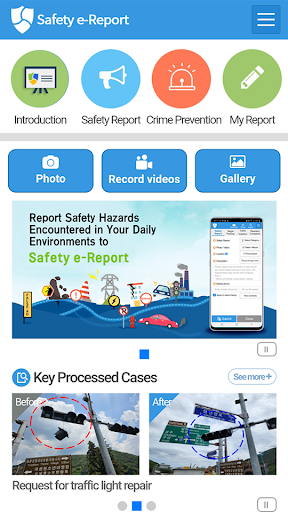
□ Safety report
- Easily report risk factors only with the photograph / video, accident location and contents.
- The address is automatically converted if you select the accident location on the e-map. The GPS function in the smartphone is only used for the user to easily select the current location as the accident site on the
- You can attach up to 3 photographs or videos with the maximum capacity of 100MB.
* The non-member should enter the private information to search for the progress in the app.
□ Report status: It summarizes and shows the total report status of Safety e-Report.
□ Safety News: The user can search for disaster-related news in Yonhap News Agency real time.
□ Major case: You can search for cases processed (improved) by Safety e-Report.
□ Membership and automatic login
- You can subscribe services after passing the mobile phone authentication and entering the private information.
- The login status maintains even if you run the app again when you select the automatic login and log in the app with your ID and password on the login screen.
□ My report
- The member can search for the report result with his/her ID and password.
- The non-member can search for the report result with his/her mobile phone number and report number.
- You can search for the result with the report number in the text message sent after the report.
- You can search for the result with the mobile phone authentication service.
□ FAQ: It provides key issues like the subscription and report process.
What's New
Once the recovery is completed, normal service will be available through this version without requiring a separate app update.
Version Information
- Version
- 3.1.9
- Downloads
- 5M+
- Updated on
- Oct 23, 2025
- Released
- Feb 9, 2015
- Requires
- Android 9
Statistics
Google Play Rating History
Rating Distribution
Downloads Over Time
Safety e-Report has been downloaded times. Over the past 30 days, it averaged downloads per day.
Shaded area shows 30-day prediction based on historical trends
Historical data collection started recently. More data points will be available over time.
Safety e-Report users say on Google Play
 Mark Balneger
edit: working again English app stopped working. Cant submit complaint anymore. After notification "please check the information..." pops up, you have to click "Yes" to agree. Button doesnt work.
 dennis ts
Although the app itself might be a bit clunky, I think the response time is great, and I want to commend the government both for implementing this app and the resolution of the reported issues. One improvement I would like to request is a change in how pictures for parking violations are handled. Currently, you can only take pictures from the camera and not upload, and you need to take two pictures, waiting one minute between each. This creates a problem if the car owner sees you doing so.
 W M
W M
"Activate the automatic time setting function to run the camera function." .... what? lol. Please explain what needs to be done.
 A Google user
The app works for the most part, but it's really confusing and strange how, if you type in any Korean words into the report description, the app will give an error message in Korean telling you that the English app only allows reports entirely in English. Why are error messages for an English app given in Korean? And why would it disallow writing Korean words to begin with?
 Trevor Ames
The police, who look into parking violations, seem to find no trouble with illegally parked vehicles when the vehicles are police vehicles. Then, the app makes the report disappear. Whether it is the app's doing or the police's, it is still reflected on the app that it has disappeared. I want to add that the English version's videos aren't accepted, and, as far as I can tell, as a non-Korean citizen, I am not allowed to use my name to make an account that let's videos be used to film criminals.
ApkTrusted Ratings & Reviews
More from 행정안전부
See more apps





Scan this QR code to download

Forwarding you to the page at Google Play market in seconds...
Open Google Play market now