
Chargeway v2025.50.1
Chargeway Inc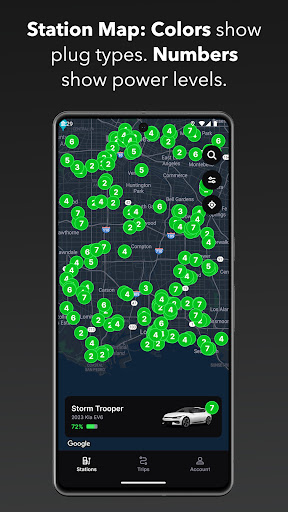
About this app
Chargeway solves the problem of finding electric vehicle charging stations and planning trips, benefiting EV owners and environmentally conscious drivers the most. Compared to alternatives in the Maps And Navigation category, Chargeway stands out with its specialized focus on EV charging infrastructure. However, its limited download numbers and lack of comprehensive user reviews may raise concerns about its overall reliability and community support. With a high user rating of 4.5, Chargeway demonstrates a well-received user experience, but its long-term success will depend on continuous updates and expansion of its feature set.
Pros
- Chargeway's high user rating of 4.5 out of 5 indicates a well-designed and user-friendly interface, making it easy for EV owners to find charging stations and plan their trips.
- The app's specialized focus on EV charging infrastructure sets it apart from more general navigation apps, providing a unique and valuable service to its target audience.
- With no ads and a reasonable in-app purchase model, Chargeway offers a clean and uninterrupted user experience, allowing users to focus on finding charging stations without distractions.
- The developer's website and email support provide a clear channel for user feedback and issue resolution, demonstrating a commitment to customer satisfaction.
- Chargeway's requirement of only Android 6.0 and above ensures a relatively modern and secure operating system, reducing the risk of compatibility issues and security vulnerabilities.
Cons
- The limited download numbers of 10,000+ may indicate a relatively small user base, which could impact the app's ability to crowdsource information and provide comprehensive coverage of charging stations.
- The lack of comprehensive user reviews and ratings may make it difficult for potential users to gauge the app's reliability and effectiveness in different regions and scenarios.
- The in-app purchase model, while reasonable, may still be a barrier for some users who prefer free or ad-supported alternatives, potentially limiting the app's adoption rate.
- The app's total lack of permissions may raise questions about its ability to provide accurate location-based services and update its database of charging stations in real-time.
Best for: The ideal user for Chargeway is an environmentally conscious driver who owns an electric vehicle and regularly needs to find charging stations while on the go, likely someone who values convenience, sustainability, and reliability, and is willing to invest in a specialized app that caters to their specific needs.
Developer Description
Find EV charging stations and plan trips with Chargeway®
Chargeway® makes driving an electric car and using “electric fuel” easy for everyone. Simply choose your vehicle and Chargeway® will answer the questions that all drivers want to know when they need to re-fuel:
- Where do I fill up?
- How long does it take?
- Where can I travel to?
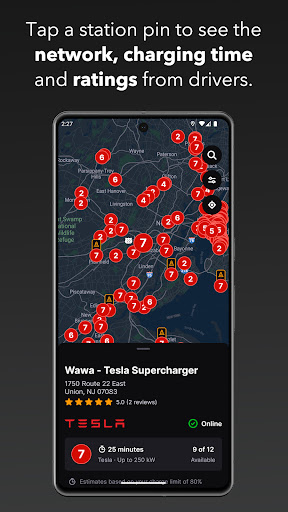
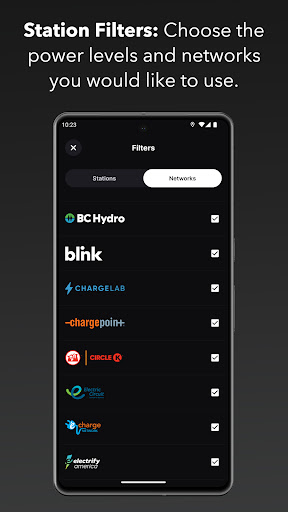
Chargeway® guides drivers to charging stations throughout the United States from networks including Greenlots, EVgo, SemaConnect, EVConnect, Chargepoint, Flo, Blink, OpConnect, Electrify America, AeroVironment, Volta, GE Wattstation and Tesla.
Designed with the individual driver in mind, Chargeway® simplifies the electric car charging experience ensuring that you see only the stations that work for your car. Features include:
Station Locator:
- Plug specific color-coding so you know which stations match your car (Green, Blue or Red)
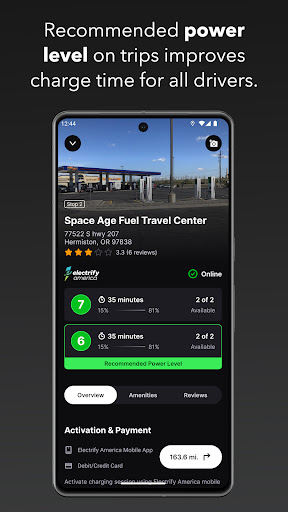
- Power levels 1 through 7 show your vehicle and stations max charging speed
- Automatic station location map filtering for the vehicles you choose
- Easy to adjust filters for station power levels and networks you want to use
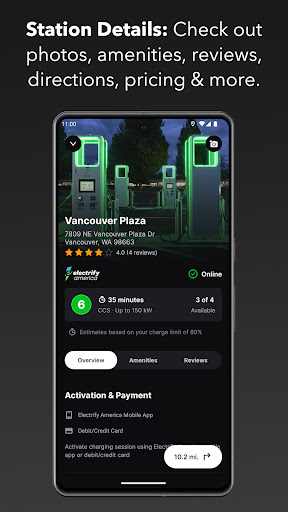
- Add reviews and photos to stations that you visit
- See shops and restaurants near a station that you can enjoy while you charge
- One-click directions to help you get to any station location
Timer:
- Charging time estimator to help you learn how charging time can vary
- Simply select the power level and your remaining range to estimate how much time your charge will take
- If you have more than one electric car, simply swipe left or right change vehicles
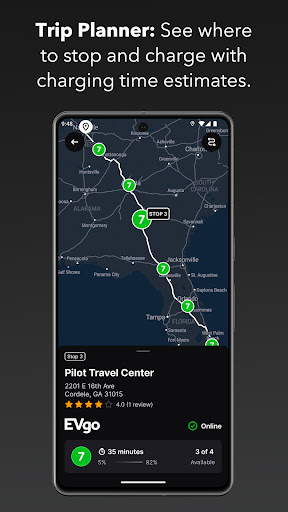
Trip Planner:
- Chargeway® detects the fastest route and charging station locations for your trip
- Set the outside temperature and your desired speed for more accurate planning
- Add in multiple stops between your starting point and destination for custom routes
- Charging times for every stop are estimated to help you plan your time better
- Select "All Stations" on planned trips to view every charging option along your route
- If a certain route doesn’t have enough stations Chargeway® will let you know so you can choose another route
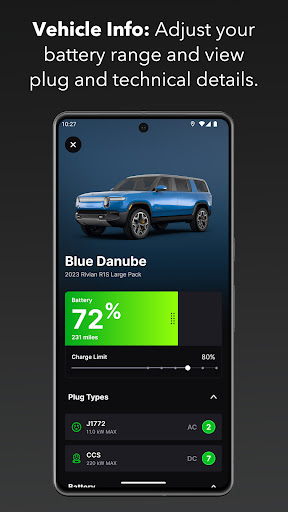
Vehicle Info:
- Click the vehicle image or name on the Stations screen to see more info
- Adjust your vehicles total range to more accurately plan trips and estimate charging times
- Technical specifications for each car listed under "More Info"
- Add more vehicles to your account by swiping all the way to the left
There are numerous electric cars available today that are perfect for every day driving as well as traveling. Download Chargeway® to discover how driving on “electric fuel” will work for you!
Privacy
Given Chargeway's lack of permissions, users can be reassured that their personal data and device information are not being collected or shared. However, users should still be cautious when using any location-based service, as their device's location data may still be inferred through other means. To minimize potential risks, users should only download Chargeway from trusted sources, such as the official Play Store.
Tips
To get the most out of Chargeway, users should first ensure their device's location services are enabled and up-to-date, allowing the app to provide accurate and relevant results. Additionally, users can optimize their experience by regularly updating the app to access new features and improvements, and by providing feedback to the developer through the official support channels. By doing so, users can help improve the app's overall performance and contribute to the growth of the EV charging community.
What's New
- Improved map behavior when viewing a place search result.
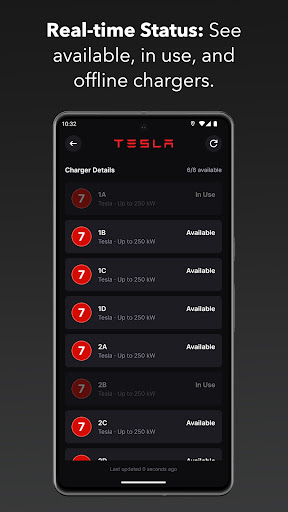
- Fixed bug where no status was shown instead of offline.
- Show the prompt to review us less frequently.
- Correctly handle when a user grants approximate location access only.
In-app purchases
$5.99 per item
Version Information
- Version
- 2025.50.1
- Downloads
- 10K+
- Updated on
- Dec 11, 2025
- Released
- Sep 14, 2018
- Requires
- Android 6.0
Statistics
Google Play Rating History
Rating Distribution
Downloads Over Time
Chargeway has been downloaded times. Over the past 30 days, it averaged downloads per day.
Shaded area shows 30-day prediction based on historical trends
Historical data collection started recently. More data points will be available over time.
Chargeway users say on Google Play
 Andrew Honeycutt
I really like the UI, how the types and charging powers of available stations are understandable at a glance, and the filters are nice and useful. But I'm reviewing because of the customer support. I first messaged to add a charger, but then also reported a bug, and got a proactive reply on both from a manager, taking my feedback seriously. I refined my report, and in a couple days they had published a patch to fix it, all while maintaining excellent communication. A+, folks!
 Joe Walz
I like what I see of the app. One improvement that would be nice is if you could set your choice for a route instead of the app picking the route. It would be better when you know where the chargers are at if you could pick your route based off of that information. Also let us add or delete charging stations to a route like Plug Share does.
 George Maestri
Not quite there yet, but a good start. I like the overall design. The range estimates by speed/temp were pretty accurate for my car (ID.4). Unfortunately, it doesn't seem to work with Android Auto and navigation does not flow through to Google Maps, making it hard to use on an actual road trip. On a few test routes, the app also had me charging to 100% at a number of stations. On my car, fast charging speed drops significantly over 80%, and the manufacturer advises against 100% fast charges. It would be nice if these factors were considered by the app or perhaps the user could set their own charging limits.
 Bob Whitmore
The bottom line is that if the developers are repeatedly having to explain the purpose of their app in the review section, then the app itself isn't doing that job. I am still very unclear as to why I need this app on my phone when Plug Share and ABRP do what this app does only better. And without demanding a phone number.
 Tamara Marble
The app won't allow you to do anything useful without an account, but it also wouldn't allow me to set up an account. The pop-up prompted me to enter a phone number to get started, but I couldn't enter one. There was no field for the number. "Continue" was grayed out. Only the "Skip" button would work. This app was unusable on my phone, and since it won't work with Android Auto anyway, I'll find something else.
ApkTrusted Ratings & Reviews
More from Chargeway Inc
See more apps

Similar Apps
Chargehub EV & Tesla Charging
Free

Autio - Travel Companion
Free

Cardata Mobile
Free
Rivercast - River Levels App
Free

Auto Agent
Free

Maintenance By EliseAI
Free

Advance Auto Parts + Tools/Acc
Free

JobNimbus: All-In-One Roof App
Free

ParkUsher: Find Parking Easily
Free

BassForecast: Fishing Forecast
Free

Elton - The EV charging app
Free
Mileage Tracker by MileageWise
Free
myBuick
Free

ParkWhiz -- Parking App
Free

MotorTrend
Free

Deep Dive - Bass Fishing App
Free
Scan this QR code to download

Forwarding you to the page at Google Play market in seconds...
Open Google Play market now