BedrockTogether v1.21.130
BedrockTogether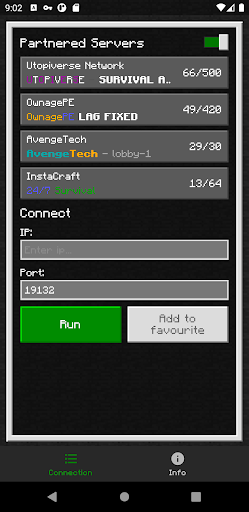
About this app
Developer Description
Bedrock Together: Join any bedrock server on Xbox/PS
Realms and compatibility with Nintendo Switch are currently not supported while using Bedrock Together.
How to connect:
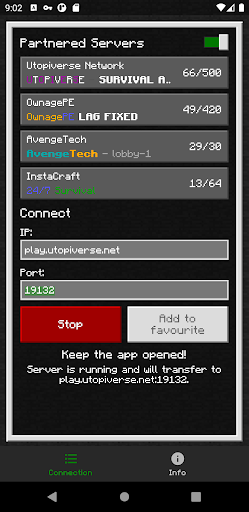
1. Enter your desired server IP and port.
2. Click the “Run” button.
3. Open game and navigate to the “Friends” tab.
4. Connect to the server using the LAN tab.
5. Close the Bedrock Together app after the client has joined the server.
Troubleshooting:
Make sure that
1. Your gaming console and mobile device are connected to the same LAN network.
If you find any bugs, join the discord to report them in the #bugs channel:
https://discord.gg/3NxZEt8 or telegram: t.me/extollite
The application icon made by nataliagemel.pl
Disclaimer: BedrockTogether is a third-party application. BedrockTogether is not an endorsed extension of or affiliated with Minecraft, its creators or proprietors, Mojang AB, Microsoft, Xbox, or Xbox Live in any way.
What's New
Version Information
- Version
- 1.21.130
- Downloads
- 1M+
- Updated on
- Dec 9, 2025
- Released
- Mar 11, 2022
- Requires
- Android 8.0
Statistics
Google Play Rating History
Rating Distribution
Downloads Over Time
BedrockTogether has been downloaded times. Over the past 30 days, it averaged downloads per day.
Shaded area shows 30-day prediction based on historical trends
Historical data collection started recently. More data points will be available over time.
BedrockTogether users say on Google Play
 Izak David Schlebusch
Very good app remember to make sure you follow instructions
 Trent Boyerd
I don't think I should watch an ad while loading in but at least I get to play
 Rob Fury
It works sometimes, many times it won't make the world for the server and also I can only do it at evenings seems like. I mean literally through the whole day I couldn't even connect to the server. please fix
 Maeson 4610
works well but it will sometimes.close and.i have to watch the ads again wich can get annoying 🙄
 Jenn O'D
Janky and Broken - Friend set up a server through this app. The ads were terrible but at least the service worked... until it didn't. Our server wouldn't load two days ago, customer service said it was broken and ALL backups were corrupt. MONTHS of progress with friends lost. Never using again. Realms is more expensive but it's at least reliable and not full of disgusting ads.
ApkTrusted Ratings & Reviews
More from BedrockTogether
See more apps
Scan this QR code to download

Forwarding you to the page at Google Play market in seconds...
Open Google Play market now