BedrockTogether (Pro) v1.21.130
BedrockTogether
About this app
Developer Description
Bedrock Together: Join any bedrock server on Xbox/PS
App allows any Bedrock Edition server to show up as a LAN server on Xbox or PlayStation clients running Minecraft Bedrock Edition and permits a simple connection without the use of DNS rerouting.
Realms and compatibility with Nintendo Switch are currently not supported while using Bedrock Together.
How to connect:
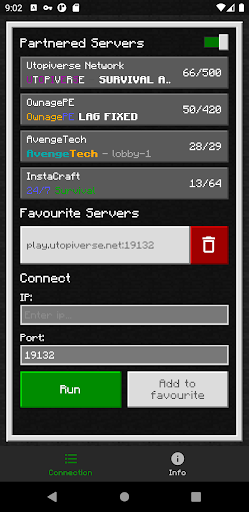
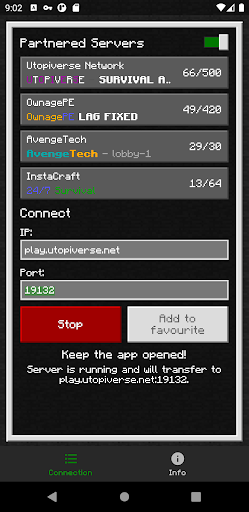
1. Enter your desired server IP and port.
2. Click the “Run” button.
3. Open game and navigate to the “Friends” tab.
4. Connect to the server using the LAN tab.
5. Close the BedrockTogether app after the client has joined the server.
Troubleshooting:
Make sure that
1. Your gaming console and mobile device are connected to the same LAN network.
If you find any bugs, join the discord to report them in the #bugs channel:
https://discord.gg/3NxZEt8 or telegram: t.me/extollite
The application icon made by nataliagemel.pl
Disclaimer: BedrockTogether is a third-party application. BedrockTogether is not an endorsed extension of or affiliated with Minecraft, its creators or proprietors, Mojang AB, Microsoft, Xbox, or Xbox Live in any way.
What's New
Version Information
- Version
- 1.21.130
- Downloads
- 5K+
- Updated on
- Dec 9, 2025
- Released
- Mar 13, 2022
- Requires
- Android 8.0
Statistics
Google Play Rating History
Rating Distribution
Downloads Over Time
BedrockTogether (Pro) has been downloaded times. Over the past 30 days, it averaged downloads per day.
Shaded area shows 30-day prediction based on historical trends
Historical data collection started recently. More data points will be available over time.
BedrockTogether (Pro) - Google Play Rankings
Top Rankings
| Rank | Country | Category | List | Change |
|---|---|---|---|---|
| — |
Ranking History in
No ranking data available yet. Rankings are updated daily.
#22 in Top Paid Tools in United States

#7 in Top Paid Tools in United Kingdom

#13 in Top Paid Tools in Australia
#14 in Top Paid Tools in Canada

BedrockTogether (Pro) users say on Google Play
 Daniel T
App works great! FYI to the dev, the About section has a bug, a duplicate line about lack of Nintendo Switch compatibility.
 the flamer gamer
Great but every so often it dosnt work no matter what u do some times it just dosnt show u I tried everything and its just not working today =(
 colx72
Used to let me in all the time, but now it'll show up maybe once in a blue moon. I use this for pokefind and for whatever reason it'll only connect to my system every once in a few days. I don't understand. I've deleted and reinstalled both applications and the main game itself. I've made sure the connection is on the same wifi and everything. I like the app and I like the content but it's damn near impossible to enjoy any of it if I cant access it.
 Kyle Roberts
I've been forced to reduce my rating for this app to 1 star. If I could I would rate it lower. Despite paying for this app, I am completely unable to connect to the server I play on, which is up to date. I would like my lonely back, although I doubt I'll ever see a penny of it
ApkTrusted Ratings & Reviews
More from BedrockTogether
See more apps
Similar Apps








Scan this QR code to download

Forwarding you to the page at Google Play market in seconds...
Open Google Play market now