
医療費 記録帳 医療費と通院費を管理するためのアプリ vVARY
メモ 記録 アプリ ダイエットや目標を記録 お買い物メモ







About this app
Developer Description
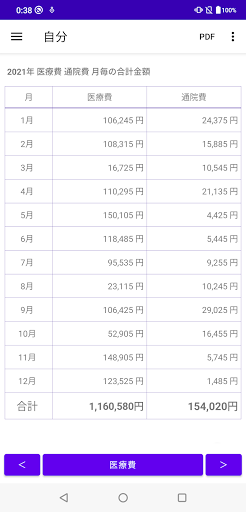
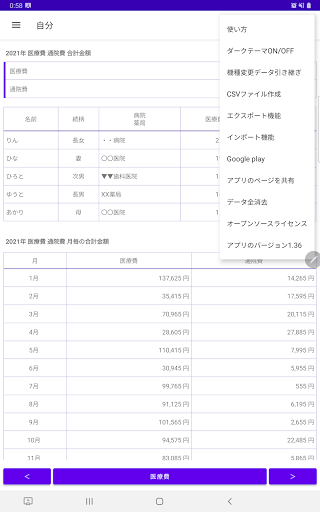
It is an application for recording medical expenses and hospital expenses. Displays a table for each "name and hospital/pharmacy", a table for each month, a graph of medical expenses, and a graph of outpatient expenses. Convert top screen to PDF file
You can check medical expenses and outpatient expenses in the table for each name.
You can check the total monthly medical expenses and the total outpatient expenses.
By checking the line graph and bar graph of the monthly medical expenses, you can understand how much medical expenses and outpatient expenses were incurred in which month.
▼ When recording medical expenses
1. Tap the "Medical Expenses" button.
2. Select "Date" and tap Next.
3. Enter "People who received medical care" and "Relationship" and tap OK.
4. Enter the name of the clinic, pharmacy, etc. and tap OK.
5. Enter "Medical expenses" and "Treatment details / medicines" and tap OK.
6. Enter "Outpatient Fee" and "Transportation" and tap OK.
* Tap "Outpatient fee 2" to record additional outpatient fee.
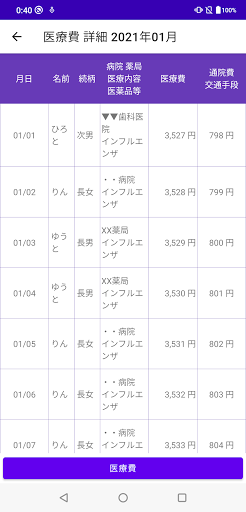
You can check the details of medical expenses by tapping the table.
・ When you press the "Medical Expenses" button at the bottom of the medical expenses details screen
The following items will be in the entered state, so you can save the trouble of inputting.
"People who received medical care"
"relationship"
"Names of clinics, pharmacies, etc."
▼ Model change data transfer procedure
Tap "Model change data transfer" in the menu to display the following selection screen.
-Create file (create backup file for model change)
-Restore (Restore data from backup file)
Step A. Steps to create a backup file
1. Tap "Model change data transfer" in the menu.
2. Tap Create File.
3. Tap "Create File" on the confirmation screen.
4. Tap "Select App" on the send screen.
5. Tap "Save to Drive".
* Internet connection is required to save to the drive.
Step B. Restore (Restore data from backup file in step A)
1. Install this app on your new smartphone / tablet from google play. Launch the app.
2. Tap "Model change data transfer" in the menu.
3. Tap Restore.
4. Tap the drive.
5. Tap My Drive.
6. From the list of files, tap the file you want to restore.
You can sort by "change date (newest first)" by tapping "Sort" from the menu on the upper right.
■ If the app does not open after changing models
Try steps 1-5 below on your new smartphone / tablet.
Step 1. Press and hold / long tap the blood pressure app icon.
Step 2. Tap the app information.
Step 3. Tap "Storage and cache".
Step 4. Tap "Erase Storage".
Step 5. Start the application and restore from "Model change data transfer"-> Restore-> File selection.
[Especially recommended for people like this! ]
Those who want to record medical expenses
Those who want to record medical and outpatient expenses
Those who want to check the total of medical expenses by "name, relationship, hospital or pharmacy name"
Those who want to check the total monthly medical expenses and the total outpatient expenses
Those who want to check medical expenses with a line graph
Those who want to check medical expenses with a bar graph
Those who want to check the hospital expenses with a line graph
Those who want to check the hospital expenses with a bar graph
Version Information
- Version
- -
- Downloads
- 10K+
- Updated on
- -
- Released
- Jan 17, 2026
- Requires
- Android Varies with device
Statistics
Google Play Rating History
Rating Distribution
Downloads Over Time
医療費 記録帳 医療費と通院費を管理するためのアプリ has been downloaded times. Over the past 30 days, it averaged downloads per day.
Shaded area shows 30-day prediction based on historical trends
Historical data collection started recently. More data points will be available over time.
ApkTrusted Ratings & Reviews
More from メモ 記録 アプリ ダイエットや目標を記録 お買い物メモ
See more apps


Scan this QR code to download

Forwarding you to the page at Google Play market in seconds...
Open Google Play market now