
健康診断 結果 記録 vVARY
メモ 記録 アプリ ダイエットや目標を記録 お買い物メモ






About this app
Developer Description
Record the results of health checkups and display the result values and graphs.
When you record your health checkup results, they are displayed in a graph.
You can check the health checkup results for each record on a line graph.
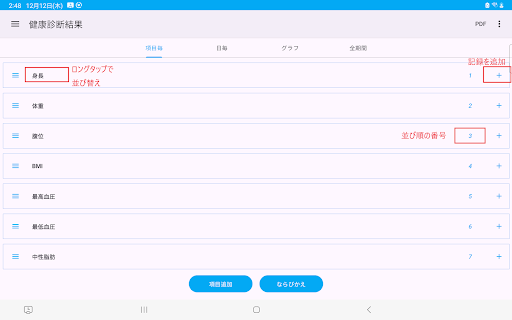
▼To record health checkup results on each item screen, follow the steps below:
1. Tap the + button on the right side of the item
2. Select the date of your health check and tap OK.
3. Enter the value of the health checkup result and tap OK.
4. Enter your note and tap OK
5. Confirm and tap Save
▼To record health checkup results on the daily screen/all-period screen, follow the steps below.
1. Tap the record button at the bottom
2. Tap the health check result item
Long tap/press to set the current date
3. Select the date of your health check and tap OK.
4. Enter the value of the health checkup result and tap OK.
5. Enter your note and tap OK
6. Confirm and tap Save
▼PDF file
Tap the PDF at the top
Create a PDF file from the displayed screen.
▼Medical checkup results (for each record)
Tap the graph at the top to display a line graph of the values of the health checkup results.
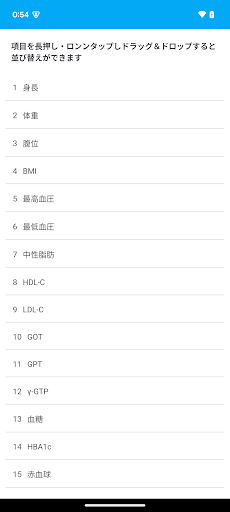
▼Change/delete/set item name
Tap each item at the top.
Tap the icon to the left of the item name to open the menu.
The menu has the following items:
・Change item name
・Move up
・Move down
・Item settings
·delete
The item settings include the following items.
・Entering numerical values
・Graph display
▼Model change data transfer
When you tap "Model change data transfer" in the menu, the following selection screen will be displayed.
・File creation (create a backup file for model change)
・Restore (Restore data from backup file)
Step A. Steps to create a backup file
1. Tap "Model change data transfer" in the menu.
2.Tap Create file.
3.Tap "Create file" on the confirmation screen.
4.Tap "Select app" on the sending screen.
5.Tap “Save to Drive”.
*Internet connection is required to save to Drive.
Step B. Restore (Restore data from the backup file in Step A)
1. Install this app from Google Play on your new smartphone/tablet. Launch the app.
2. Tap "Model change data transfer" in the menu.
3.Tap Restore.
4.Tap Drive.
5. Tap My Drive.
6. Tap the file you want to restore from the file list.
If you tap "Sort" from the top right menu, you can sort by "Modified date (newest first)".
Version Information
- Version
- -
- Downloads
- 1K+
- Updated on
- -
- Released
- Jan 18, 2026
- Requires
- Android Varies with device
Statistics
Google Play Rating History
Rating Distribution
Downloads Over Time
健康診断 結果 記録 has been downloaded times. Over the past 30 days, it averaged downloads per day.
Shaded area shows 30-day prediction based on historical trends
Historical data collection started recently. More data points will be available over time.
ApkTrusted Ratings & Reviews
More from メモ 記録 アプリ ダイエットや目標を記録 お買い物メモ
See more apps


Scan this QR code to download

Forwarding you to the page at Google Play market in seconds...
Open Google Play market now