
Clock Vault-Hide Photos,Videos v69.0
WS INFOTECH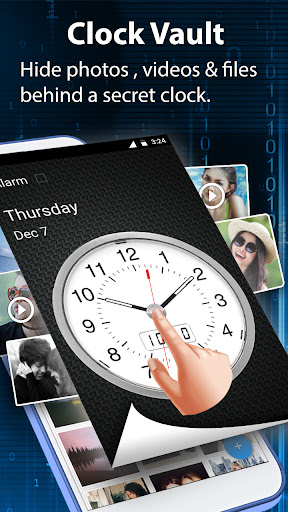

About this app
The Clock Vault-Hide Photos,Videos app solves the problem of securing private media and files on Android devices, benefiting individuals who value their privacy and security. Compared to alternatives in the Tools category, Clock Vault stands out with its high user rating and large download base, indicating a trustworthy and effective solution. However, its lack of permissions raises questions about its functionality and potential limitations. Overall, it's a solid choice for those seeking a private gallery and file locker, but users should be aware of its potential drawbacks.
Pros
- With over 10 million downloads and a 4.5-star rating, Clock Vault has demonstrated its effectiveness and reliability in hiding photos, videos, and files, making it a top choice for users seeking a private gallery and file locker.
- The app's simple and intuitive interface makes it easy for users of all skill levels to navigate and use, even for those who are not tech-savvy.
- The developer's active updates and responsive support, as indicated by the frequent version updates, ensure that the app stays secure and functional, addressing any issues that may arise.
- The in-app purchases offer additional features and functionality, allowing users to customize their experience and enhance their security, although the pricing may be a concern for some users.
Cons
- The app's monetization model, which includes ads and in-app purchases, may be aggressive and intrusive, potentially affecting the user experience and causing frustration.
- The lack of permissions requested by the app raises questions about its functionality and potential limitations, as it may not be able to access certain features or data necessary for its purpose.
- Some users may be concerned about the app's data collection and privacy implications, particularly given the sensitive nature of the media and files being hidden and locked.
- The app's compatibility with certain devices or Android versions may be limited, which could lead to performance issues or errors for some users.
Best for: The ideal user for Clock Vault is an individual who values their privacy and security, likely between the ages of 18 and 50, with a moderate to high level of technical skill, who needs to hide and lock sensitive media and files on their Android device, such as photos, videos, and documents, and is willing to pay for additional features and functionality to enhance their security.
Developer Description
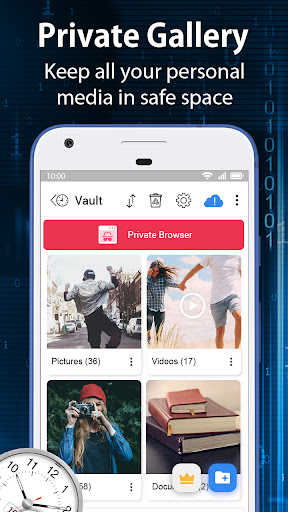
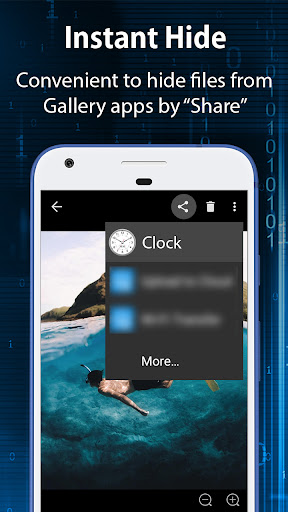
Private Gallery Clock lock app to hide photos, hide videos, Docs & files locker
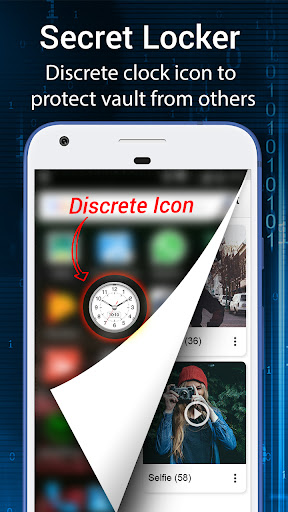
Photo video vault feature hidden behind Clock App for protecting your privacy by keep it safe behind your secret time password!
Secure the albums of the gallery to View, Import, Move & Restore the pictures, movies & documents.
Highlight Features:
• Hide Pictures: Easily hide photos from your gallery to the secret vault with gallery clock vault. Now it has photo crop and rotate features in personal Picture viewer within the hider app.
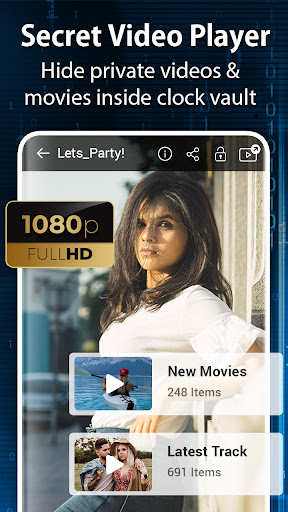
• Hide Videos: You can hide personal videos in many format movies. You can also play video using another video player app in your phone without unlock the file.
• Album Cover: You can set your desired folder cover inside your vault hidden albums. Also you can set album cover by picture view screen options.
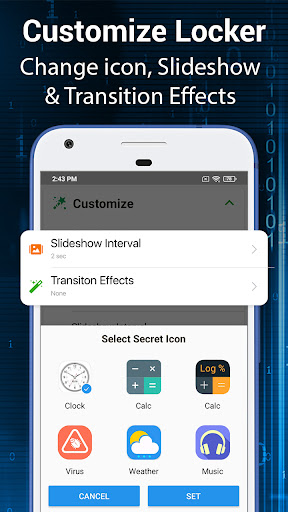
• Launcher Icon Change: Make your secret Clock Icon even more secret with other icons like Whether, Music, Calculator, etc.
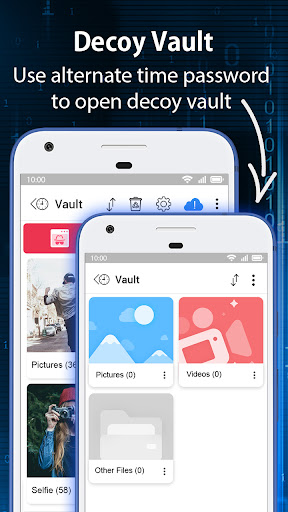
• Fake Password(Decoy Vault): Hide the files in the decoy vault when you input fake password to protect real gallery photo lock. It is alternate vault with another password when you need.
• Private Browser: Private web browser to download and Lock photos, hide videos and music audios from Internet & leaves no tracks in your system.
• Video Player: Super Inbuilt Video player to watch videos inside video Vault. Supports video locker with many formats.
• Fingerprint Unlock app: Vault security can be unlocked with fingerprint also with fingerprint supported and enabled devices with our settings.
• Cloud Backup:
Safeguard your important files by storing them in your personal online storage. This feature helps protect your files in case your phone is lost, broken, or stolen. You can easily download your vault files to a new device from the cloud.
Security Note: Your files are securely stored online and cannot be accessed outside of the app.
Important: Only files that were uploaded prior to losing access to your old phone will be available for download.
How to set up the password?
Step 1: Launch our gallery clock vault app and the clock hands will be moved at 00:00 position for setup.
Step 2: Move the hour or minute clock hand to set a desired time password and press the middle button of the clock.
Step 3: Now repeat the same password again and press the center button of the clock to confirm. The vault will be open!
How to unlock the app?
Step 1: Press Center button of the clock. Hands will be moved to the 00:00 positions.
Step 2: Now you can move the clock hour and minute hands manually to your password position and press Center button again to validate! That’s it! Now you can hide photos, videos & other secret files.
IMPORTANT: Do not uninstall this Video Vault before restoring your personal files to the public gallery. Any files not uploaded online will be permanently lost.
Question Answers
What can I do if I forgot my password of the secret vault?
- Launch Clock Vault and press middle button of the clock. Set 10:10 time by moving hour and minute clock hands and press middle button again. It will show password recovery options.
Are my hidden files stored online?
Your hidden files are stored locally on your device by default. They are only stored online if you have enabled the Cloud Backup feature and manually uploaded them.
Important: Before transferring to a new device, performing a factory reset, or uninstalling the app, make sure to unlock and back up all hidden files. Any files not uploaded or restored may be permanently lost.
Contact our developer team for any help you need.
Privacy
Given the app's lack of permissions, users should be cautious about the potential risks of data collection and ensure that they understand the app's terms and conditions before using it. To minimize risks, users should also use strong passwords and keep their device and app up to date, and consider using additional security measures such as two-factor authentication.
Tips
To get the most out of Clock Vault, users should first set up a strong password and familiarize themselves with the app's interface and features. Additionally, users can optimize performance by closing unnecessary apps and clearing cache regularly, and consider using the app's in-app purchases to enhance their security and functionality.
In-app purchases
$5.49 - $33.99 per item
Version Information
- Version
- 69.0
- Downloads
- 10M+
- Updated on
- Nov 20, 2025
- Released
- Jan 10, 2018
- Requires
- Android 7.0
Statistics
Google Play Rating History
Rating Distribution
Downloads Over Time
Clock Vault-Hide Photos,Videos has been downloaded times. Over the past 30 days, it averaged downloads per day.
Shaded area shows 30-day prediction based on historical trends
Historical data collection started recently. More data points will be available over time.
Clock Vault-Hide Photos,Videos - Google Play Rankings
Top Rankings
| Rank | Country | Category | List | Change |
|---|---|---|---|---|
| — |
Ranking History in
No ranking data available yet. Rankings are updated daily.
#54 in Top Free Tools in Pakistan
 Venture VPN - Secure Proxy VPN
Clock Vault-Hide Photos,Videos
Venture VPN - Secure Proxy VPN
Clock Vault-Hide Photos,Videos
 Snaptub-è Video Downloader
Clock Vault-Hide Photos,Videos users say on Google Play
 Arizona Coleman
So far, it is working, & it is much easier to use than the last one. Should anything change, this review shall be updated to reflect that change.
 Richard Matope
good
 Ehwarieme Blessing
The app makes sense.. but there's something missing... Anytime I loose my phone, I loose the files in the app permanently... There should be a way to get those videos and pictures back. I'll complete the stars when this is done...
 MUAWIA MANSHA
add more nowels
 Pintu Sagar
Best
ApkTrusted Ratings & Reviews
Similar Apps
Calculator Lock - Hide Photos
Free
Calculator - Hide Photo, Video
Free
Calculator - Hide apps, Photo
Free
Photo Lock App - Hide Pictures
Free

App Locker - Lock App
Free

LOCKit: App Lock, Photos Vault
Free

Photo Lock: Hide Videos, Pics
Free
AppLock
Free

AppLock - Fingerprint
Free

Calculator Lock - Hide Photo
Free
AppLock Master
Free

Private Photo Vault - Keepsafe
Free
LockMyPix Safe Photo Vault
Free

Gallery - Album, Photo Vault
Free
My Folder : Safe Secure Hidden
Free

Hide Photo Vault &Videos
Free
Scan this QR code to download

Forwarding you to the page at Google Play market in seconds...
Open Google Play market now