PolarAligner Pro (Astro Tool) v8.3
Kechkoindustries


About this app
Developer Description
The Polar-Aligner is a great tool to align your equatorial telescope mount
Unfortunately, the app keeps getting bad reviews because the compass or spirit level doesn't work. This is then because the device does not have a compass sensor or a tilt sensor. An understanding from the buyer is very rare. A refund is of course possible. So please convince yourself before buying whether your device has the following sensors.
-Compass sensor
-Tilt sensor
-GPS
manual:
https://www.kechkoindustries.de/polaraligner-pro
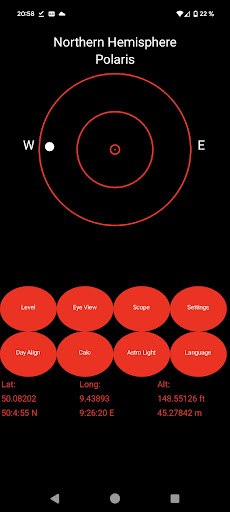
The Polar-Aligner is a simple astronomical application for the northern and southern hemisphere to help you to align your mount easily. It includes basic tools for leveling your equatorial mount (spirit level) and to adjust it to north (compass).
Choose the Settings for the conpass.
-magnetic North
-manual declination for True North
-automatic declination for True North (offline calculation, no Internet needed)
You can calibrate your spirit level with a real spiritlevel and have the highest accuracy for a smartphone.
The daylight alignment is included for north and south hemisphere.
The GPS gives you the most accurate information about your location with the altitude and calculate the position of Polaris and show you graphically the Polaris position, the Hourangle, exact location ....
You get also information about Drift-Alignment. The tool helps you to get the right direction for the alignment. With the calculator, you can get the calculated result to align your mount with a small error.
There are many Polarscopes for:
IOptron
Meade
Orion
Sky Adventurer
Skywatcher
Astrophysics
Takahashi
Bresser
Vixen
Celestron
If you miss a scope, write us!
What's New
Version Information
- Version
- 8.3
- Downloads
- 10K+
- Updated on
- Nov 1, 2025
- Released
- May 16, 2017
- Requires
- Android 4.0
Statistics
Google Play Rating History
Rating Distribution
Downloads Over Time
PolarAligner Pro (Astro Tool) has been downloaded times. Over the past 30 days, it averaged downloads per day.
Shaded area shows 30-day prediction based on historical trends
Historical data collection started recently. More data points will be available over time.
PolarAligner Pro (Astro Tool) - Google Play Rankings
Top Rankings
| Rank | Country | Category | List | Change |
|---|---|---|---|---|
| — |
Ranking History in
No ranking data available yet. Rankings are updated daily.
#14 in Top Paid Tools in Australia

#18 in Top Paid Tools in Spain

#27 in Top Paid Tools in Germany
 PDF editor & PDF converter pro
PolarAligner Pro (Astro Tool)
PDF editor & PDF converter pro
PolarAligner Pro (Astro Tool)
 1DM+: Browser & Video Download
#32 in Top Paid Tools in France
 Trazado tubería El Tubero 2.0
PolarAligner Pro (Astro Tool)
Trazado tubería El Tubero 2.0
PolarAligner Pro (Astro Tool)
 Central for DayZ - Pro Unlock
PolarAligner Pro (Astro Tool) users say on Google Play
 Karl Moretz
I don't have a clear view of Polaris from my house, and using the beta feature dayalign seems to work really well. Using it, I can easily get tracked exposures of a minute without star trails. About as good as I could ask for without an actual polar alignment. The other features work well, pretty much all you should need to achieve alignment. One small gripe would be that the UI is not the slickest, but it does what it advertises well. Checked against an actual compass and it was spot on.
 Adam Reason
All in one except for compass/GPS reliance. This app is great when used for setting up astrophotography tripod. I only have two issues. 1. The compass is just useless. 2. I wish this didnt rely only on GPS for finding latitude. Would love to have a built in inclometer. Frustrating to be at a dark sky site and no signal which makes this app a glorified level.
 Mark Hanley
Had trouble with Bresser view. Now fixed. Thanks
 A Google user
This is a much poorer version than the IOS equivalent. The compass is effectively useless continually oscillating often by 4 or 5 degrees.Most of the other functions suffer the same instability. Not an app you should pay money for. It needs a lot of work to make it practical.
 Jim Buckman
I am using this app on a Samsung Galaxy S20 Ultra. The S20 has a built in compass that is very accurate. I also have a Garmin GPS digital compass that points to exactly the same north that the compass built into my phone does. This app's compass is at least 15° off and is obviously not accessing the built in compass on my phone. How about either fixing your app and add in all the neat stuff found in the iPhone version. Very very disappointed.
ApkTrusted Ratings & Reviews
More from Kechkoindustries
See more apps

Similar Apps






Scan this QR code to download

Forwarding you to the page at Google Play market in seconds...
Open Google Play market now