
Meteo Weather Widget - Donate v2.9.0-c20251012_155126
Benny Wydooghe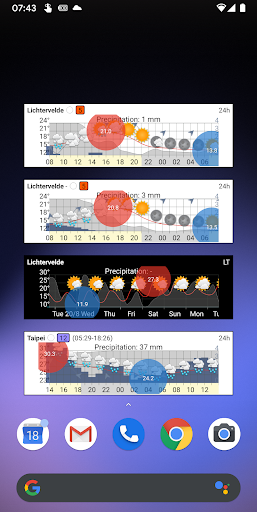



About this app
Developer Description
A detailed weather forecast at a glance on your home screen
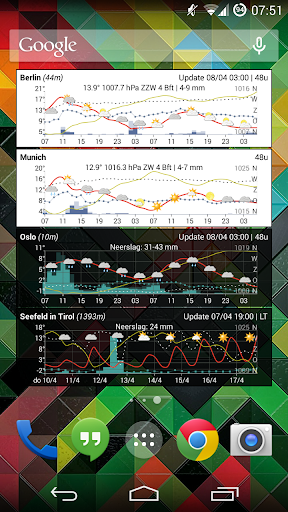
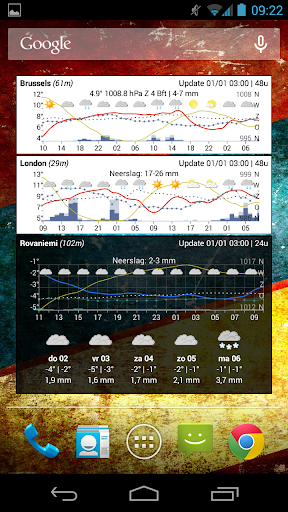
The main focus of the app consists in showing the meteogram on a small home screen widget (e.g. a 4X1 widget). Even while the widget does not occupy that much space on the home screen, it still manages showing the forecast in a clear way. Simply add a widget on your home screen, specify your location (or let the widget automatically determine your location) and the weather forecast appears on your home screen.
The meteogram shows the temperature and expected precipitation for the complete forecast period. Besides those weather elements, the wind speed, wind direction and air pressure can also be visualized on the meteogram. The user has all freedom to customize how the meteogram should look like.
Feature overview:
• Temperature, precipitation, wind and pressure
• Cloudiness / clearness indication
• Short-term forecast (next 24 or 48 hours)
• Short-term forecast for the next 5 days
• Lots of user settings: colors, weather elements, ...
Features exclusively available in this Donate version:
• Widget providing a long-term forecast (next 10 days)
• Show humidity percentage
• Show sunrise and sunset
• Show wind vane for wind direction
• Better (temperature) graph visualization (f.e. color the graph in blue when the temperature falls below freezing, custom line thickness and style, ...)
• Show moon phase
• Show wind chill
• Feature allowing you to save current settings as default settings
• Enable more weather providers (via in-app subscription)
• For the United States only: NOAA as weather provider
About the weather forecast data
All thanks to MET.NO (The Norwegian Meteorological Institute) for offering the weather forecast data (notice that for the long-term forecast period, one of the best weather models - ECMWF - is used by MET.NO).
For locations in the United States, NOAA is offered as short term weather provider.
NOTE: other weather providers can be enabled via in-app subscription.
And finally ...
• Contact me if you have suggestions, remarks, issues... (info@meteogramwidget.com).
• The app is optimized for use on smartphones.
What's New
In-app purchases
$0.99 - $1.84 per item
Version Information
- Version
- 2.9.0-c20251012_155126
- Downloads
- 10K+
- Updated on
- Oct 14, 2025
- Released
- Oct 14, 2013
- Requires
- Android 6.0
Statistics
Google Play Rating History
Rating Distribution
Downloads Over Time
Meteo Weather Widget - Donate has been downloaded times. Over the past 30 days, it averaged downloads per day.
Shaded area shows 30-day prediction based on historical trends
Historical data collection started recently. More data points will be available over time.
Meteo Weather Widget - Donate - Google Play Rankings
Top Rankings
| Rank | Country | Category | List | Change |
|---|---|---|---|---|
| — |
Ranking History in
No ranking data available yet. Rankings are updated daily.
#31 in Top Paid Weather in Pakistan

#31 in Top Paid Weather in Saudi Arabia
#31 in Top Paid Weather in Argentina
#31 in Top Paid Weather in Thailand
Meteo Weather Widget - Donate users say on Google Play
 Nick Legge
I used to have the AIX weather widget for years and loved it, but after Android Pie it just wouldn't work all the time, which was really frustrating. One of the very few apps that I have been happy to pay for. Well done. UPDATE, hi Benny, I cannot get the widget to update on a Poco X7 Pro. running android 15 . Any ideas?
 Peter Wong
I've been missing my quick weather forecast ever since wunderground updated and killed all their good widgets. this one is an almost perfect replacement. I'd give another star if it would show chance of precipitation instead of just the amount of precipitation. otherwise it's actually much better. maybe another plus would be to use wunderground as an optional source as well.
 Randal A
Only a 2-day maximum forecast? No thanks. Uninstalling.
 John
John
I wish it could present the Day/Night as background shading (like AIX Weather) rather than just indicated at the bottom axis.
 A Google user
Confusing GUI, no clock in Widget. Settings back arrow on top left not working. Setting unit: "Celcius/Fahrenheit" followed by a check box. What is the unit enabled? Messy widget showing several lines, no labels to indicate the meaning of each line.
ApkTrusted Ratings & Reviews
More from Benny Wydooghe
See more apps
Similar Apps
NOAA Weather Unofficial (Pro)
Paid
St. Cloud Live StormTRACKER
Free
Weather Forecast Accurate Info
Paid

WeatherX Forecast
Free

FOX10 Weather Mobile Alabama
Free
Windfinder Pro: Wind & Weather
Paid
Weather Live
Paid
Weather data & microclimate :
Free

Local 10 - WPLG Miami
Free

Today Weather:Data by NOAA/NWS
Free

Weather & Radar USA - Pro
Paid
Weather Forecast & Widget
Free

FOX Weather: Daily Forecasts
Free

ATMOS : Online dive logbook
Free
Weather for Wear OS
Free
Rivercast - River Levels App
Free
Scan this QR code to download

Forwarding you to the page at Google Play market in seconds...
Open Google Play market now