Cast to Chromecast, Roku, & TV v2.1.9
EAGLE APPS


About this app
Developer Description
Easily cast Images & Videos to Chromecast, Roku or smart TVs.
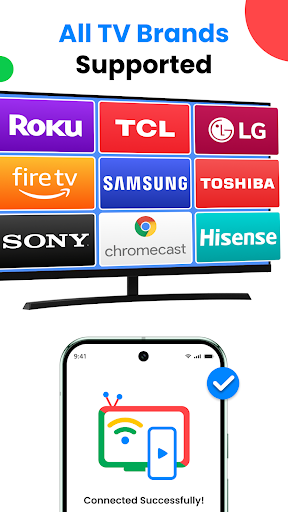
With Cast to Chromecast, Roku, & TV, you can easily connect phone to TV and start sharing your screen in real-time. Whether it’s for entertainment, work presentations, or fitness sessions, this app makes Cast to TV simple, fast, and reliable.
Key Features of TV Cast for Chromecast and Roku
High-Quality Screen Casting
Cast your entire phone screen to your TV in real time with smooth, lag-free performance, ensuring a stable connection with Miracast TV
Screen Mirroring to TV
Enjoy lag-free screen share to TV using this Screen Mirroring App with your TV’s built-in wireless display. Whether you’re gaming or streaming, you’ll experience a fast and clear connection-no cables required
Photos & Videos on the Big Screen
Easily connect to TV to view your favorite photos and videos. Turn moments into stunning slideshows or stream clips in real time using Connect to TV app
Remote Control for Chromecast, Roku & Fire TV
Use your phone as a Chromecast remote with advanced controls. The built-in Remote for Chromecast lets you play, pause, adjust volume, or switch content effortlessly - with the option to customize your remote’s theme
Quick & Easy Miracast TV Setup
⁕ Using Cast to TV - Screen casting is super simple:
⁕ Make sure your phone and TV are connected to the same Wi-Fi network.
⁕ Enable Miracast on your TV.
⁕ Open the TV Cast to Chromecast app, and connect phone to TV within seconds.
⁕ For best results, keep wireless display turned on and ensure both devices are properly paired.
Free vs Premium - Compare Screen Share with TV Features
Free Version:
⁕ Basic TV screen mirroring
⁕ Cast local media (Photos, videos, audios and docs etc.)
Premium Version (VIP):
⁕ Unlimited web streams
⁕ Ad-free experience
⁕ Unlock all paid features
⁕ Block IP address feature
⁕ Priority support
Start Casting Today!
Download Cast to TV now and enjoy seamless screen mirroring and screen casting on your smart TV. Experience a whole new way to watch, play, and share on the big screen
DISCLAIMER: Cast to Chromecast, Roku, & TV is an independent app designed for easy streaming. This Miracast TV app and Cast to Roku solution is not made by or affiliated with Google, Roku, Amazon, or any other TV brand.
Need help? Contact us at globaleagleapps@gmail.com.
What's New
Thanks for using Screen Cast! Here’s what’s new in this update:
✨ Refreshed splash screen with smoother animations
🧩 Cleaner experience with unnecessary popups & premium screens removed
🎨 UI updated for a simpler, modern look
⚡ Improved app performance & stability with crash fixes
📺 More stable casting experience
In-app purchases
$9.99 - $34.99 per item
Version Information
- Version
- 2.1.9
- Downloads
- 100K+
- Updated on
- Jan 6, 2026
- Released
- Apr 16, 2024
- Requires
- Android 7.0
Statistics
Google Play Rating History
Rating Distribution
Downloads Over Time
Cast to Chromecast, Roku, & TV has been downloaded times. Over the past 30 days, it averaged downloads per day.
Shaded area shows 30-day prediction based on historical trends
Historical data collection started recently. More data points will be available over time.
Cast to Chromecast, Roku, & TV users say on Google Play
 Kanishk Op
Op
 Usman Saeed
Too many ads not even allowing user to explore anything
ApkTrusted Ratings & Reviews
More from EAGLE APPS
See more apps
Live Wallpapers 4K, HD, 3D
Free
Caller Name Announcer - SMS
Free
Animal sounds & wallpaper
Free

PhotoFixer - AI Photo Enhancer
Free

PDF Reader, Editor & Scanner
Free

Find My Phone Anti Theft Alarm
Free

Play Song Offline Music Player
Free
Voice Changer & Sound Effects
Free

Universal TV Remote | All TVs
Free

Battery Charging Animation
Free

PDF Document Reader & Editor
Free
Edge Lighting - Border Colors
Free
Image to PDF Converter App
Free

Auto Clicker & Auto Tapper
Free
Similar Apps






Scan this QR code to download

Forwarding you to the page at Google Play market in seconds...
Open Google Play market now