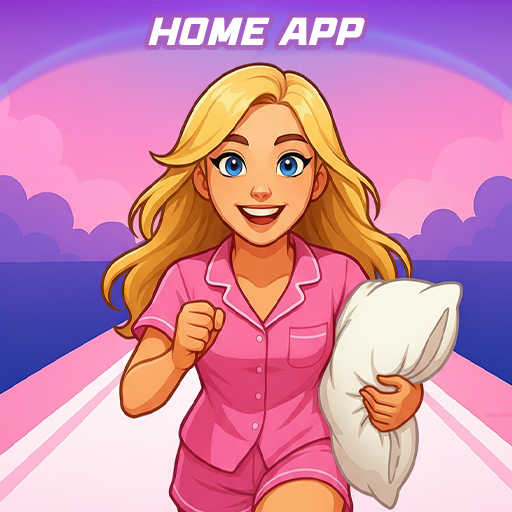
Pillow Chase Home App v1.4
Hadiz Studio


About this app
Developer Description
Download Pillow Chase: Home App now and turn every run into an adventure!
This launcher app lets you create a home screen that feels completely your own for a personal touch. You can fully customize the home screen layout, create folders, and choose colors. With a fresh style, it’s a launcher that keeps things exciting from the moment you start using it.
You can pick this app as the default choice via the "Default home app" setting to use this as your day-to-day launcher. You can switch back to your previous launcher anytime you choose.
⚡ Jump into the Pillow Chase Game! ⚡
Run, dodge, and race your way to sweet dreams in Pillow Chase! Collect pillows, leap over alarm clocks, and avoid coffee cups that slow you down. It’s fast, funny, and full of surprises, the perfect game for quick breaks and endless fun.
Open via the game icon on your home screen.
🌙 Pillow Chase Home App Features: 🌙
The features listed below are available via your home screen. Long-press an empty area on your home screen to open the pop-up menu.
✅ Game Style Wallpapers – Add unique wallpapers inspired by the Pillow Chase game.
Long-press on home screen -> click "Game Style Wallpapers".
✅ Custom Icon Shape – Personalize your device with fun icon shapes and custom icon looks.
Long-press on home screen -> click "Custom Icon Shape".
✅ Custom Gestures – Swipe or tap to quickly open an app, settings or app drawer.
Long-press on home screen -> click "Home settings" -> Gestures.
✅ Hide Apps – Keep your private apps invisible while staying fully in control.
Long-press on home screen -> click "Home settings" -> "App drawer" -> "Hidden apps".
✅ Accent Color – Customize your home app colors. Use presets or create your own device style.
Long-press on home screen -> click "Home settings" -> General -> "Accent color".
Note: When using this home app, your home screen’s layout may be changed. You can customize the layout as you wish. Your previous home’s layout is not affected once you switch back.
What's New
> Added minor fixes for functionality
> Addressed stability issues in some scenarios
Version Information
- Version
- 1.4
- Downloads
- 5M+
- Updated on
- Dec 16, 2025
- Released
- Sep 10, 2025
- Requires
- Android 8.0
Statistics
Google Play Rating History
Rating Distribution
Downloads Over Time
Pillow Chase Home App has been downloaded times. Over the past 30 days, it averaged downloads per day.
Shaded area shows 30-day prediction based on historical trends
Historical data collection started recently. More data points will be available over time.
Pillow Chase Home App - Google Play Rankings
Top Rankings
| Rank | Country | Category | List | Change |
|---|---|---|---|---|
| — |
Ranking History in
No ranking data available yet. Rankings are updated daily.
#10 in Top Free Personalization in United States


#1 in Top Free Personalization in Mexico


#2 in Top Free Personalization in Egypt

#2 in Top Free Personalization in Brazil


Pillow Chase Home App users say on Google Play
 Bronique Van wyk
it is really relaxing love it!!!
 c00lkidd k1ng
I don't like how you have to make the settings home app but it's still a really good app
 new life6242
I am just doing this just to get the annoying ad of this out.
 Merveille Umunyurwa
It's good but the amount of ads is crazy🤪😍 they need to change it
 Misyel Martin
Something happened to my home screen and now I can't get my old home screen back, dont install this app, I think it has virus bro, I'm so upset about it.
ApkTrusted Ratings & Reviews
More from Hadiz Studio
See more apps


Similar Apps

ZEPETO: Avatar, Connect & Live
Free
SUPER PADS DJ: Music & Beats
Free
Magic Wallpaper: Magic Fluid
Free

Piano - Play Unlimited songs
Free

Super Slime Simulator: DIY Art
Free
No.Pix Color by Number & Pixel
Free
InColor: Coloring & Drawing
Free

Butterfly Draw Step by Step
Free
Weight Loss for Women: Workout
Free
Addons for Minecraft Mods
Free

Airbrush: Face & Photo Editor
Free

Goal Planner Mini
Paid

ARLOOPA: AR Camera 3D Scanner
Free
Women Workout: Lose Belly Fat
Free
Drum Pad Machine - beat maker
Free
Colorfy: Coloring Book Games
Free
Scan this QR code to download

Forwarding you to the page at Google Play market in seconds...
Open Google Play market now