
Airbrush: Face & Photo Editor v7.23.2
PIXOCIAL TECHNOLOGY (SINGAPORE) PTE. LTD.





About this app
The Airbrush: Face & Photo Editor app solves the problem of quick and easy photo editing for individuals looking to enhance their portraits, making it an ideal solution for social media enthusiasts and those who want professional-looking photos without extensive editing knowledge. It benefits most those who frequently take selfies or post photos online, as it offers a user-friendly interface for making cosmetic adjustments. Compared to alternatives in the Photography category, Airbrush stands out with its broad range of editing tools specifically tailored for facial and body adjustments. However, its effectiveness can be somewhat marred by the presence of ads and in-app purchases, which may detract from the overall user experience.
Pros
- With over 50 million downloads and a 4.0-star rating, Airbrush demonstrates high social proof and a well-received user experience, indicating a robust and reliable application.
- The app's extensive feature set for facial and body editing, including teeth whitening, skin smoothing, and body reshaping, provides users with comprehensive tools for enhancing their photos.
- The developer, PIXOCIAL TECHNOLOGY, maintains a professional website and provides support email, suggesting a commitment to user support and potential for future updates and improvements.
- Airbrush operates with zero permissions, which is a significant advantage in terms of privacy and security, as users do not have to worry about their data being accessed or shared without their consent.
- The app's offline capability allows users to edit photos anywhere, making it convenient for those who may not always have internet access.
Cons
- The presence of ads can be intrusive and detract from the user experience, especially for those looking for a seamless editing process without interruptions.
- The in-app purchases, with prices ranging from $0.49 to $89.99, may be seen as aggressive monetization, potentially leading to a paywall for full functionality, which could be a deterrent for some users.
- Some users may find the interface and features overwhelming, particularly those who are not familiar with photo editing software, which could lead to a steeper learning curve.
- The lack of transparency about what data is collected, despite the app requiring no permissions, raises questions about the app's privacy policy and how user data is handled.
Best for: The ideal user for Airbrush: Face & Photo Editor is likely a tech-savvy individual between the ages of 16 and 35 who frequently uses social media platforms and values having professional-looking profile pictures and posts, but may not have extensive experience with complex photo editing software, thus benefiting from the app's user-friendly interface and broad range of automatic editing features.
Developer Description
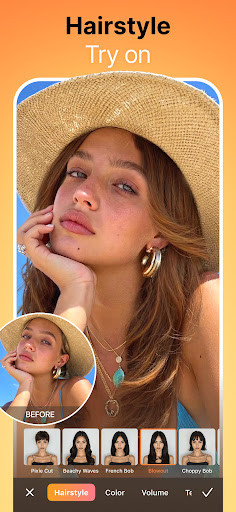
Change hairstyle, whiten teeth, smooth skin, reshape body & erase acne
✨ EXCELLENCE IN EVERY SHOT
✔ AI Retouch – Upgrade your portraits with AI precision automatically, refining every detail to perfection.
✔ Teeth Whitening – Brighten your smile instantly.
✔ Blemish Removal – Instantly erases acne & imperfections for flawless skin.
✔ Smooth – Soften wrinkles and even out skin tones for a youthful glow.
✔ Highlighter – Accentuate your best features with added texture & glow.
✔ Reshape – Fine-tune your face & body proportions effortlessly.
✔ Contouring – Enhance your facial contours to always look your best.
✔ Eye Enhancer – Fix red-eye, remove under-eye shadows, or change eye color.
✔ Virtual Makeup – Apply AI-powered makeup for a polished look.
✔ Hairstyling – Discover fresh hair colors & trendy hair styles — from bold highlights to soft waves in Airbrush.
🎨 SPARK YOUR IMAGINATION
- Background Editing – Blur, replace, or enhance your background with ease.
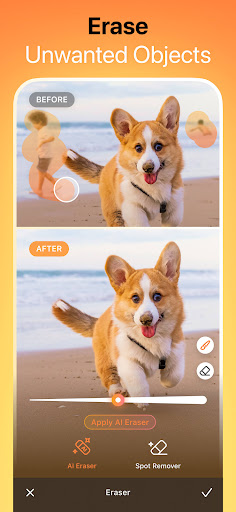
- AI Eraser – Remove unwanted objects in seconds.
- AI Enhancer – Adjust brightness, saturation, & temperature automatically.
- Filters & Effects – Transform your photos with stunning filters & artistic effects.
- AI Repair – Restores low-quality images and brings every detail back to life.
📹 VIDEO SELFIES REIMAGINED
- Face Retouch – Apply real-time beautification to your videos.
- Object Removal – Remove distractions from your scenes.
- Quality Enhancement – Boost video clarity for a crisp & cinematic look.
😊 ENJOYMENT WITH AI
- Pro Headshots – Generate studio-quality headshots instantly.
- Mood Swapper – Change expressions with AI-powered mood adjustments.
- Style Explorer – See yourself in different styles & artistic portraits.
Unlock Your Full Creative Power
✨ 300+ exclusive presets & makeup looks
🎨 400+ filters and stunning effects
🎭 Unlimited access to all stylized tools
🔓 100+ premium-only features & retouch options
📷 Join millions of users who trust Airbrush to edit their photos & videos with ease! Whether you're making a quick touch-up or a full makeover, Airbrush gives you the best result.
📥 Download Airbrush now & start creating stunning selfies & videos today!
📌 DISCOVER EDITING TIPS ON SOCIAL MEDIA!
Instagram: instagram.com/airbrushOfficial
TikTok: tiktok.com/@airbrushofficial
Facebook: facebook.com/airbrushappofficial
Twitter: twitter.com/airbrushApp
📜 Terms of Service: Airbrush.com/legal/terms-of-service
🔒 Privacy Policy: Airbrush.com/legal/privacy-policy
Privacy
Given that Airbrush requires zero permissions, the risk of data leakage or unauthorized access is significantly reduced. However, users should still be cautious about the information they share through the app, especially if they decide to share their edited photos on social media platforms. It's also advisable to review the app's privacy policy to understand how any collected data might be used.
Tips
For first-time users, it's beneficial to explore the app's tutorial or guide to understand the full range of editing tools available. To optimize performance, closing other resource-intensive apps while using Airbrush can help prevent lag or crashes. Additionally, saving edited photos in a dedicated folder can help keep them organized and easily accessible for future reference or sharing.
What's New
Happy creating!
In-app purchases
$0.49 - $89.99 per item
Version Information
- Version
- 7.23.2
- Downloads
- 50M+
- Updated on
- Dec 29, 2025
- Released
- Oct 23, 2015
- Requires
- Android 8.0
Statistics
Google Play Rating History
Rating Distribution
Downloads Over Time
Airbrush: Face & Photo Editor has been downloaded times. Over the past 30 days, it averaged downloads per day.
Shaded area shows 30-day prediction based on historical trends
Historical data collection started recently. More data points will be available over time.
Airbrush: Face & Photo Editor - Google Play Rankings
Top Rankings
| Rank | Country | Category | List | Change |
|---|---|---|---|---|
| — |
Ranking History in
No ranking data available yet. Rankings are updated daily.
#19 in Top Grossing Photography in United States
 Hailuo AI: AI Video Generator
Airbrush: Face & Photo Editor
Hailuo AI: AI Video Generator
Airbrush: Face & Photo Editor
 AI Photo Generator, Enhancer
#2 in Top Free Photography in Brazil

#2 in Top Grossing Photography in Brazil
#8 in Top Grossing Photography in United Kingdom


Airbrush: Face & Photo Editor users say on Google Play
 Darin D
This has always been my favorite app for editing. It does so much more than any other for the price. Best thing about it is once you get the paid version that's it. There's no buying additional credits to make AI changes that they've incorporated or anything. Sooo much better than other apps where you have to purchase the "pro" membership just to use their tools and then purchase credits to use the tools on top of that.
 Jaime Patten
Its a great app, plenty of free options. Been using it for a long time, am looking to upgrade to the paid version.
 Gary Bond
I really like the app but there's just one thing that I find really disappointing. Airbrush have a facility that enables you to upscale photos to improve the quality of them. What's annoying though is the upscale facility is not available in the app! It's only available on the online version of Airbrush and even though I have a full subscription to Airbrush the web upscale facility only allows you to do 3 upscales every 24 hours. This is poor considering that I have a full subscription.
 Kyle Horton
app has been great- I've subscribed to premium for over 3 years. however, now theres a "pro limit" of 5 (outdated) AI avatar generations? pro limit? no. thats why people pay for pro tier. FIVE generations, including failures. I had 4 failures today that all counted towards the "pro limit."
 Tee Nanu Concept
NOTICE: There's an issue with the wrinkles and spot removal tool, the more one apply them now, the more the overall photo one is working on becomes darker and blurry, which makes the image un-useable. aside that that app is amazing.
ApkTrusted Ratings & Reviews
More from PIXOCIAL TECHNOLOGY (SINGAPORE) PTE. LTD.
See more apps



Similar Apps
FaceApp: Perfect Face Editor
Free

Retake AI: Face & Photo Editor
Free
Facetune: Hair, Photo Editor
Free
Hypic - Photo Editor & AI Art
Free

EPIK - AI Photo & Video Editor
Free
PhotoApp - AI Photo Enhancer
Free

Lightroom Photo & Video Editor
Free
Peachy: Face App & Body Editor
Free
Photo Retouch- Object Removal
Free

Remove Objects - Photo Editor
Free

PrettyUp - Video Body Editor
Free

Wink: Video Enhancer & Editor
Free

PhotoBoost - AI Photo Enhancer
Free
FaceLab: Future Face Aging App
Free

AI Photo Editor - Lumii
Free

Persona: AI Beauty Editor
Free
Scan this QR code to download

Forwarding you to the page at Google Play market in seconds...
Open Google Play market now