
Lightroom Photo & Video Editor vVARY
Adobe







About this app
The Lightroom Photo & Video Editor app solves the problem of editing photos and videos on-the-go by providing a powerful and user-friendly interface, making it ideal for professional photographers and enthusiasts alike. With its excellent rating and high download numbers, it stands out in the Photography category as a top-tier app. Compared to alternatives, Lightroom's seamless integration with Adobe's ecosystem and frequent updates make it a strong contender. However, its in-app purchase model may be a turn-off for some users.
Pros
- With over 100 million downloads and a 4.6-star rating, Lightroom has demonstrated its quality and reliability, making it a trustworthy choice for photo and video editing needs.
- The app's interface is well-designed and intuitive, allowing users to easily navigate and access its robust feature set, including retouching, blemish removal, and blur effects.
- As a product of Adobe, Lightroom benefits from the company's reputation for delivering high-quality creative software, ensuring that users receive regular updates and support.
- The app's lack of ads and minimalistic approach to in-app purchases make for a distraction-free editing experience, allowing users to focus on their creative work.
- Lightroom's compatibility with Android 8.0 and later ensures that a wide range of devices can run the app smoothly, making it accessible to a broad audience.
Cons
- The in-app purchase model, with prices ranging from $1.99 to $119.99 per item, may be perceived as aggressive or expensive by some users, potentially limiting access to certain features.
- Some users may find the app's feature set overwhelming, particularly those without prior experience with photo editing software, which could lead to a steeper learning curve.
- Although Lightroom does not request any permissions, some users may still be concerned about the potential collection of data through Adobe's servers, highlighting the need for transparency in the company's data handling practices.
- The app's size and system requirements may be a concern for users with lower-end devices or limited storage space, potentially impacting performance and overall user experience.
Best for: The ideal user for Lightroom is a creative professional or enthusiast with a moderate to advanced level of technical skill, likely between the ages of 18 and 45, who requires a powerful and versatile photo and video editing tool to produce high-quality content, and is willing to invest time in learning the app's features and potentially purchasing additional premium features.
Developer Description
A picture editor for perfect portraits: retouch, remove blemishes, and add blur.
Whether you’re curating a social feed or snapping a photograph — retouch photos with editing tools in your pocket with this photo editor. Lightroom is here to help you create photos you’re proud to share.
WHY YOU SHOULD TRY LIGHTROOM:
TOUCH UP YOUR PHOTOS WITH OUR PHOTO EDITOR
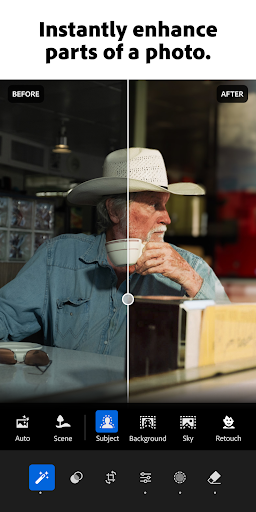
- Photo retouch: In a few taps, make a photograph brighter, soften a background, or touch out blemishes.
- One-tap features: Retouch with Quick Actions and Adaptive Presets that let you enhance photo quality in seconds.
- Presets for photos: Discover filters or make your own signature look.
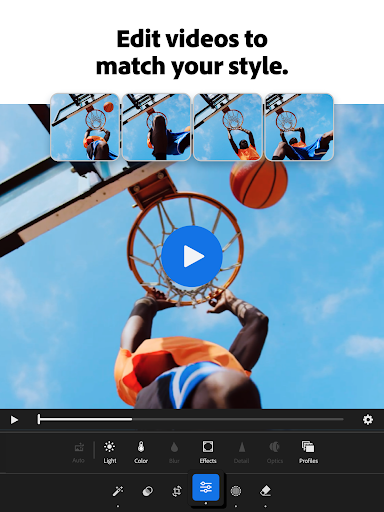
- Video Editing: Touch up videos with tools for light, color, and presets.
REMOVE DISTRACTIONS AND BLUR THE BACKGROUND
- Picture editor tools that give professional results.
- Touch up photos and blur the photo background for a polished look.
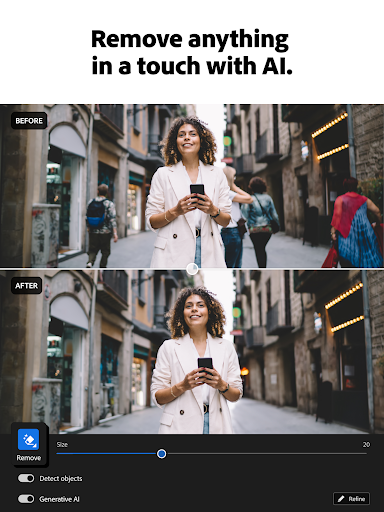
- Adjust the finer details, or use Generative Remove to remove objects and erase people from a photo.
STATE OF THE ART PHOTO EDITOR
- Take control of light with tools to tweak exposure, highlights, and shadows.
- Photo retouch, play with presets, HD photo effects, color grading, hue, saturation and add a blur or bokeh effect.
- AI photo editor: These tools suggest the best edits for your images. Touch up photos quickly or add your unique style to an HD photo, no experience required.
FIND COMMUNITY INSPIRATION
- Browse photo filters and presets shared by photo enthusiasts around the world.
- Match your aesthetic with inspiration from the community: Whether they’re bold edits with an AI photo editor or subtle tweaks for a polished portrait edit, find a look that matches your style — or create your own.
EDIT ONCE, APPLY IT TO MULTIPLE PHOTOS
- Photo editing that is quick, easy, and effortless.
- Batch edit photos: Create consistent editing across a group of photos when you copy and paste your edits across multiple photos.
- Save your favorites and make every photo feel like you.
Download Lightroom today.
Terms & Conditions:
Your use of this application is governed by the Adobe General Terms of Use http://www.adobe.com/go/terms_en and the Adobe Privacy Policy http://www.adobe.com/go/privacy_policy_en
Do not sell or share my personal information www.adobe.com/go/ca-rights
Privacy
Given that Lightroom does not request any permissions, the risk of data collection is relatively low, but users should still be aware of Adobe's data handling practices and review the company's privacy policy. To ensure secure use, users should keep their app and operating system up-to-date, and consider using a VPN when editing sensitive content. By taking these precautions, users can minimize potential risks and enjoy a safe editing experience.
Tips
To get the most out of Lightroom, users should start by exploring the app's tutorial and guides, which provide a comprehensive introduction to its features and capabilities. Additionally, users can optimize performance by closing unnecessary apps and clearing cache regularly, and take advantage of the app's integration with other Adobe services, such as Creative Cloud, to streamline their workflow. By doing so, users can unlock the full potential of Lightroom and enhance their photo and video editing experience.
What's New
- Now, you can go seamlessly from editing to sharing customized photo albums of your favorite moments via a unique link or QR code--no subscription required.
- Edit in HDR on Samsung Galaxy S24 and S25.
- New camera & lens support (adobe.com/go/cameras).
- Bug fixes and stability improvements.
In-app purchases
$1.99 - $119.99 per item
Version Information
- Version
- -
- Downloads
- 100M+
- Updated on
- Dec 18, 2025
- Released
- Jan 14, 2015
- Requires
- Android 8.0
Statistics
Google Play Rating History
Rating Distribution
Downloads Over Time
Lightroom Photo & Video Editor has been downloaded times. Over the past 30 days, it averaged downloads per day.
Shaded area shows 30-day prediction based on historical trends
Historical data collection started recently. More data points will be available over time.
Lightroom Photo & Video Editor - Google Play Rankings
Top Rankings
| Rank | Country | Category | List | Change |
|---|---|---|---|---|
| — |
Ranking History in
No ranking data available yet. Rankings are updated daily.
#5 in Top Grossing Photography in United States

#7 in Top Free Photography in United States


#1 in Top Grossing Photography in Netherlands
#2 in Top Free Photography in South Korea
 Falling Filter: Loop Me Effect
Lightroom Photo & Video Editor
Falling Filter: Loop Me Effect
Lightroom Photo & Video Editor
 PDF Reader File Read & Viewer
Lightroom Photo & Video Editor users say on Google Play
 Kamogelo Maleka
The app is really amazing. I really enjoyed using it to retouch my photos that I took with a professional camera. The features available in the standard app (without premium subscription) are really good. I'm looking to get my first ever subscription to a photo or video editing tool and it will start with this Adobe Lightroom.
 Priyanka Oraon
good app
 Siam Khan
nice app
 Ratan Parte
this ap good
 T A B R A I Z
I paid for the subscription but haven't got my subscription yet and the support team is saying they haven't received the money and the worst part is they charged me 2 times.
ApkTrusted Ratings & Reviews
More from Adobe
See more apps
Adobe Learning Manager
Free

Adobe Scan AI PDF Scanner, OCR
Free

Adobe Account Access
Free

Adobe Express: AI Photo, Video
Free

Photoshop Express Photo Editor
Free

Adobe Firefly: AI Generator
Free

Adobe Acrobat Reader: Edit PDF
Free

Adobe Photoshop: Photo Editor
Free
Adobe Analytics dashboards
Free

Adobe Connect
Free

Adobe Experience Manager Forms
Free
Adobe Xd
Free

Adobe Acrobat Sign
Free

Adobe Digital Editions
Free

Project Pulsar XR Video Editor
Free

Adobe Government Forum 2026
Free
Similar Apps

Picsart AI Photo Editor, Video
Free

Photoroom: AI Photo Editor
Free

Canva: AI Photo & Video Editor
Free

Video Editor & Maker - InShot
Free

Remini - AI Photo Enhancer
Free

AI Photo Editor - Lumii
Free

CapCut - Video Editor
Free

Luminar: AI Photo Editor
Free

FaceApp: Perfect Face Editor
Free

Photo Editor: Retouch, Enhance
Free

Hypic - Photo Editor & AI Art
Free

Photo Lab Picture Editor & Art
Free

AI Morph: AI Video & Photo
Free

Snapseed
Free

SNOW - AI Profile
Free

Free
Scan this QR code to download

Forwarding you to the page at Google Play market in seconds...
Open Google Play market now