
Luminar: AI Photo Editor v3.1.1
Skylum Software



About this app
Luminar: AI Photo Editor solves the problem of complex photo editing by providing an easy-to-use interface powered by AI, making it ideal for amateur photographers and social media enthusiasts who want to enhance their photos without extensive editing knowledge. Compared to other photography apps, Luminar stands out with its user-friendly design and robust feature set, but may fall short in terms of advanced features for professional photographers. With over 1 million downloads and a 4.2-star rating, it's clear that Luminar has resonated with many users. However, its in-app purchase model may deter some users seeking a one-time payment option.
Pros
- Luminar's high user rating and large download numbers indicate a well-received and popular app, suggesting that it meets the needs of many users in the photography category.
- The app's AI-powered editing features make it accessible to users without extensive photo editing experience, allowing them to achieve professional-looking results with ease.
- Skylum Software's reputation as a developer and their provision of a support website and email suggest a commitment to customer service and app maintenance.
- The absence of ads and the option for in-app purchases provide users with a flexible and uninterrupted editing experience.
- Luminar's compatibility with Android 11 ensures that it can run smoothly on newer devices, providing a modern and efficient user experience.
Cons
- The in-app purchase model, with prices ranging from $0.99 to $179.99 per item, may be seen as aggressive or expensive by some users, potentially limiting the app's accessibility to those on a budget.
- Despite its user-friendly interface, Luminar may not offer enough advanced features for professional photographers who require more complex editing tools and options.
- The lack of information about the app's data collection practices, despite not requiring any permissions, raises some privacy concerns and the need for transparency from the developer.
- Some users may find the app's reliance on AI for editing tasks limiting in terms of creative control and customization options.
Best for: The ideal user for Luminar: AI Photo Editor is likely an amateur photographer or social media enthusiast between the ages of 18 and 45, with basic knowledge of photo editing principles, seeking an easy-to-use yet powerful tool to enhance their photos without requiring extensive technical expertise or a significant financial investment.
Developer Description
Luminar: Photo Editor - easy picture editing with AI
Streamlined design with unparalleled control
Luminar: Photo Editor’s user-friendly design allows you to edit your photos with intuitive gestures, featuring smoothly gliding sliders and spinning dials that respond realistically to your touch with motion and sound. With Luminar: Photo Editor, there are no complicated functions or processes. Less fuss, more creativity.
Smart AI enhancements
Powered by cutting-edge technology, Luminar: Photo Editor is the revolutionary smart AI photo enhancer for your every picture edit need:
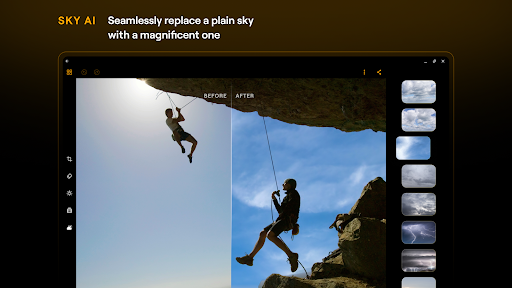
SkyAI: Seamlessly replace dull skies with brilliant ones for impressive backdrops
EnhanceAI: Effortlessly enhance photo quality with a single slide, adjusting color, tone and clarity for professional results in seconds
StructureAI: Unlock hidden details and clarity in your images, enhancing contrast and texture for striking visual impact
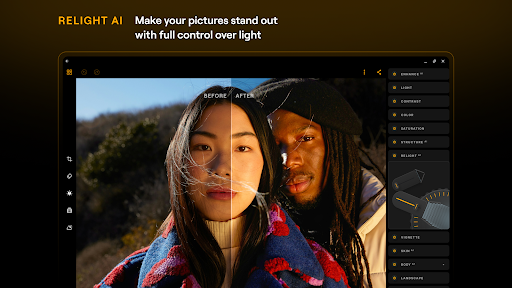
RelightAI: Take full control over exposure and light sources, dynamically adjusting lighting conditions to suit your artistic vision
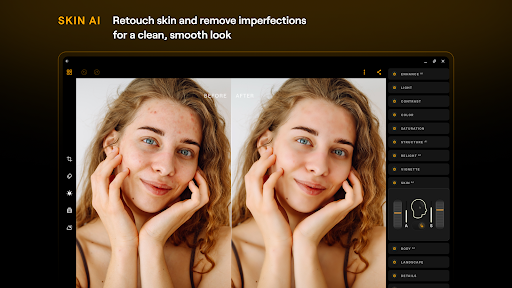
SkinAI: Automatically retouch the skin of a subject and remove imperfections for a clean and smooth result
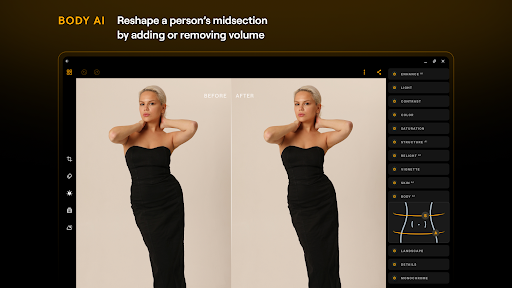
BodyAI: Shape a subject’s midsection in a realistic way by adding or removing volume
All-in-one powerhouse
Curves: Edit photos with precise color and tone adjustments, achieving the perfect balance and mood
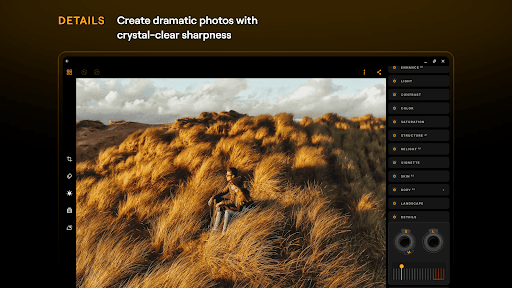
Details: Enhance every detail with just a tap, bringing your images to life with clarity and sharpness
Crop: Easily trim, align, flip and rotate for the perfect composition, ensuring your images stand out
Landscape: Transform your landscapes with ease and enhance golden hour lighting, brighten foliage, or remove haze for breathtaking results
Monochrome: Convert your color photos to stunning black and white masterpieces, adding depth and mood to your images
Erase: Effortlessly remove distracting elements from your photos to place focus on your subjects
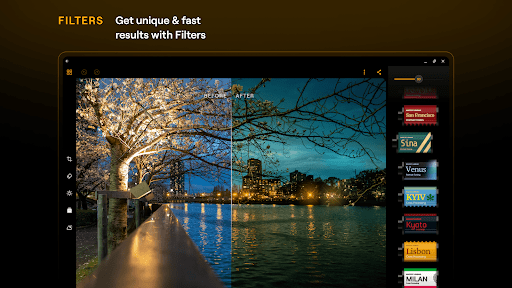
Photo Filters: Enjoy a diverse collection of photo effects that add a unique style to your shots
RAW File Support: Edit your RAW photos directly on your mobile, preserving maximum image quality and flexibility in post-processing
Seamless integration with Android devices
Designed for Android and ChromeOS, the Luminar: Photo Editor AI editor brings powerful photo editing tools to your fingertips. Available on devices running Android 11 or later, and on ChromeOS with Android Runtime support, it enhances your editing workflow with a smooth and intuitive experience. Whether you're editing on your phone or Chromebook, you’ll enjoy a streamlined, responsive interface built for creativity on the go.
Luminar: Photo Editor — Envision more
Whether you're a beginner or a pro, the Luminar: Photo Editor AI photo editing app offers a range of features to suit your needs, including detail enhancement, photo retouching, color adjustment, and more. Try Luminar: Photo Editor now and experience next-level photo editing at your fingertips.
Compatibility Note:
The Luminar: Photo Editor picture editor is optimized for devices running on ChromeOS and Android 11 and newer.
To access all features, you need to purchase one of the plans below:
1 Month subscription
12 Months subscription (+7 days free trial. Once the trial is over, you will be charged a yearly subscription)
Lifetime license
Subscriptions auto-renew at the cost of the chosen package, unless canceled 24-hours in advance prior to the end of the current period. You may manage your subscription and turn off auto-renewal by going to your Account Settings after purchase.
Privacy Policy: https://skylum.com/legal
Terms of use: https://skylum.com/legal-eula
Privacy
Given that Luminar does not request any permissions, the risk of data collection seems minimal, but users should still be cautious when making in-app purchases and ensure they understand what they are buying. It's also essential to review Skylum Software's privacy policy, available on their support website, to understand their data handling practices. Users should always monitor their account activity and report any suspicious transactions.
Tips
To get the most out of Luminar, users should start by exploring the app's AI-powered editing tools and presets to understand their capabilities and limitations. For optimal performance, it's recommended to edit photos in smaller batches and to regularly clear the app's cache to prevent slowdowns. Additionally, users can enhance their editing experience by combining Luminar with other photography apps that offer complementary features.
What's New
• Smarter Luminar Space — unedited photos are now saved and easier to organize.
• Advanced export — PNG, HEIF, and TIFF with adjustable quality.
• Metadata saving — exported images keep their metadata.
• Updated UI — refreshed Settings and Login screens.
• Hotfix: fixed crashes after the 3.1 update.
Update now!
In-app purchases
$0.99 - $179.99 per item
Version Information
- Version
- 3.1.1
- Downloads
- 1M+
- Updated on
- Dec 22, 2025
- Released
- Apr 30, 2025
- Requires
- Android 11
Statistics
Google Play Rating History
Rating Distribution
Downloads Over Time
Luminar: AI Photo Editor has been downloaded times. Over the past 30 days, it averaged downloads per day.
Shaded area shows 30-day prediction based on historical trends
Historical data collection started recently. More data points will be available over time.
Luminar: AI Photo Editor - Google Play Rankings
Top Rankings
| Rank | Country | Category | List | Change |
|---|---|---|---|---|
| — |
Ranking History in
No ranking data available yet. Rankings are updated daily.
#49 in Top Free Photography in United States


#14 in Top Grossing Photography in Netherlands

#17 in Top Grossing Photography in India


#21 in Top Free Photography in Thailand


Luminar: AI Photo Editor users say on Google Play
 Pal Jatinder
It's very good for color grading. Every tool works very professionally. But it is not possible to work with video color grading. Please. Please make it possible.
 Alaska Yang
It is very useful, but... Are all the photos processed in the cloud? Can they be processed offline? Without the network, pictures cannot be edited.
 Michael Anderson
Latest update added granular export options, and that's a big step toward the day when I can use Luminar as a daily driver for post-processing; however, exports still don't preserve all original EXIF data. GPS data, in particular, is missing, and that's a huge hole in my workflow.
 Sagar Patel
I purchased this app to edit RAW photos on the go. Initial impression was good and hope was high given their partnership with Google to bring it to Play Store. I found issues in it after using it. It doesn't support Samsung S23 ultra RAW photos. There is no way to specify export quality, size, type etc. When a RAW photo is directly shared with the app it somehow gets compressed and pixelated(From ~30MB to <2MB). The control panels are inconsistent in the design and wastes a lot of screen space.
 Saptaswa Dey
A privacy nightmare When I attempt to log into the app using my Google account in my browser, it requests access to my entire local network to proceed with the login. On the other hand, when I try to log in through the Microsoft ID, it requests a list of permissions that's unacceptable. Following is the list: Skylum Account Login will be able to see and update your info, even when you're not using this app will be able to see your profile info, gender, display picture, contacts, and friends.
ApkTrusted Ratings & Reviews
More from Skylum Software
See more apps
Similar Apps

PREQUEL AI Filter Photo Editor
Free

Lightroom Photo & Video Editor
Free

ReLens Camera-Focus &DSLR Blur
Free

Photo Editor: Retouch, Enhance
Free

Hypic - Photo Editor & AI Art
Free

VSCO: Photo Editor
Free

Vintify : Vintage Photo Editor
Free

Adobe Photoshop: Photo Editor
Free

Presets For LR - Photo Filters
Free

Lightleap by Lightricks
Free

Pixelcut AI Photo Editor
Free

Photo Studio: Edit Photos App
Free

EPIK - AI Photo & Video Editor
Free
VIMAGE 3D Live Photo Animation
Free

PhotoBoost - AI Photo Enhancer
Free

Image Toolbox - Edit & Convert
Free
Scan this QR code to download

Forwarding you to the page at Google Play market in seconds...
Open Google Play market now