
Pixel Studio: pixel art editor v5.45
Hippo Games AM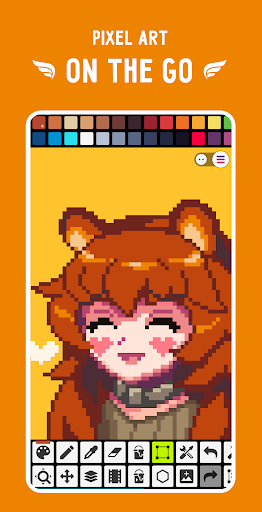



About this app
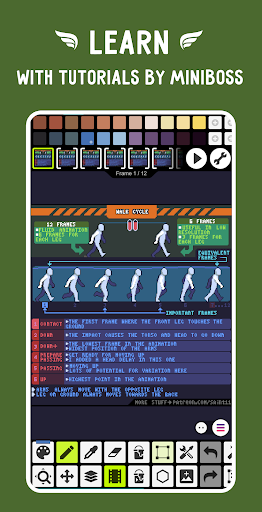
Pixel Studio: pixel art editor solves the problem of creating and editing pixel art on-the-go, benefiting artists, game developers, and enthusiasts who need a portable and user-friendly tool. Compared to alternatives in the Art And Design category, Pixel Studio stands out with its simplicity, speed, and portability, making it an excellent choice for those who want to create pixel art without the need for a desktop computer. However, it may fall short in terms of advanced features and functionality compared to more comprehensive art editing software. With over 5 million downloads and a 4.7-star rating, Pixel Studio has established itself as a top-tier app in its category.
Pros
- Pixel Studio's high user rating and large download numbers demonstrate its effectiveness and popularity among users, indicating a well-designed and user-friendly interface.
- The app's small size and offline capability make it an excellent choice for artists who need to work on their projects without an internet connection, providing flexibility and convenience.
- The developer's active engagement with the community, as evident from their Discord channel, suggests a commitment to user feedback and continuous improvement, which is a significant advantage for users.
- The app's simple and fast editing capabilities, combined with its portability, make it an ideal tool for creating pixel art on-the-go, allowing users to work efficiently and effectively.
- The presence of in-app purchases provides users with the option to enhance their editing experience with additional features and tools, although it may raise concerns about monetization aggressiveness.
Cons
- The presence of ads in the free version may be intrusive and disrupt the user experience, potentially causing frustration and distractions.
- The monetization model, which includes in-app purchases, may lead to a pay-to-win situation or create an uneven playing field for users who do not purchase additional features, potentially affecting the overall user experience.
- The lack of transparency about the data collected by the app, despite not requiring any permissions, may raise concerns about user privacy and security, as users may be unsure about how their data is being used.
- The app's simplicity, while a benefit for some users, may also be a limitation for more advanced artists who require more complex features and functionality, potentially causing them to seek alternative solutions.
Best for: The ideal user for Pixel Studio is a creative individual, likely between the ages of 15 and 35, who has a basic understanding of art and design principles and is looking for a user-friendly and portable tool to create and edit pixel art, such as artists, game developers, and enthusiasts who value simplicity, speed, and flexibility in their editing software.
Developer Description
Mobile pixel art editor. Simple. Fast. Portable.
Features:
• It's super simple, intuitive and user friendly
• It's cross-platform, use it on mobile and desktop with Google Drive sync
• Use layers for advanced pixel art
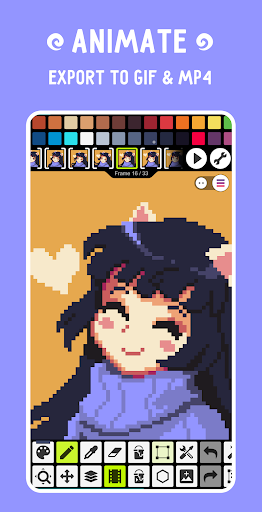
• Create frame-by-frame animations
• Save animations to GIF or sprite sheets
• Extend animations with music and export videos to MP4
• Share arts with friends and Pixel Network™ community
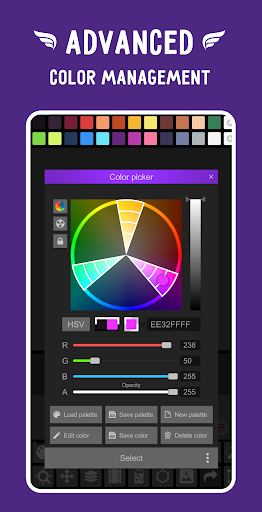
• Create custom palettes, use built-in or download palettes from Lospec
• Advanced color picker with RGBA and HSV modes
• Simple zoom and move with gestures and joysticks
• Use Portrait mode for mobile and Landscape for tablets and PC
• Customizable toolbar and a lot of other settings
• We support Samsung S-Pen, HUAWEI M-pencil and Xiaomi Smart Pen!
• We support all popular formats: PNG, JPG, GIF, BMP, TGA, PSP (Pixel Studio Project), PSD (Adobe Photoshop), EXR
• Autosave and backup - don't lose your work!
• Discover a ton of other useful tools and features!
More features:
• Shape Tool for primitives
• Gradient Tool
• Built-in and custom brushes
• Sprite Library for your image patterns
• Tile Mode for brushes
• Symmetry drawing (X, Y, X+Y)
• Dot Pen for precise drawing with a cursor
• Text Tool with different fonts
• Dithering Pen for shadows and flares
• Pixel art rotation with Fast RotSprite algorithm
• Pixel art scaler (Scale2x/AdvMAME2x, Scale3x/AdvMAME3x)
• Onion Skin for advanced animation
• Apply palettes to images
• Grab palettes from images
• Mini-map and Pixel Perfect preview
• Unlimited canvas size
• Canvas resizing and rotation
• Customizable background color
• Customizable grid
• Multithreaded image processing
• JASC Palette (PAL) format support
• Aseprite files support (import only)
You can support us by purchasing PRO (one-time purchase):
• No ads
• Google Drive sync (cross-platform)
• Dark Theme
• 256-color palettes
• Tile mode for making seamless textures
• Extended max project size
• Extra formats support: AI, EPS, HEIC, PDF, SVG, WEBP (cloud read only) and PSD (cloud read/write)
• Unlimited color adjustment (Hue, Saturation, Lightness)
• Unlimited export to MP4
• Extended storage in Pixel Network
System requirements:
• Minimal: 4 GB of RAM, Snapdragon 460 / Helio G80 / Tiger T606
• Recommended: 6 GB of RAM, Snapdragon 4 Gen 1 / Helio G99 / Unisoc T760 and newer
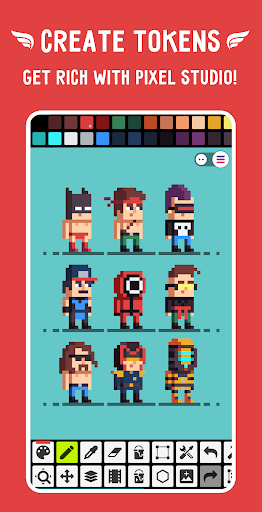
Sample images made by lorddkno, Redshrike, Calciumtrice, Buch, Tomoe Mami are used under CC BY 3.0 license.
Privacy
Since Pixel Studio does not require any permissions, users do not need to worry about granting excessive access to their device's data. However, users should still be cautious about the data they create and store within the app, as it may be subject to the developer's data collection policies. To ensure optimal security, users should review the developer's terms and conditions, as well as the app's privacy policy, to understand how their data is being used and protected.
Tips
To get the most out of Pixel Studio, users should start by exploring the app's tutorials and guides, which provide a comprehensive introduction to the app's features and functionality. Additionally, users can optimize their editing experience by adjusting the app's settings to suit their needs, such as customizing the interface and adjusting the zoom levels. By regularly saving their work and utilizing the app's autosave feature, users can prevent data loss and ensure a seamless editing experience.
What's New
In-app purchases
$2.99 - $17.99 per item
Version Information
- Version
- 5.45
- Downloads
- 5M+
- Updated on
- Jan 2, 2026
- Released
- May 18, 2018
- Requires
- Android 7.0
Statistics
Google Play Rating History
Rating Distribution
Downloads Over Time
Pixel Studio: pixel art editor has been downloaded times. Over the past 30 days, it averaged downloads per day.
Shaded area shows 30-day prediction based on historical trends
Historical data collection started recently. More data points will be available over time.
Pixel Studio: pixel art editor - Google Play Rankings
Top Rankings
| Rank | Country | Category | List | Change |
|---|---|---|---|---|
| — |
Ranking History in
No ranking data available yet. Rankings are updated daily.
#33 in Top Free Art And Design in Russia
 AR Drawing: Trace and Draw
Pixel Studio: pixel art editor
AR Drawing: Trace and Draw
Pixel Studio: pixel art editor
 Logo Maker : AI Logo Generator
Pixel Studio: pixel art editor users say on Google Play
 Bee - Four 0
The best, best, best, best, best app ever !! <3 Can use whatever colors, can animate, can use lasso tool, can rotate, can lower opacity and copy paste and more, has layers, used it for at least 5 years 💋 I recommend it to all my friends and express my love for it as doing pixel art on a pc is much harder. The art can be saved in many ways too and the settings aren't confusing, such good design. I don't usually give reviews or comment and I don't know who made it but thank you so much !!
 ammara Aisyah
I like it! tho it might be confusing for beginners,the more you use it the more you get used to it! I'm a bigginer so I don't really know how to yet,but it's good!
 Fakhrul Abi Utanto
They made refusing to share your data tedious, there's accept all button, but you have to reject one by one (I'm a pro user). Otherwise, pretty good pixel art app for mobile.
 Momen Aid
i lost some of my projects for no reason?
 Bonnie Buddy
way too confusing
ApkTrusted Ratings & Reviews
More from Hippo Games AM
See more apps



Similar Apps
Poseit
Free

Pixilart - Make Pixel Art
Free

Magic Poser - Art Pose Tool
Free
ibis Paint
Paid

Nomad Sculpt
Free

MediBang Paint:Draw Art, Comic
Free

Tayasui Sketches
Free

FlipaClip: Create 2D Animation
Free

ibis Paint X
Free
Prisma3D - Animation, Modeling
Free

HiPaint: Sketch & Draw art
Free
CUSTOM CAST
Free
Stick Nodes - Animation
Free

Sketch Pro: Draw & Create Art
Free

Infinite Painter
Free
Easy Pose - 3D pose making app
Free
Scan this QR code to download

Forwarding you to the page at Google Play market in seconds...
Open Google Play market now