AR Drawing: Trace and Draw v1.1.2
Veewa Labs


About this app
AR Drawing: Trace and Draw solves the problem of limited artistic skills by providing an augmented reality platform for users to trace and sketch like professionals. This app benefits artists, designers, and hobbyists who want to improve their drawing skills without extensive training. Compared to alternatives in the Art And Design category, AR Drawing stands out with its user-friendly interface and excellent user rating of 4.5/5. However, its limited features and in-app purchases may fall short for advanced users seeking more complex functionality.
Pros
- With over 500,000 downloads and a 4.5/5 user rating, AR Drawing has demonstrated its effectiveness and user satisfaction, making it a reliable choice for those seeking a drawing app.
- The app's developer, Veewa Labs, has a professional website and provides a support email, indicating a commitment to customer service and potential for future updates and improvements.
- The absence of required permissions is a significant advantage, as it minimizes potential privacy and security risks, making the app a safe choice for users.
- AR Drawing's excellent user rating and moderate download numbers suggest a well-designed and engaging user experience, which is further enhanced by its accessibility and performance on Android 8.1 and above devices.
Cons
- The app's monetization model, which includes in-app purchases of $19.99 per item, may be perceived as aggressive and could lead to a negative user experience for those who are not willing or able to pay for additional features.
- The limited version history and update frequency may raise concerns about the app's long-term support and potential for introducing new features or fixing issues.
- Some users may find the app's functionality too basic or limited, especially compared to more advanced drawing and design apps available in the market.
Best for: The ideal user for AR Drawing: Trace and Draw is likely an individual with a basic to intermediate level of artistic skill, possibly a student, hobbyist, or professional looking for a user-friendly and accessible tool to improve their drawing skills or create simple designs, who values ease of use, safety, and a minimal learning curve.
Developer Description
Trace and sketch like a pro with AR Drawing
How does it work?
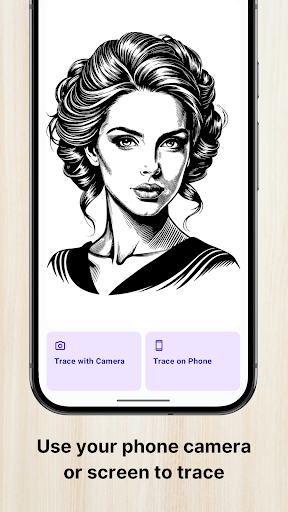
Choose an image from your gallery or our vast library of images, and the app will display that image on the camera screen with transparency. Place your phone or tablet on a glass or tripod above the paper, follow the lines, and trace the image as if it’s in front of you! Alternatively, you can place the paper on your phone or tablet screen and trace images right through it.
Features you'll love
★ Trace any image
Import photos from gallery or use images from our library.
★ Search millions of images online
Easily find the perfect image to draw with our built-in image search.
★ Simple and intuitive UI
Designed for all ages and skill levels - beginner to professional.
★ Trace and sketch
Use your phone's camera or screen to trace & draw stunning masterpieces.
★ Adjust and align
Scale, rotate and position the image to fit your paper perfectly.
★ Convert to outlines
Transform colored images into clean outlines for easier tracing.
★ Save and share your artwork
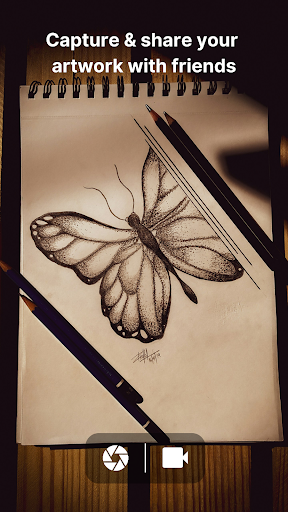
Snap a pic of your creations and show it off.
★ Record while drawing
Create videos of your drawings and sketches while you draw.
Whether you're learning to draw, practicing portraits, drawing anime, or just doodling for fun, AR Drawing makes it feel like magic.
Trace. Draw. Create. Share.
Download the app today!
Privacy
Given that AR Drawing does not require any permissions, it presents a minimal risk to user privacy and security. However, users should still be cautious when making in-app purchases and ensure they are using a secure payment method. It is also advisable to review the developer's privacy policy, available on their website, to understand any potential data collection practices.
Tips
To get the most out of AR Drawing, users should start by exploring the app's tutorial or guidance on how to use its tracing and sketching features effectively. For optimal performance, it is recommended to use the app on devices with a stylus or high-precision touch screen, and to regularly check for updates to ensure access to the latest features and improvements.
What's New
- Polished UI for a smoother experience
- Bug fixes and performance improvements
In-app purchases
$19.99 per item
Version Information
- Version
- 1.1.2
- Downloads
- 500K+
- Updated on
- Dec 30, 2025
- Released
- Jun 9, 2025
- Requires
- Android 8.1
Statistics
Google Play Rating History
Rating Distribution
Downloads Over Time
AR Drawing: Trace and Draw has been downloaded times. Over the past 30 days, it averaged downloads per day.
Shaded area shows 30-day prediction based on historical trends
Historical data collection started recently. More data points will be available over time.
AR Drawing: Trace and Draw - Google Play Rankings
Top Rankings
| Rank | Country | Category | List | Change |
|---|---|---|---|---|
| — |
Ranking History in
No ranking data available yet. Rankings are updated daily.
#31 in Top Free Art And Design in Mexico


#31 in Top Free Art And Design in Russia

#34 in Top Free Art And Design in United Kingdom

#36 in Top Free Art And Design in Spain

AR Drawing: Trace and Draw users say on Google Play
 Explicit
No ads! works exactly like it's supposed to. I've tried 6 other apps before this and every single one was locked behind a paywall and had so many ads it was unusable. highly recommend. if it continues to work like this I will recommend it to everyone
 Hoorain Fatima
it is very enjoyable 😉☺️ no ads problem ❣️❣️my experience is very good 👍 i made the same art of the picture🙌🤌🤌 i just love the app ❤️😀soo download the app right now 😀😄
 Aadiv Raje
when I use the "Draw on screen" feature, it either •take a screenshot •closes the app 😠😡
 stella irene
mmm not bad 👍
 Jessyca A
2 seconds in and it completely shut my phone down.
ApkTrusted Ratings & Reviews
More from Veewa Labs
See more apps

Similar Apps

Sketchar AR Drawing Sketchpad
Free

AR Drawing: Sketch & Paint
Free
Draw Easy AI: AR Trace Sketch
Free

ArtFlow: Paint Draw Sketchbook
Free

PaperColor
Free

Sketch Pro: Draw & Create Art
Free

AR Drawing - Paint and Sketch
Free
Learn Drawing
Free

HiPaint: Sketch & Draw art
Free

Infinite Painter
Free

Tayasui Sketches
Free

MediBang Paint:Draw Art, Comic
Free

PENUP – Drawing-sharing SNS
Free
Drawing Desk: Learn to Draw
Free
Drawify - Photo to Sketch
Free

Picsart Color - Painting, Draw
Free
Scan this QR code to download

Forwarding you to the page at Google Play market in seconds...
Open Google Play market now