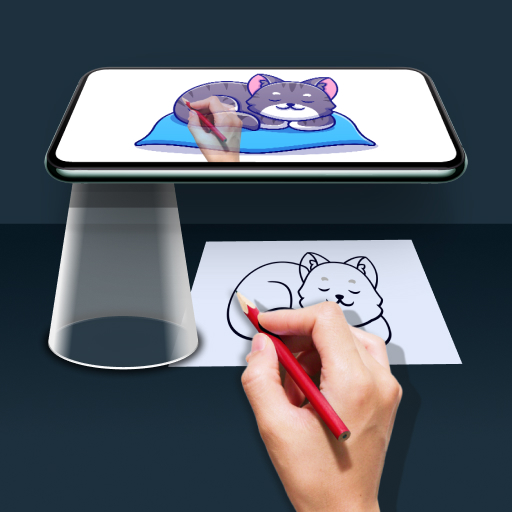
Draw Easy AI: AR Trace Sketch v2.1.0
Kraph Tech


About this app
Developer Description
Trace and sketch using AR with AI image generation plus photo and video capture.
Describe what you want to draw using a prompt, tap “Generate” to instantly create an AI-made image for trace and sketch.
• AR Drawing
- Select any image from camera, gallery, or ready-made categories
- Adjust edges or apply filters if needed
- Place the image on a surface through your phone’s camera view
- Follow real-time AR outlines to trace accurately
• What is Tracing?
- Tracing is used to transfer an image into line work from a photo or artwork. You place your tracing paper over it and draw the lines that you see. So, Trace it & Sketch it.
- Using this app you can learn drawing or tracing.
• So how does it works?
- Select an image from the gallery or capture an image with a camera then just apply the filter. After that, you will see that image on the camera screen with transparency & you have to put drawing paper or book anything on which you want to trace and draw. Your image will not appear on paper but a transparent image with camera so that you can trace it on paper.
- Draw on paper by looking at the phone with a transparent image.
- Select any image and convert it to a tracing image.
- Users can create videos of their own drawings and sketches while they draw.
- Users can also edit their captured videos of drawings with the time-lapse feature and add music to them.
- Advance Filters
1. Edge level : With Edge Level filter, you can control the sharpness and definition of edges in your drawings, giving them a different and professional look. Adjusting the Edge Level can help you achieve different artistic styles and emphasize specific details.
2. Contrast :The Contrast filter lets you enhance the tonal range in your drawings, making the colors appear more vibrant and the shadows and highlights more pronounced. It adds depth and richness to your artwork.
3. Noise: To tackle any unwanted noise in your drawings or images, we have included a Noise filter. This feature helps reduce graininess or pixelation, resulting in cleaner and smoother lines and surfaces.
4. Sharpness : The Sharpness filter enables you to enhance the overall clarity and crispness of your drawings. By adjusting the sharpness level, you can achieve a more defined and polished look, making your artwork stand out.
Permission:
1. READ_EXTERNAL_STORAGE - Show a list of images from the device and allow a user to select images for tracing and drawing.
2. CAMERA - To Show trace image on camera and draw it on paper. also, it is used for capturing and drawing on paper.
In-app purchases
$0.99 - $49.00 per item
Version Information
- Version
- 2.1.0
- Downloads
- 10M+
- Updated on
- Jan 2, 2026
- Released
- Dec 22, 2022
- Requires
- Android 7.0
Statistics
Google Play Rating History
Rating Distribution
Downloads Over Time
Draw Easy AI: AR Trace Sketch has been downloaded times. Over the past 30 days, it averaged downloads per day.
Shaded area shows 30-day prediction based on historical trends
Historical data collection started recently. More data points will be available over time.
Draw Easy AI: AR Trace Sketch users say on Google Play
 Shravani S
This app is very easy to draw any diagram and very easy to use it, it has so many options to draw anything like about girl, doll, some nature pictures for boys random not any picture you can use with your storage app and can apply these photos and you can make it is very use full for school going students and college going students and it has languages you may ask any picture it will very veey help full to all childrens and i have made so many diagrams every picture is very perfect cute
 Yash Kirar
this app is good because it make drawing easy but have one problem in the app it has to much add but have to much feature 😊🎀 like we can make video of our drawing while making and also take photo 🤗 and have much options for making drawing like . anime . cartoon . music . insect . building. vehicle. shape . fruit. cafe etc . and also have AR drawing I have to much word for this app but not time 😅🤗 so I hope my feedback is help full for you all Thank you 🙏😊🎀
 Madhav Sharma
I am giving this app only two stars because after few time the app starts lagging very bad.
 Kastari Husain
this app take too long to load it take near 15 minit just to load 😭✌️ (btw in a bad artist so that's why I use this app☺️)
 Sunita aditya
This app is not useful it have many ads and it is very difficult to use
ApkTrusted Ratings & Reviews
More from Kraph Tech
See more apps
Safe Hearing: Recording Aid
Free
Email Writer: Ready Templets
Free

Device Info & Test: System CPU
Free
Digital Personal Daily Diary
Free

Mobile Secret : Tricks & Info
Free

App Notification Edge Lighting
Free

Photo To Contact - Set Photo
Free
Digital Anemometer & UV Index
Free

HTML / MHTML Viewer
Free

Dual Music Player: Left Right
Free

Contact Folder Organizer
Free

Expiry Date Alert & Reminder
Free

Image, Text & Voice Translator
Free

Phone Tilt Scrolling Gesture
Free
Auto Time & Place Stamp Camera
Free

ScreenOff Smart Video Recorder
Free
Similar Apps

AR Drawing: Sketch & Paint
Free

PaperColor
Free

Sketchar AR Drawing Sketchpad
Free
Drawing Desk: Learn to Draw
Free

Tayasui Sketches
Free
Sketchbook
Free

ibis Paint X
Free

Butterfly Draw Step by Step
Free
Drawify - Photo to Sketch
Free
No.Pix Color by Number & Pixel
Free

FlipaClip: Create 2D Animation
Free
InColor: Coloring & Drawing
Free
Learn Drawing
Free

Diary Me: My Journal With Lock
Free
My Diary - journal diary
Free

Clip Studio Paint
Free
Scan this QR code to download

Forwarding you to the page at Google Play market in seconds...
Open Google Play market now