
Clip Studio Paint v4.2.2
CELSYS,Inc.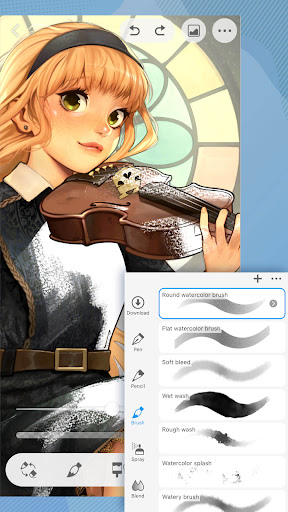


About this app
Developer Description
Unleash your drawing and painting potential
Tablet
・You need an annual or monthly plan to save or export your artwork
・Up to 3 months free with your first plan
Smartphone
・Enjoy all features for 30 hours in a free trial that refreshes monthly with no ads!
Subscribe for the time you want to use it. Get all the latest features, materials, and cloud storage (10 GB)!
Drawing and painting is easy with Clip Studio Paint!
Try it and see why pros and beginners alike choose Clip Studio Paint.
CSP’s digital art features will have you drawing better! Now with new and more powerful features!
Making character art?
CSP will bring your character to life!
・Create up to 10,000 layers for detailed artwork
・Pose 3D models to draw tricky angles
・Liquify on multiple layers to adjust line art and color instantly
・Use Gradient maps to have greater control over your colors
・Capture difficult hand poses with live video for drawing reference
・Adjust drawings with Puppet warp
・Use snap to quickly place objects
・Record a timelapse and share your work on social media
Want to try out new ideas and drawing styles?
Get inspired with our superpowered drawing tools
・Download 270,000+ free/premium materials made by other creators, including various textures for brushes
・Adjust lines with your fingers or stylus, no more undo!
・Use 3D primitives to create ideas fast for layouts & perspective
・Customize brush texture, shape, dual brush setting, color mixing, spray effect, and more to make your perfect brush
Clip Studio Paint's brush engine, wealth of assets, and helpful features give you full control over your art!
・We have the brush for you! Access 70,000+ brushes by artists worldwide (free/premium) on our dedicated Assets store!
・Enjoy the ability to paint in vectors and scale up your art with no loss in quality
・28 layer effects to touch up your art
・Perceptual color mixing so you can blend colors like real paint
Enjoy a traditional feel and use vectors for the perfect drawing!
・Draw smoother line art with Line Stabilization
・Draw on vector layers and use control points to fix your lines
・Lay down flat colors with smart fill tool
・Draw correct perspective just by snapping your lines to the guides to create amazing backgrounds
Get the most out of CSP:
We recommend the device specs below to use advanced features such as 3D tools & edit large files with ease. If you are unsure, try the free trial or contact Support.
Clip Studio Paint is also super easy to start drawing with right away!
・CSP has two drawing modes!
Use Simple Mode to start drawing fast
Use Studio mode and use all the features of Clip Studio Paint
・Free tutorials on the Clip Studio Paint website & YouTube channel to build your skills
・Thousands of user Tips available on every topic imaginable
Bring your comic, manga, or webtoon to life with the app that is loved by pro comic creators
・Create speech bubbles, frames, & action lines instantly
・Customize & save character faces and drawing figure body types
・Add shadows instantly with Shading Assist
・Preview your webtoon on your smartphone
・Manage multi-page works in one file (EX)
Even on your current device, you can become an animator!
・Make anything from GIFs to full-length animations
・Add sound, camera movements, and tweening
● Recommended Devices + Specifications
Please see the following for supported devices.
https://www.clipstudio.net/en/dl/system/#Android
Please see the following for information on ChromeBook.
https://www.clipstudio.net/en/dl/system/#Chromebook
smartphone plan:
You can use the app fully for free for up to 30 hours each month.
After this free period has ended, please purchase a plan to:
・Save your canvas
・Export your data in various file formats on Android tablets and Chromebooks
Note:
・Clip Studio account needed to buy a plan.
・To use DeX mode, sign up for any plan besides the smartphone plan.
Terms of Service
https://www.celsys.com/en/information/csp/
What's New
・ Fixed an issue so that selecting a hidden ruler in the Layer palette and using the Object sub tool will no longer move the entire layer or cause the application to crash.
・ Fixed an issue where downloading sub tool materials from Clip Studio Assets would cause the application to crash when operated a certain way when Sub Tool is turned on in the Material palette menu > Auto-install settings.
・ Other issues have also been fixed.
In-app purchases
$0.99 - $119.99 per item
Version Information
- Version
- 4.2.2
- Downloads
- 10M+
- Updated on
- Dec 9, 2025
- Released
- Dec 4, 2020
- Requires
- Android Varies with device
Statistics
Google Play Rating History
Rating Distribution
Downloads Over Time
Clip Studio Paint has been downloaded times. Over the past 30 days, it averaged downloads per day.
Shaded area shows 30-day prediction based on historical trends
Historical data collection started recently. More data points will be available over time.
Clip Studio Paint - Google Play Rankings
Top Rankings
| Rank | Country | Category | List | Change |
|---|---|---|---|---|
| — |
Ranking History in
No ranking data available yet. Rankings are updated daily.
#7 in Top Grossing Art And Design in United States


#14 in Top Free Art And Design in United States
#4 in Top Grossing Art And Design in South Korea


#4 in Top Grossing Art And Design in Poland

Clip Studio Paint users say on Google Play
 Seth Goldhoft
Great art app, the best out there! However the subscription model could use simplification.
 Sanae Hee (Sanae Hee)
The app is nice but the UI is kinda bad... And no matter how hard I tried, not all of my brushes are showing and I even paid for some. Please fix this 🥲
 Kaylee Santana
You have to pay millions just to save work or else you just dont get to and it was not even good to use for animation .
 Casey
Casey
sad, I came on here expecting the things the game said it would do, but NO OF COURSE NOT!? I got hit with "buy a plan" aka translation to "were broke and want money" there THAT desperate they only put "4.99 a YEAR" and the cheapest thing I've EVER seen "79p a month" like WHAT!? I couldn't get in the app if I didn't buy it so ridiculous and I'm unimpressed with this app
ApkTrusted Ratings & Reviews
Similar Apps

Infinite Painter
Free

FlipaClip: Create 2D Animation
Free

ibis Paint X
Free

Sketchbook
Free

Concepts: Sketch, Note, Draw
Free
Drawing Desk: Learn to Draw
Free

Tayasui Sketches
Free

Adobe Express: AI Photo, Video
Free

MediBang Paint:Draw Art, Comic
Free

Lightroom Photo & Video Editor
Free

Nomad Sculpt
Free

HiPaint: Sketch & Draw art
Free
Prisma3D - Animation, Modeling
Free

Canva: AI Photo & Video Editor
Free

Sketch Pro: Draw & Create Art
Free

Free
Scan this QR code to download

Forwarding you to the page at Google Play market in seconds...
Open Google Play market now