
WiFi Analyzer: WiFi Manager v7.4
Smart Code Studios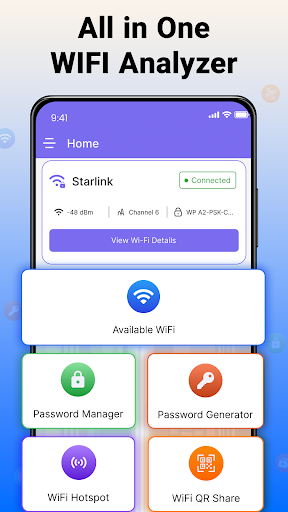


About this app
WiFi Analyzer: WiFi Manager solves the problem of inefficient WiFi network management by providing an all-in-one solution for analyzing networks, managing passwords, and sharing hotspots. This app benefits most those who frequently switch between different WiFi networks, such as remote workers or students. Compared to alternatives in the Productivity category, WiFi Analyzer stands out with its comprehensive feature set and high user rating. However, its lack of permissions requests raises questions about its ability to effectively analyze and manage WiFi networks.
Pros
- With over 1 million downloads and a 4.5-star rating, WiFi Analyzer has demonstrated its value to a large user base, indicating a high level of social proof and user satisfaction.
- The app's comprehensive feature set, including network analysis, password management, and hotspot sharing, makes it a one-stop solution for WiFi management needs.
- The developer, Smart Code Studios, has maintained a good reputation, and the app's frequent updates suggest a commitment to improving and expanding its functionality.
- The app's offline capability and lack of permissions requests suggest a focus on user privacy and security, making it a good choice for those concerned about data protection.
- The app's performance is optimized for devices running Android 7.0 and above, ensuring a smooth user experience for a wide range of devices.
Cons
- The app's monetization model, which includes ads and in-app purchases, may be seen as aggressive by some users, potentially disrupting the user experience.
- The lack of permissions requests by the app raises concerns about its ability to effectively analyze and manage WiFi networks, potentially limiting its functionality.
- Some users may find the app's interface and feature set overwhelming, particularly if they are not familiar with WiFi network management.
- The app's developer website appears to be an ad-serving page rather than a dedicated developer website, which may raise concerns about the developer's priorities and commitment to user support.
Best for: The ideal user for WiFi Analyzer is a tech-savvy individual, likely between the ages of 25 and 45, who frequently switches between different WiFi networks and values a comprehensive and user-friendly WiFi management solution, such as remote workers, students, or frequent travelers.
Developer Description
All in one WIFI app to analyze network, manage passwords, and share hotspot.
Main Features of WIFI Analyzer Password Manager:
● WIFI Hotspot
● Password Generator
● Password Manager
● Scan QR Code
WIFI Hotspot: Use your device as a wi-fi hotspot and share the internet securely. See connected devices in real time and control their access easily. The wi-fi hotspot feature is useful for quick sharing without the need for a complex setup.
Password Manager and Generator: Create strong, unique passwords with the password generator and keep them organized in the password manager. Store login credentials safely and retrieve them whenever needed. With both features combined, you manage all your passwords in one secure place.
Scan QR Code: Use your device camera to scan QR codes for Wi-Fi networks and connect instantly. This built-in makes network access fast and reliable without manual input.
Benefits of the Wi-Fi Analyzer Password Manager:
● Use Wi-Fi analyzer to check nearby WIFI channels and signal strength
● Share the internet by enabling a WIFI hotspot on your device
● Generate strong passwords and securely manage them in one place
● Connect to Wi-Fi networks by scanning QR codes
Download now and experience the complete feature set of WIFI Analyzer Password Manager on your device.
Privacy
Given the app's lack of permissions requests, it is likely that it does not collect sensitive user data. However, users should still be cautious when using the app's hotspot sharing feature, as it may potentially expose their device to security risks. To minimize risks, users should only share their hotspot with trusted devices and use a secure password.
Tips
To get the most out of WiFi Analyzer, users should start by running a network analysis to identify areas for improvement. They can then use the app's password management feature to secure their WiFi networks and the hotspot sharing feature to share their connection with other devices. Additionally, users can optimize the app's performance by closing other resource-intensive apps while using WiFi Analyzer.
What's New
⭐ New User Interface
⭐ Performance Improved
In-app purchases
$2.99 - $99.99 per item
Version Information
- Version
- 7.4
- Downloads
- 1M+
- Updated on
- Nov 25, 2025
- Released
- Nov 3, 2022
- Requires
- Android 7.0
Statistics
Google Play Rating History
Rating Distribution
Downloads Over Time
WiFi Analyzer: WiFi Manager has been downloaded times. Over the past 30 days, it averaged downloads per day.
Shaded area shows 30-day prediction based on historical trends
Historical data collection started recently. More data points will be available over time.
WiFi Analyzer: WiFi Manager users say on Google Play
 William Kimball
Very helpful. Excellent app to keep in the toolbox. Located WiFi hotspots and connects you without needing a password. I no longer have unlimited talk and poor cellular spots are often resolved with WiFi Password Map connecting to a nearby hotspot, router or WAP.
 Dallas Reeder
trying it now
 Joshua Mccullum
I do like what I read about it but i still gave y'all a 3 so if this app is for sure about the words that I read with my on two eyes if y'all software of this product is real I sure too give y'all those extra 2 sar
 Eddie Thomas
Someone even worth the time it took to download . I thought it would provide internet service from any location. But it doesn't. Not even after you've purchased Wi-Fi from the site. It still doesn't provide internet from your location. You have to find an area where you can tap into a Wi-Fi within its network. Lots of good that will help if you're somewhere stuck and need to get in touch with someone for assistance. You can't even make contact with the company by phone or internet.
 Katana G
I was a dumbass and forgot to cancel my subscription after the free trail failed to provide any connection to wifi with the supposed passwords given. when the auto payment took the last money in my account I attempted to be positive and give it another try only to have the app tell me to upgrade to even contact customer service. I WANT A REFUND!
ApkTrusted Ratings & Reviews
More from Smart Code Studios
See more apps

Similar Apps

WiFi Analyzer (open-source)
Free
NetShare+ Wifi Tether
Free

Nedis SmartLife
Free

Wi-Fi Toolkit
Free

eero wifi system
Free

ASUS Router
Free

WiFiman
Free

Opensignal - 5G, 4G Speed Test
Free

Fing - Network Tools
Free

WiFi Detector: Who Use My WiFi
Free

Wifi Network Analyzer, Scanner
Paid

AVG Secure VPN Proxy & Privacy
Free

NETGEAR Orbi – WiFi System App
Free

Linksys
Free

SafeInCloud 1
Paid

FlexiRoam: eSIM & Data Plans
Free
Scan this QR code to download

Forwarding you to the page at Google Play market in seconds...
Open Google Play market now