
WiFi Analyzer (open-source) vVARY
VREM Software Development






About this app
Developer Description
Optimize your WiFi network using WiFi Analyzer (open-source)
Users' privacy and security is a huge concern these days and WiFi Analyzer (open-source) is designed to use as few permissions as possible. It asks for just enough to perform the analysis. Plus, it is all open source so nothing is hidden! Most notably, this application does not require access to internet, so you can be sure it does not send any personal/device information to any other source and it does not receive any information from other sources.
WiFi Analyzer is under active development by volunteers.
WiFi Analyzer is free, has no-ads and does not collect any personal information.
WiFi Analyzer is not a WiFi password cracking or phishing tool.
Features:
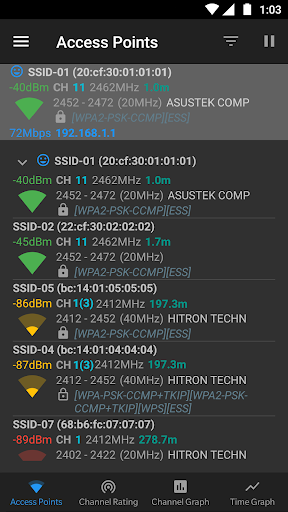
- Identify nearby Access Points
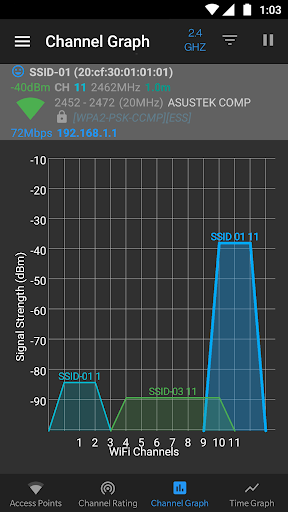
- Graph channels signal strength
- Graph Access Point signal strength over time
- Analyze Wi-Fi networks to rate channels
- HT/VHT Detection - 40/80/160/320 MHz (Requires hardware/software support)
- 2.4 GHz, 5 GHz and 6 GHz Wi-Fi bands (Requires hardware/software support)
- Access Point view: complete or compact
- Estimated Distance to the Access Points
- Export access points details
- Dark, Light and System theme available
- Pause/Resume scanning
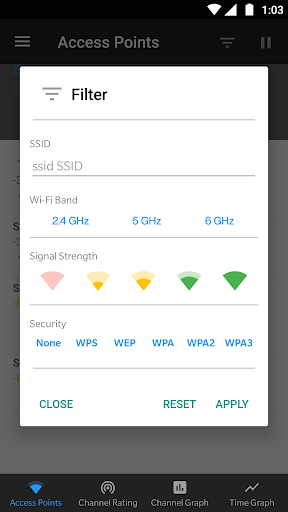
- Available filters: Wi-Fi band, Signal strength, Security and SSID
- Vendor/OUI Database Lookup
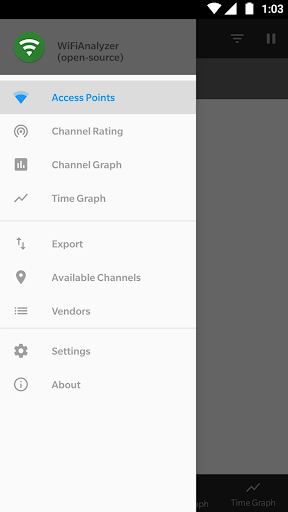
- The application has too many features to mention them all
Please note WiFiAnalyzer is not a Wi-Fi password cracking tool.
Please visit our website for more helpful information:
https://vremsoftwaredevelopment.github.io/WiFiAnalyzer
Notes:
- Android 9 introduced Wi-Fi scan throttling. Android 10 has a new developer option to toggle the throttling off under (Settings > Developer Options > Networking > Wi-Fi scan throttling).
- Android 9.0+ requires location permission and location services to perform a WiFi scan.
Features:
https://vremsoftwaredevelopment.github.io/WiFiAnalyzer/#features
Usage Tips:
https://vremsoftwaredevelopment.github.io/WiFiAnalyzer/#usage-tips
How-to:
https://vremsoftwaredevelopment.github.io/WiFiAnalyzer/#how-to
FAQ:
https://vremsoftwaredevelopment.github.io/WiFiAnalyzer/#faq
GitHub is the place to go for bug reports and code contributions:
https://vremsoftwaredevelopment.github.io/WiFiAnalyzer/#feedback
What's New
- WiFi7 - 320MHz
- OUI DB update
- Dependencies update
- Bug fixes, performance and UI improvements
Version Information
- Version
- -
- Downloads
- 10M+
- Updated on
- Jan 10, 2026
- Released
- Mar 11, 2016
- Requires
- Android Varies with device
Statistics
Google Play Rating History
Rating Distribution
Downloads Over Time
WiFi Analyzer (open-source) has been downloaded times. Over the past 30 days, it averaged downloads per day.
Shaded area shows 30-day prediction based on historical trends
Historical data collection started recently. More data points will be available over time.
WiFi Analyzer (open-source) users say on Google Play
 Enamul Hassan
A very informative app. I would say everyone should install it and keep it on the mobile. You can have a good idea about the strength of the wifi in your surroundings. If you have an idea how dB works, it would give you a way to understand better but even if you don't have an idea about that you will still find it useful because they show wifis in different colors: green, yellow, red. I really appreciate the effort developers put on this. Keep up the good work. Enjoy!
 Madeline DeMorato
Only 1 issue, but app worked GREAT! It shows the MAC address at top with other info just like screenshot in ad. There's no instructions so if you don't already know how to use a wifi scanner your flying blind.I read I could use this app to find the hidden MAC address of my drone's camera. I think cause its a hidden MAC is why its not showing up instantly like all the other MACs. I guess I need to know how to adjust settings, Im somewhat computer savvy but not THAT computer friendly
 Theagames10
I am still confused on how to ue a wifi analyzer, I cannot figure out what is the best wifi channel for me to use and the 11th channel i'm using is getting cut out. The ''Channel Rating" area is very confusing on telling me the best channel, and i'm just wanting to know how to stop my router from cutting out at random points. :(
 Quincy Leslie
never use
 Ramdileo.sys Ramdileo
I used it for years on my previous phones... unfortunately v1.8.6 no longer works on my new phone ... and new ones keeps bothering me with the GPS thing... you can't skip that and it doesn't open... I will keep using the old version in my old phone...hoping they fix that problem in the new ones... for now... uninstall
ApkTrusted Ratings & Reviews
Similar Apps

WiFiman
Free

Wi-Fi Toolkit
Free

Opensignal - 5G, 4G Speed Test
Free
NetShare+ Wifi Tether
Free
ASUS Router
Free

WiFi Detector: Who Use My WiFi
Free

Fing - Network Tools
Free
NetShare - no-root-tethering
Free

Nedis SmartLife
Free

NETGEAR Orbi – WiFi System App
Free

QR Code Scanner - Barcode Scan
Free

Starlink
Free

eero wifi system
Free

Speedtest by Ookla
Free
NetSpeed Indicator
Free

TP-Link Tether
Free
Scan this QR code to download

Forwarding you to the page at Google Play market in seconds...
Open Google Play market now