Night Shift: Blue light filter v25.10.2
Better Life - Health Apps



About this app
Developer Description
When the night comes, we prepare your eyes for deep, sweet dreams
What is the solution to all these eye health issues caused by using the device during the night light? It can be the one and only solution, and it is a dark mode that dimly light your screen. 🌆 Night shift will make your life so much easier, and your eyes will be grateful for it. 🤓 Using a device in the dark brightness won’t be a problem for you anymore, thanks to the suitable light flux. 😴 Night filter will take care of your sleep and your health in general 🌙
Features:
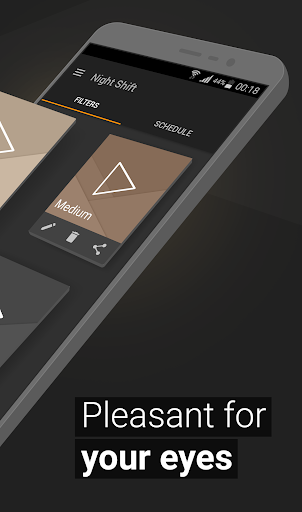
📱 Premade filters - Use our premade blue light filter for free to light your screen dimly, and it will protect you from the night brightness in the best way possible. Let the night shift begin!
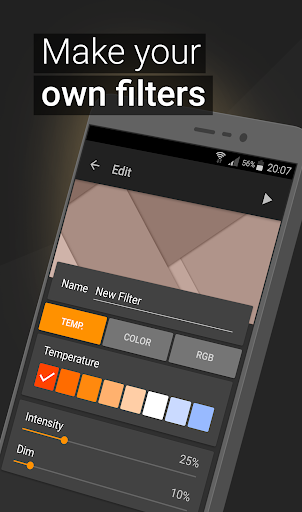
💾 Saving and editing filters - You can also make a dark filter on your own, using our customizable options for dark mode. This night shift app allows you to create unlimited blue light filters.
🌚 Dimming below system minimum - Night mode can help you with headaches or insomnia. The dimly lighted screen will ensure your eyes get the care they deserve!
🌡 Temperature customization - Set the right temperature and convenient intensity for your night screen.
🌈 Color customization - Choose the color you want with the optimal intensity and adjust your display to become dimly lit. Play with colors in this blue light filter for free and make a lot of night shift filters. There are so many options for the dark mode. Don’t let the night light hurt you and your mobile.
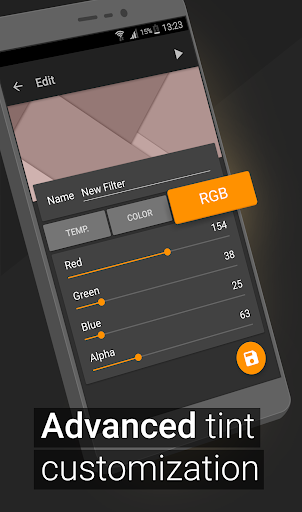
📊 RGB customization - Set the amount you wish of the red, green, or blue color in your filter and how much you want the screen to become dimly lit. Create your night filter.
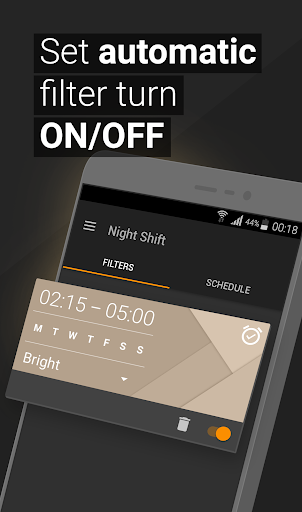
⏰ Automatic filter schedule - Adjust when you want your night mode to be turned on. Night shift will automatically start and end according to your program with this night filter application.
🚹 Accessibility Service - The app enables notification and lock screen filtering using accessibility service. The service does not collect or share any user data.
Find the whole new world in this dark mode and enjoy reading, playing games, or reading the news. You won’t have to worry about your eyes and health in general, thanking the right amount of light flux. Enjoy the night light! Don’t let a headache stand in your way. Start using this night mode as an eye protector from screen brightness as soon as possible, and your eyes will be grateful for this blue light filter.
What's New
We regularly release updates to the app, including great new features and improved speed and reliability.
Version Information
- Version
- 25.10.2
- Downloads
- 10K+
- Updated on
- Oct 30, 2025
- Released
- Feb 8, 2017
- Requires
- Android 6.0
Statistics
Google Play Rating History
Rating Distribution
Downloads Over Time
Night Shift: Blue light filter has been downloaded times. Over the past 30 days, it averaged downloads per day.
Shaded area shows 30-day prediction based on historical trends
Historical data collection started recently. More data points will be available over time.
Night Shift: Blue light filter - Google Play Rankings
Top Rankings
| Rank | Country | Category | List | Change |
|---|---|---|---|---|
| — |
Ranking History in
No ranking data available yet. Rankings are updated daily.
#50 in Top Paid Health And Fitness in United States

#8 in Top Paid Health And Fitness in France

#55 in Top Paid Health And Fitness in Argentina

#55 in Top Paid Health And Fitness in Pakistan
Night Shift: Blue light filter users say on Google Play
 James Stikeleather
get this app! it has good preset filters but you can make your own with a few clicks, dimness, patina, etc. what is great is that you can turn it on anytime from your pull-down menu! it's simple and light-weight but very customizable. get it! EDIT April, 2021: I have several document/reading apps (Xodo, Read Era, & others) that I keep as “daytime” 'cause I would rather use this app to ease my eyes (I'm fussy about my Sepia). This is still the best.
 A Google user
Awesome app, worth the pro version to remove ads, however I wish the app had the ability to sync with all my Google devices. Also, app advertises it supports 10 inch tablets yet it can't even auto rotate the UI based on my device orientation?? If these things mentioned were addressed, I would be happy to re-rate at 5 stars.
 Jonathan Squyres
It works well for my old Samsung Galaxy s8. But... Samsung Galaxy s10e it doesn't work that well.
 Austin Niemeyer
I have used this app every night for many months. I absolutely love it. However, recently, I can no longer click "sensetive information" like log-ins, installing or updating apps, etc. because it detects the overlay. According to the official help page, there is not a fix. You have to turn off the filter, click what you want, then turn the filter back on. This is incredibly inefficient and it is sad because this was such a great app.
 M P
M P
A month ago, this would have been a 5 star review, but something has changed and when the filter is engaged, the rest of the phone is not able to be used (the touch filter or something has gone weird). Around the same time, I noticed that the app icon changed. There is a similarly named app with the old logo, but the upgrade I made to the pro version does not work there. I emailed the company and they responded with an email that indicated they had not even read mine. Hard pass on this one.
ApkTrusted Ratings & Reviews
More from Better Life - Health Apps
See more apps
Similar Apps

Sleep Tracker basic
Paid
LucidMe: Sleep & Dream Journal
Free

ZenAlarm: Smart Wake Up
Paid
Binaural Beats Brainwaves
Free
Pzizz - Sleep, Nap, Focus
Free

Castro Premium - system info
Paid

Alora: Sleep Sounds & Meditate
Free

Lume: Quit Gaming Now
Paid
Celestia: Baby Sleep Sounds
Free

Sleep Tracker: Sleep Recorder
Free
Headlamp Health
Free
Star Chart
Free
Flow : Music Therapy
Free

Eye Break Reminder
Paid

Twilight: Blue light filter
Free

Slo: Sleep Sounds, Brown Noise
Free
Scan this QR code to download

Forwarding you to the page at Google Play market in seconds...
Open Google Play market now