
Dark screen filter vVARY
Yogesh Dama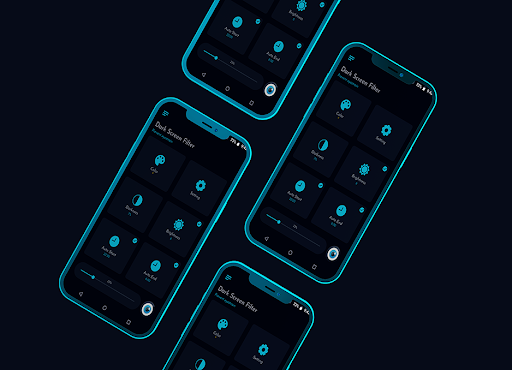


About this app
Developer Description
Blue light filter app to adjust the screen to dark mode to relieve eye strain
Dark screen filter at night mode activates the dark mode on your phone automatically, enables you to read books or use your phone till long time without any eye strains and its power savior.
Reducing blue light on your phone can significantly improves your sleep, Exposure to blue light for long time during night affects your eyes and your sleep,
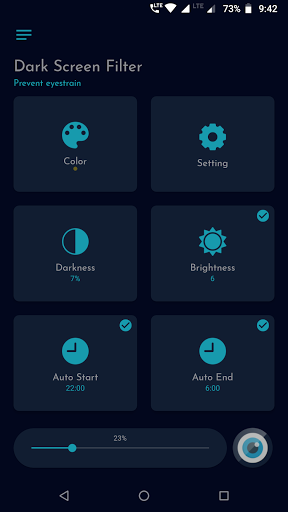
App reduces the blue light by applying color screen filters to your phone screen. With auto start and auto end options, you can configure app to activate screen filter during night automatically.
☆ Features:
◇ Dark screen filter to reduce blue light
◇ Full control over screen filter intensity
◇ Protects your eyes from screen light
◇ Save power-battery by reducing screen blue light
◇ Auto start and end options to start night mode automatically
◇ Adjust color darkness, opacity
◇ Adjust screen filter intensity to soften the screen light
◇ Very easy and simple UI
◇ Dark and light themes
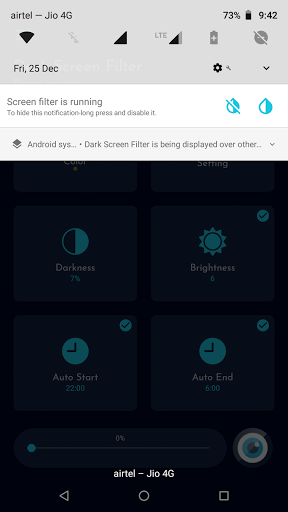
◇ Permanent notification to activate or stop screen filter quickly from notification
☆ Note:
✔ You may have to stop screen filter while you install apk from third party.
✔ Xiaomi and MIUI users go to Settings -> Installed apps -> Dark Screen Filter -> Other permissions & enable "Display pop-up window" for App to work.
✔ Some phones like Xiaomi, Huawei, OnePlus, etc kills background service require to apply screen filter, you may need to follow the instructions to prevent unwanted termination of the background service.
OnePlus: https://bit.ly/2XyVU80
Huawei: https://bit.ly/2KGXE9c
Meizu: https://bit.ly/2Lnk0Ms
Xiaomi: https://bit.ly/2RFNuGr
☆ Permissions:
✔ System overlay: Require to apply dark screen filter.
✔ Network and internet: Require to unlock the app.
Please try app and let us know, what more we can do to improve the app and to make app more useful to all users.
If you like the app, please leave your review and rating on playstore.
Thank you.
Version Information
- Version
- -
- Downloads
- 100K+
- Updated on
- -
- Released
- Jan 14, 2021
- Requires
- Android Varies with device
Statistics
Google Play Rating History
Rating Distribution
Downloads Over Time
Dark screen filter has been downloaded times. Over the past 30 days, it averaged downloads per day.
Shaded area shows 30-day prediction based on historical trends
Historical data collection started recently. More data points will be available over time.
Dark screen filter - Google Play Rankings
Top Rankings
| Rank | Country | Category | List | Change |
|---|---|---|---|---|
| — |
Ranking History in
No ranking data available yet. Rankings are updated daily.
#29 in Top Paid Health And Fitness in United States

#53 in Top Paid Health And Fitness in India
#53 in Top Paid Health And Fitness in Turkey
#54 in Top Paid Health And Fitness in Egypt
Dark screen filter users say on Google Play
 Melissa Winget (Missy)
Working great. Simple to set up. Helps with my ONN tablet being horribly bright at evening.
 Marco Move
It'll be great to have a "grayscale" filter like the one built in samsung phones (bedtime mode is called). And super great if you could apply those filters to certain apps (like social media to make them less pleasable and stop ppl for spending that much time there).
 Andrie Tunggono
The option that we can choose which color to use as dark filter is very good. Cause i find it better on the eyes rather than the factory mode blue light filter. But there is a problem on auto start/stop according to time, whenever you restart your phone, you need to restart this app manually for the auto start/stop to work again. Please fix this devs, so the auto function can work as it supposed to be.
 Marcus Mangels
The app 'in theory' is really good. In practice it's terrible. It saves me from straining my eyes in more than one way.... Not only with adjusting the light, but also making it impossible to use any other app. It just blocks everything. It's like someone locking most apps and disconnecting the internet. Uninstalling in 3....2....1....bye bye.
 Dhafin Rayhan
WARNING!!!! There is an option to filter the screen up to 100%. Once you did it you can't see anything and you have to restart your phone. The devs doesn't seem to care about this issue and simply let users do it without any warning.
ApkTrusted Ratings & Reviews
More from Yogesh Dama
See more apps
Apps Giveaway - Paid App sales
Free
Paid app sales & Promocodes
Paid
Photos Charging Slideshow
Paid
Side Bar - Edge Screen
Free

Contact Edge side bar
Paid

App Organizer
Free

Bookmark Manager - URL manager
Paid

Dark screen filter - Dark mode
Free
Simple App Locker
Paid
Gallery Slideshow
Paid
Fake call screen - Prank call
Free

Offline Password Manager
Paid

Contact Side bar - Shortcuts
Free
Resize Image - Resize Photos
Paid

Limit app usage - screen time
Paid

Contact Organizer
Paid
Similar Apps
Hermit — Lite Apps Browser
Free

Progressive Pomo: Focus Timer
Paid

Sesame Search & Shortcuts
Free

Retro Mode - Icon Pack (Light)
Paid

Nothing Pomodoro Timer
Paid

Quikshort: Shortcut Creator
Free
Nuki Smart Lock
Free

Lib of Dev (Open Source)
Free
F-Secure: Total Security & VPN
Free

Castro Premium - system info
Paid
MultiTimer: Multiple timers
Free
YourHour - Screen Time Control
Free
Good Lock: Premium Lock Screen
Free

TicNote: AI Recorder & Agent
Free

PurpleLine Icon Pack : LineX
Paid

Freedom: App & Website Blocker
Free
Scan this QR code to download

Forwarding you to the page at Google Play market in seconds...
Open Google Play market now