
Limit app usage - screen time vVARY
Yogesh Dama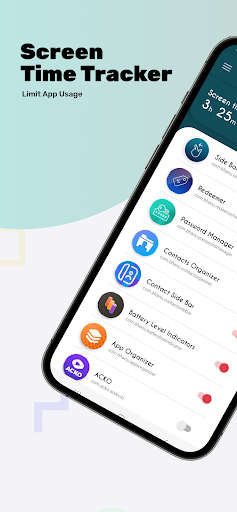





About this app
Developer Description
Track screen time, limit app usage, stay focused & break phone addiction.
Take control of your digital habits! Screen Time Tracker helps you monitor and limit daily app usage to reduce screen time, stay focused, and break phone addiction. It’s simple, powerful, and perfect for developing self-control.
🔑 Key Features:
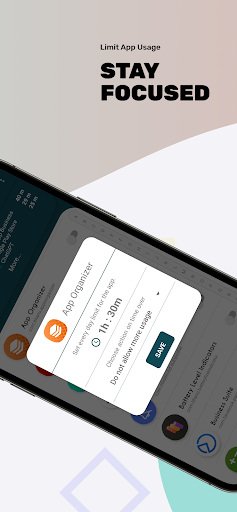
✔ Daily App Limits – Set time limits or usage counts for any app.
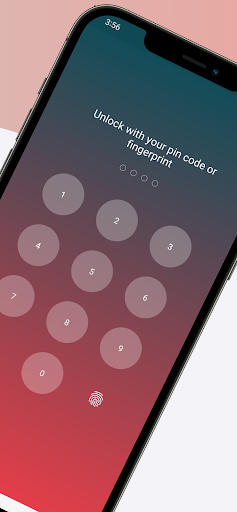
✔ App Lock with PIN or Fingerprint – Block access with security options.
✔ Emergency Time Extension – Allow limited extra usage when needed.
✔ Screen Time Insights – View accurate app usage stats and trends.
✔ Lightweight & Battery-Friendly – Runs in the background with minimal battery impact.
✔ Boost Focus & Productivity – Reduce distractions and stay in control.
✔ User-Friendly Interface – Clean, easy-to-use design for everyone.
✔ Supports All Apps – Works with social, gaming, messaging, and more.
💡 Why Use Screen Time Tracker?
Overcome phone addiction
Build better digital habits
Improve focus at work or school
Spend more quality time with family
Practice digital wellness & self-care
Whether you're working, studying, or relaxing, Screen Time Tracker empowers you to set boundaries and stay mindful of your screen usage.
🛠️ App Permissions Explained:
Usage Access: Needed to monitor app activity.
Overlay Permission: Required for blocking apps, PIN prompts, and extensions.
🔒 Your privacy is always respected. The app only checks usage data—nothing more.
⚠️ Important for Some Devices:
If you're using a Xiaomi, OnePlus, Huawei, Meizu, or similar device, you may need to whitelist the app to avoid background service termination.
Here are helpful guides:
OnePlus: https://bit.ly/2XyVU80
Huawei: https://bit.ly/2KGXE9c
Meizu: https://bit.ly/2Lnk0Ms
Xiaomi, Redmi: https://bit.ly/2RFNuGr
🌟 We’d love your feedback!
Try the app and let us know what features you'd like to see next. Your support helps us build the best screen time control experience.
👉 If you like the app, please leave a rating and review on the Play Store.
Version Information
- Version
- -
- Downloads
- 500+
- Updated on
- -
- Released
- Nov 20, 2025
- Requires
- Android Varies with device
Statistics
Google Play Rating History
Rating Distribution
Downloads Over Time
Limit app usage - screen time has been downloaded times. Over the past 30 days, it averaged downloads per day.
Shaded area shows 30-day prediction based on historical trends
Historical data collection started recently. More data points will be available over time.
Limit app usage - screen time users say on Google Play
 Camden Turner
Doesn't work. App limits don't function unless you first open the "Limit app usage - screen time" app and leave it open.
ApkTrusted Ratings & Reviews
More from Yogesh Dama
See more apps
Apps Giveaway - Paid App sales
Free
Paid app sales & Promocodes
Paid

Dark screen filter
Paid
Photos Charging Slideshow
Paid
Side Bar - Edge Screen
Free

Contact Edge side bar
Free

App Organizer
Free

Dark screen filter - Dark mode
Free
Gallery Slideshow
Paid

Bookmark Manager - URL manager
Free
Simple App Locker
Paid
Fake call screen - Prank call
Free

Offline Password Manager
Paid

Contact Side bar - Shortcuts
Free
Resize Image - Resize Photos
Paid

Contact Organizer
Paid
Similar Apps

Engross: ADHD Focus Timer
Free

Progressive Pomo: Focus Timer
Paid
App Limit - Limit apps
Free

GoalQuest: daily goal coaching
Free

Headlamp Health
Free
Flipd: Focus & Study Timer
Free

Boosted Time Tracker
Free

Weekly Planner Journal
Paid

Nothing Pomodoro Timer
Paid
OffScreen - Less Screen Time
Free

Workout Quest - Gamified Gym
Free

Freedom: App & Website Blocker
Free
Pomotimer - ADHD & Study Timer
Free
YourHour - Screen Time Control
Free

Quitch
Free

stickK: Goals & Accountability
Free
Scan this QR code to download

Forwarding you to the page at Google Play market in seconds...
Open Google Play market now