
Blue Iris v3.0.46
Perspective Software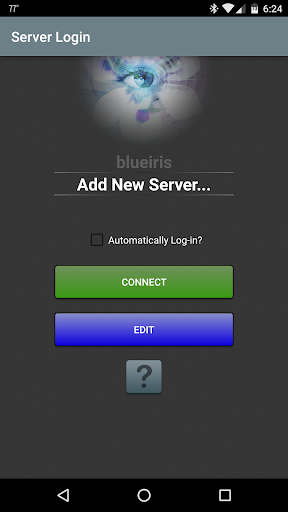


About this app
Developer Description
The essential companion to your Blue Iris PC software
This app provides a single point of contact to your home camera network. There is no need to insecurely open individual cameras to the Internet. This app connects using a secure and session-based protocol--no passwords are transmitted in plain text.
Key features include:
- Manage multiple Blue Iris installations
- Control the traffic signal icon, schedule and profile selection
- Receive Android push alerts when a Blue Iris camera is triggered or there is a critical status message
- Fast H.264 streaming
- Control PTZ, IR and more for any camera that’s also controllable at the Blue Iris PC
- Listen to and talk to any camera that’s also supported at the Blue Iris PC
- Navigate cameras by tapping and swiping
- Review recordings as stored on the Blue Iris PC, up to 64x speed
- Selectively delete recordings from the Blue Iris PC
- Remote control DIO output signals on compatible devices
What's New
Version Information
- Version
- 3.0.46
- Downloads
- 100K+
- Updated on
- Sep 17, 2024
- Released
- Apr 1, 2013
- Requires
- Android 8.0
Statistics
Google Play Rating History
Rating Distribution
Downloads Over Time
Blue Iris has been downloaded times. Over the past 30 days, it averaged downloads per day.
Shaded area shows 30-day prediction based on historical trends
Historical data collection started recently. More data points will be available over time.
Blue Iris - Google Play Rankings
Top Rankings
| Rank | Country | Category | List | Change |
|---|---|---|---|---|
| — |
Ranking History in
No ranking data available yet. Rankings are updated daily.
#13 in Top Paid Video Players in United States


#18 in Top Paid Video Players in United Kingdom
 Noir Pro: USB Camera HDMI Link
 AirMirror: AirPlay Receiver
#22 in Top Paid Video Players in Poland


#23 in Top Paid Video Players in Vietnam

Blue Iris users say on Google Play
 Jeff Hutchins
Love this app, works great! Only suggestion would be in camera page to be able to turn off groups, cameras and filter at the top to just show the cameras only. One other minor issue, when reviewing recordings, when you click last recording it plays fine, when you click left to go to next oldest recording that works fine, but you cannot then go back to latest recording. Thanks!
 Mark Jusko
I've been using Blue iris since 2016. The mobile app has always been so-so, but for realtime monitoring and basic functionality it works alright. If you want to truly admin the app, you need to log into the console. For a closed circuit solution, this is the solution to have. Use a VPN tunnel in to your home/work network to access, I don't recommend exposing the app externally. This product isn't for someone non-technical, it's for IT professionals who see the forest for the trees.
 Brian Adams
Push notifications working again, but only default sound. Can't change the ringtone.
 D N
D N
4 Desktop versions and an Android update and sounds are pretty much fixed finally. BUT push alerts are still hit and miss. Some are fast, others take minutes or longer. Or never show up. Changing priority from normal to high doesn't change that either. Annoying to pay for this app in addition to the desktop version for something crucial like timely alerts thst do not work properly. I paid for the maintenance contract. Anyone who didn't is now SOL, and won't get updates to a fixed version.
 Kevin Hull
Please make the app re-initialize when resuming from being in the background. having to close and reopen it every time you get an alert just to view the alert doesn't provide a great experience.
ApkTrusted Ratings & Reviews
Similar Apps

INTEGRA CONTROL
Free

Arenti
Free

Lorex Classic
Free

Café Zupas Rewards
Free

Force Fleet Tracking
Free

VicoHome: Smart Home Camera
Free

Rheem EcoNet
Free
Roku Smart Home
Free

TruStone Home Mortgage App
Free

Geeni
Free

SuperCam Plus
Free

Vivint
Free

Blink Home Monitor
Free
Nest
Free
iLink
Free

CHORELINKS
Paid
Scan this QR code to download

Forwarding you to the page at Google Play market in seconds...
Open Google Play market now