
CCSWE App Manager (Device Owne v6.7.0
Cory Charlton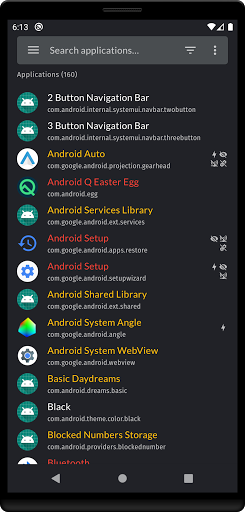


About this app
Developer Description
CCSWE App Manager is the ultimate package disabler and bloatware killer!
★★ Does not require root ★★
How to activate device owner
1) Remove all Google accounts from your device under the Android Settings -> Accounts
2) Go to Android Settings on your device and enable "USB Debugging"
3) Connect your device to the PC with USB cable and open CMD prompt and run this command
adb shell dpm set-device-owner com.ccswe.appmanager.deviceowner/com.ccswe.appmanager.receivers.DeviceAdminReceiver
4) Re-add your Google accounts
NOTE: More detailed instructions and a helper application for Windows can be found at this link: https://ccswe.com/ccswe-app-manager/device-owner/
Contact appmanager@ccswe.com if you have any issues. We are more than happy to offer any help we can but cannot do anything if you simply give us a low rating instead of contacting us.
★★ Features ★★
★ Clear data for any application
★ Export and import package lists
★ Home screen widget
★ Favorites list
★ Freeze (disable) applications
★ Password protection
★ Uninstall applications
★★ Frequently asked questions ★★
★ Why does CCSWE App Manager (Device Owner) require device owner privileges?
Unfortunately the Android security model does not make it possible for one application to enable/disable another application. This makes sense for standard applications because you wouldn't want a competing application to be able to disable yours. That is why CCSWE App Manager requires device owner privileges in order to achieve this.
What's New
Version Information
- Version
- 6.7.0
- Downloads
- 5K+
- Updated on
- Aug 30, 2025
- Released
- Feb 18, 2021
- Requires
- Android 6.0
Statistics
Google Play Rating History
Rating Distribution
Downloads Over Time
CCSWE App Manager (Device Owne has been downloaded times. Over the past 30 days, it averaged downloads per day.
Shaded area shows 30-day prediction based on historical trends
Historical data collection started recently. More data points will be available over time.
CCSWE App Manager (Device Owne users say on Google Play
 Ray Buettner
Thank God I can still use the app from this person, was ticked when android did their little backdoor fun. 1 thing I have to say that is not on the website (and I swear, not a bad thing) but if you are having problems getting the ccswe app to work without errors, go to settings > apps > permission manager, and make sure that ALL body, calendar, location, and other permissions are cleared. If not you will get errors. Otherwise, this is a outstanding app to stop, freeze, and down right kill apps
 B
B
Novice user of this method. Had the previous Samsung specific version. It took me a bit more than just removing Google accounts. Took several tries and developer support but I got working. The key for me is that the developer is responsive. I appreciate that. My only criticism is I'd like to see a simpler UI. Perhaps separating apps into categories like "System", "Bloatware", etc. Also had problems with importing previously saved settings. Still an excellent tool. Highly recommend!
 Mr. Jones
This app works well even without root. However, I am getting the following error: "Security policy prevents the installation of Secure Folder". Due to this, I can't enable Secure Folder. I can't figure out how to get around it (if that's even possible). I haven't seen anyone else with this same error when Googling for it. Do I have to uninstall this app to be able to use Secure Folder? I am on One UI 4 official build now.
 Na Ne
Na Ne
I'm following all the steps and still cant active the app, it make me confuse
 Phynnr
I would agree with what Sunny Bonnard said about paying multiple times for this App. I have paid 4 times for this App within 3 months since November 2020. I have no intention of buying this app anymore as the app only lasts 2 weeks & then you have to make a purchase again. Oh Really Mr. Charlton?? You are lying on yourself. I have all the proof that you charged me for this app of yours 4 times within the duration of 3 months!! You are very bold to defend your actions.
ApkTrusted Ratings & Reviews
More from Cory Charlton
See more apps


Similar Apps










Scan this QR code to download

Forwarding you to the page at Google Play market in seconds...
Open Google Play market now